
SSH certificates: video series and reference
Two short video series for Linux sysadmins who use SSH every day but have never used SSH certificates. Watch an episode, then use its section as the cheat sheet. Subtitles are in English. All videos are also in the YouTube playlist.
Series 2 — Principals in depth:
Running example everywhere: company Acme, servers
web1.acme.example and db1.acme.example, user Alice, role
developers, local account deploy, PKI Manager at pki.acme.example.
Colours: orange = User CA and user certificates,
green = Host CA and host certificates.
Why SSH certificates
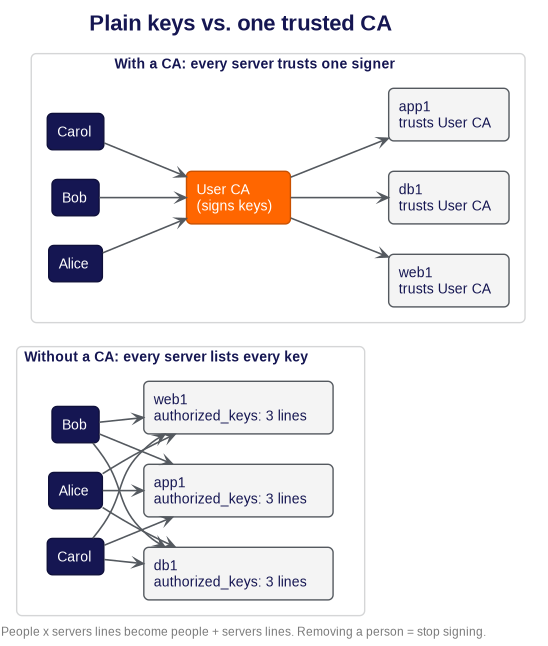
Plain keys do not scale, and "trust on first use" trusts nothing. A certificate authority (CA) fixes both: trust one signer instead of every key.
Problem 1: key sprawl
Every server has its own
authorized_keys. People × servers lines. Miss one when someone leaves, and
they keep access.
Problem 2: trust on first use
The first connection asks "fingerprint? yes/no" and you cannot check it. A rebuilt server shows a scary warning.
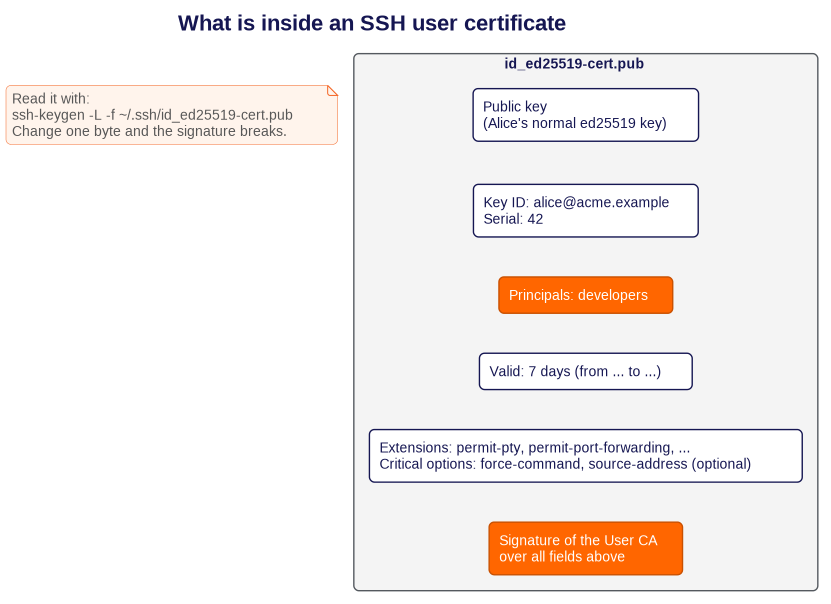
A certificate is your normal public key plus signed fields: key ID, principals
(roles), validity dates and a serial. Change one byte and the signature breaks. Read one with
ssh-keygen -L -f ~/.ssh/id_ed25519-cert.pub.
PKI Manager is the CA. The CA private keys live in a key management system and never leave it. PKI Manager signs, tracks, and generates every file; it never logs in to your machines — you place the files by hand or with Ansible.
Two CAs, trust crosses over
Every login answers two questions, so there are two CAs.
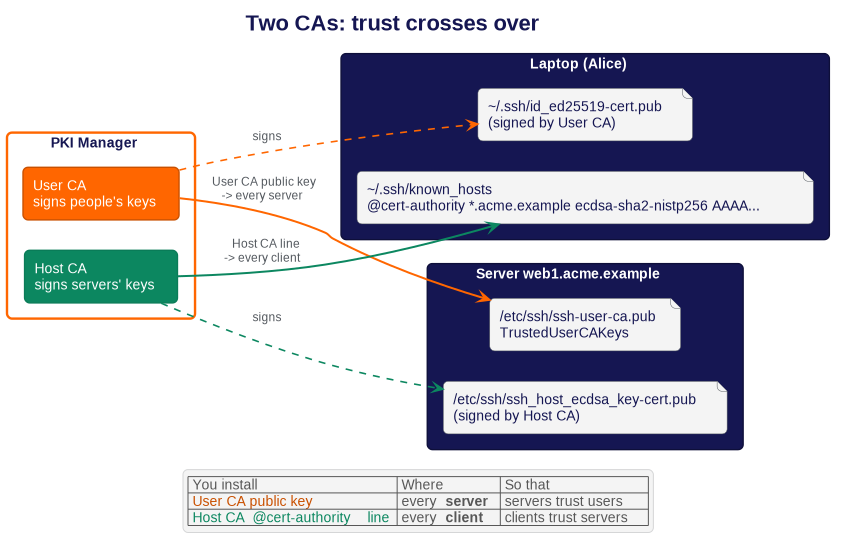
User CA → every server
Signs people's keys. Servers trust it
through TrustedUserCAKeys /etc/ssh/ssh-user-ca.pub.
Host CA → every client
Signs servers' keys. Clients trust it
with one @cert-authority *.acme.example … line in ~/.ssh/known_hosts.
Create both once: SSH → Certificate Authorities → Create SSH Certificate Authority, one of type User, one of type Host.
Host certificates: no more "fingerprint?" prompt
Register the server's ECDSA P-256 public key, place the deploy bundle, reload.
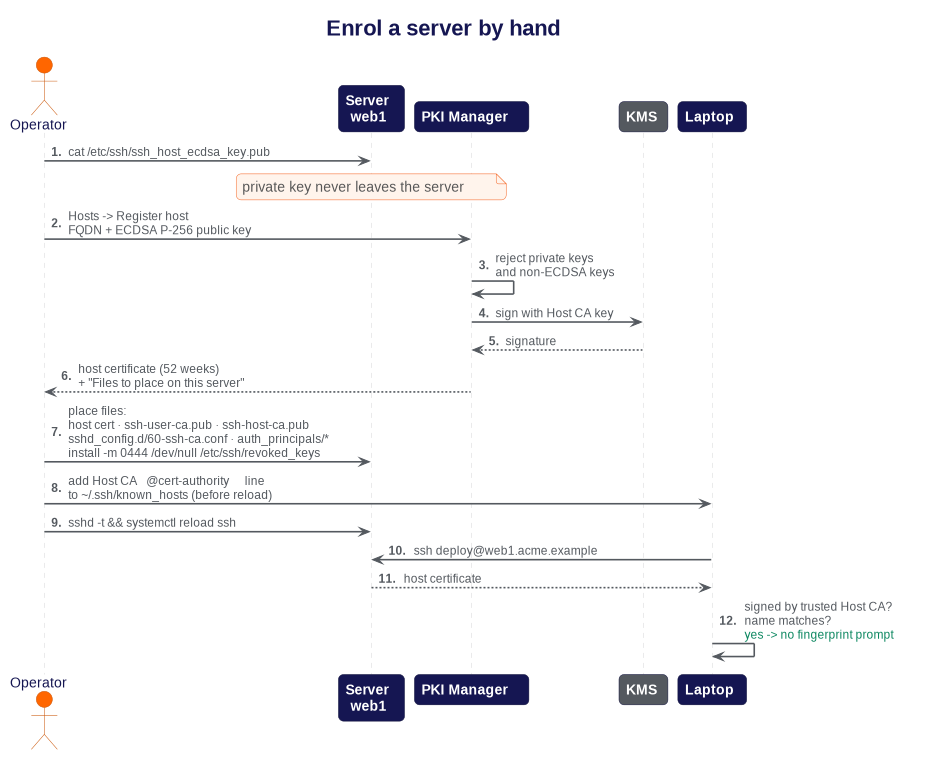
On the server
cat /etc/ssh/ssh_host_ecdsa_key.pub # send ONLY this (PKI Manager accepts only ecdsa-sha2-nistp256)In PKI Manager: Hosts → Register host (FQDN + key, Issue a host certificate immediately on). The host page shows Files to place on this server:
| File | Path |
|---|---|
| Host certificate (52 weeks) | /etc/ssh/ssh_host_ecdsa_key-cert.pub |
| User CA public key | /etc/ssh/ssh-user-ca.pub |
| Host CA public key (KRL signature anchor) | /etc/ssh/ssh-host-ca.pub |
| sshd config file | /etc/ssh/sshd_config.d/60-ssh-ca.conf |
| Principals per account | /etc/ssh/auth_principals/<account> |
| Revocation list (must exist) | /etc/ssh/revoked_keys |
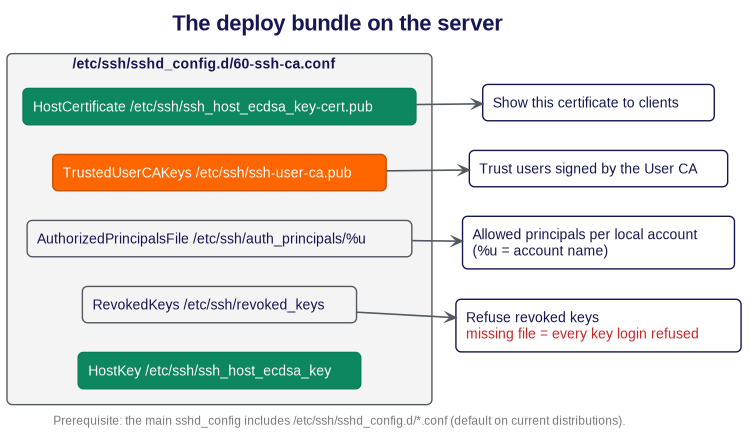
sudo install -m 0444 /dev/null /etc/ssh/revoked_keys   # missing file = every key login refused
sudo sshd -t && sudo systemctl reload ssh               # RHEL: sshd
On every laptop (do it before the reload)
curl "https://pki.acme.example/ssh/zones/default/cert-authority?pattern=*.acme.example" \
  >> ~/.ssh/known_hosts
ssh deploy@web1.acme.example # use the exact name in the host certificateUser certificates: log in with a signed key
Create an identity, issue a one-week certificate for the user's public key, install it next to the key.
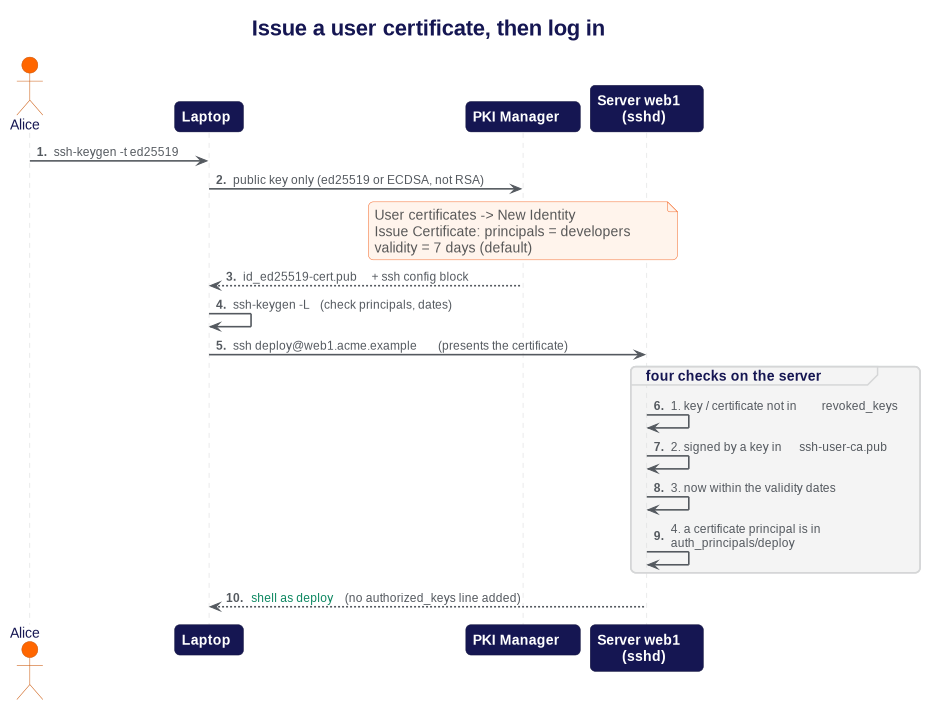
ssh-keygen -t ed25519 -f ~/.ssh/id_ed25519     # Ed25519 or ECDSA; RSA is not accepted
cat ~/.ssh/id_ed25519.pub                       # send ONLY this
In PKI Manager: User certificates → New Identity, then Issue Certificate (principals, default validity 7 days). The form shows where each principal is mapped.
# save as ~/.ssh/id_ed25519-cert.pub (same name + -cert.pub)
Host *.acme.example
  IdentityFile ~/.ssh/id_ed25519
  CertificateFile ~/.ssh/id_ed25519-cert.pub
  IdentitiesOnly yes

ssh-keygen -L -f ~/.ssh/id_ed25519-cert.pub   # key ID, principals, validity
ssh deploy@web1.acme.example
The server checks four things: not revoked, signed by the User CA, within the dates, and a principal that matches. Next week: issue a new certificate for the same key.
Principals: the one rule that matters
A principal is a role label. It gives access only when it is in two places.
/etc/ssh/auth_principals/<account> on the server.
Otherwise: signature OK, but Permission denied (publickey); sshd logs
Certificate does not contain an authorized principal.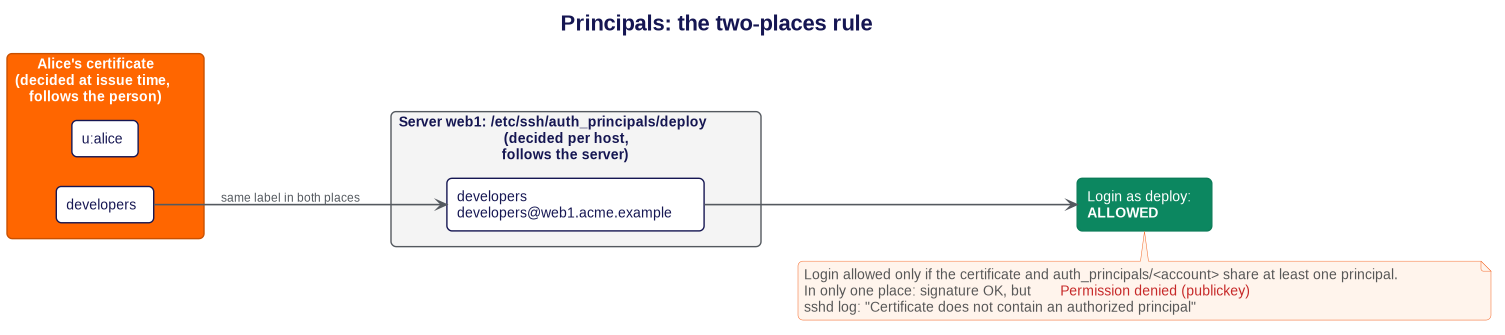
In PKI Manager: Principals → create the principal in the catalog → map it per host to a
local account (developers → deploy on web1). The host shows Stale — needs push
until you deploy the file and click Mark pushed (it records only; it deploys nothing).
The local account must already exist.
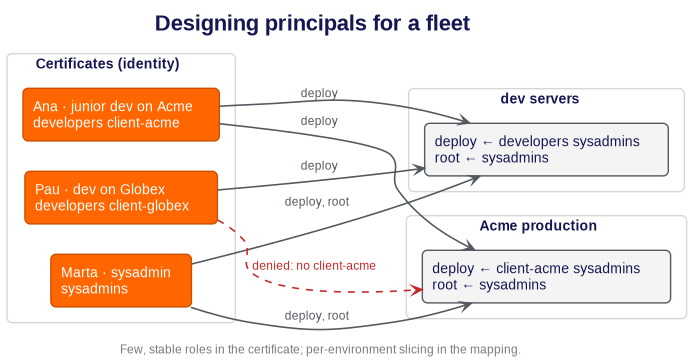
- Certificate = identity, follows the person. Mapping = policy, follows the server.
- Few, stable roles (
developers,sysadmins) plus scopes (client-acme). Slice per environment in the mapping.
Lifecycle: expiry, revocation, rotation
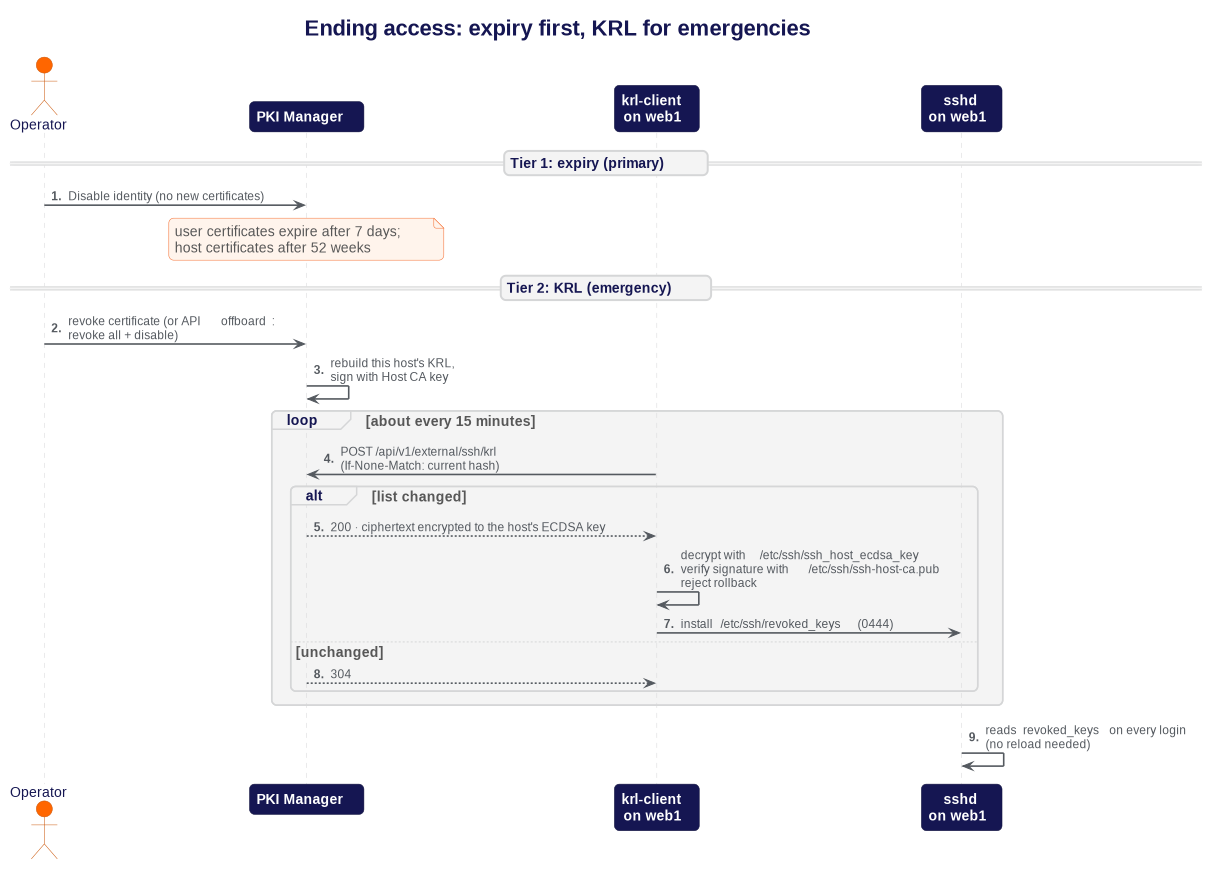
Short lifetimes first; the KRL for emergencies.
| Need | Action |
|---|---|
| Stop new certificates | Disable the identity; old ones expire within 7 days |
| Someone leaves | Offboard the identity: revokes all active certificates (KRL) + disables. Cannot be undone |
| Revoke one certificate now | Revoke it → KRL → hosts pull it (≈15 min with krl-client) |
| Decommission a server | Offboard the host (final) and destroy its host key: laptops do not check the KRL |
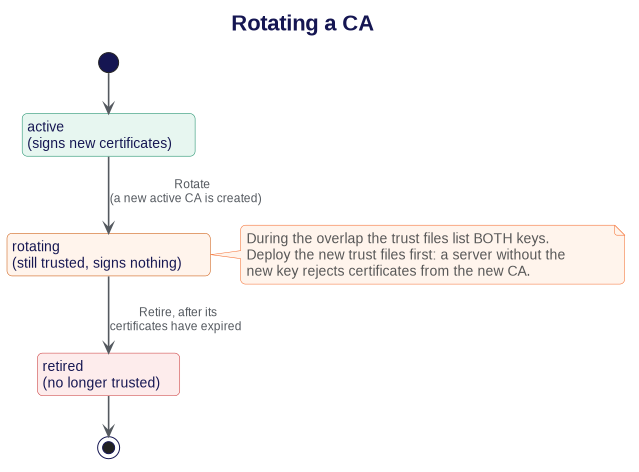
| Rotate a CA | Rotate → old CA "rotating" (still trusted), new CA signs. Deploy new trust files first; retire the old CA when its certificates expire |
Remove old authorized_keys entries: sshd still accepts them. Run NTP/chrony on
every server and laptop.
Per-host access blocks
Cut one person off one server, keep the rest. A block is not a revocation.
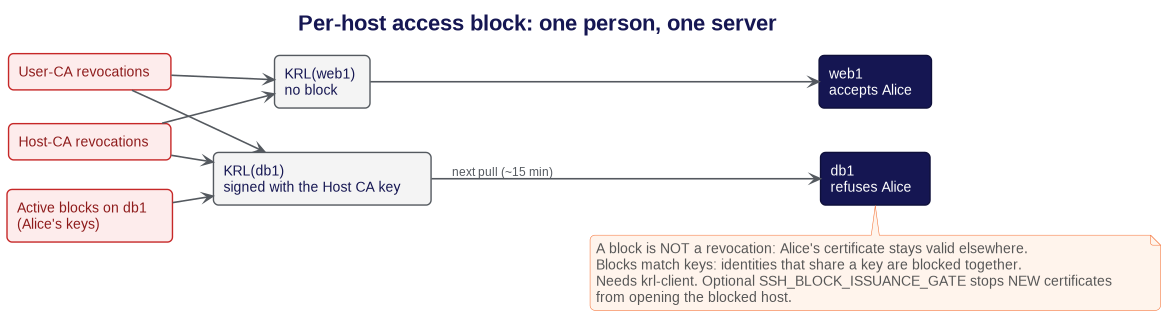
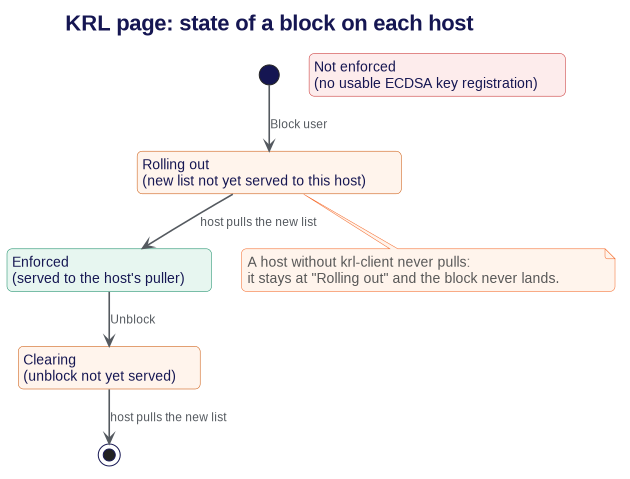
Host page → Block user… → pick the identity, add a reason, confirm. Undo with Unblock. The KRL page shows each host's state:
Limits: one pull interval of delay; a person who can still get certificates could use a new key
in that window — the optional SSH_BLOCK_ISSUANCE_GATE stops new certificates from
opening the blocked host.
Zones: separate trust domains
Prod and staging, or customer A and B, in one PKI Manager — with a real boundary.
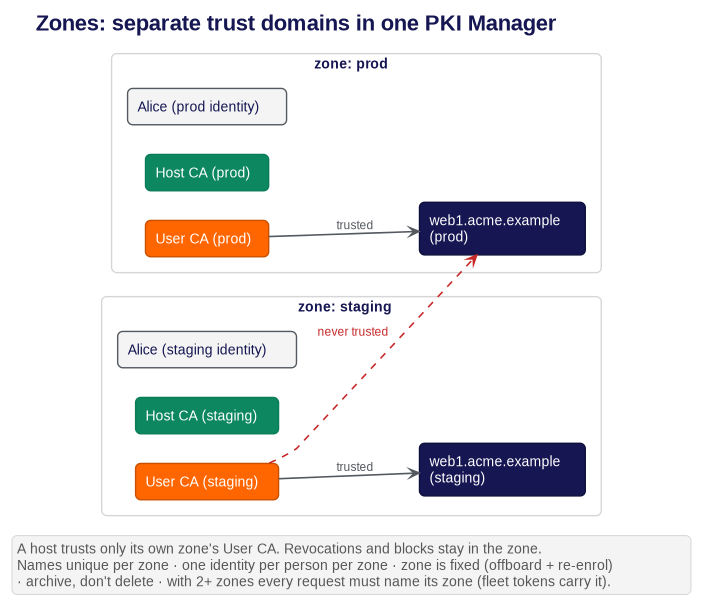
- Names are unique per zone; one identity per person per zone.
- A host cannot change zone: offboard and enrol it again. Archive a zone; do not delete it.
- With two or more zones, every request must name its zone, or PKI Manager refuses
(
zone is ambiguous — 2 zones exist (prod, staging); specify one explicitly). Fleet tokens carry their zone. Use the zone switcher in the UI.
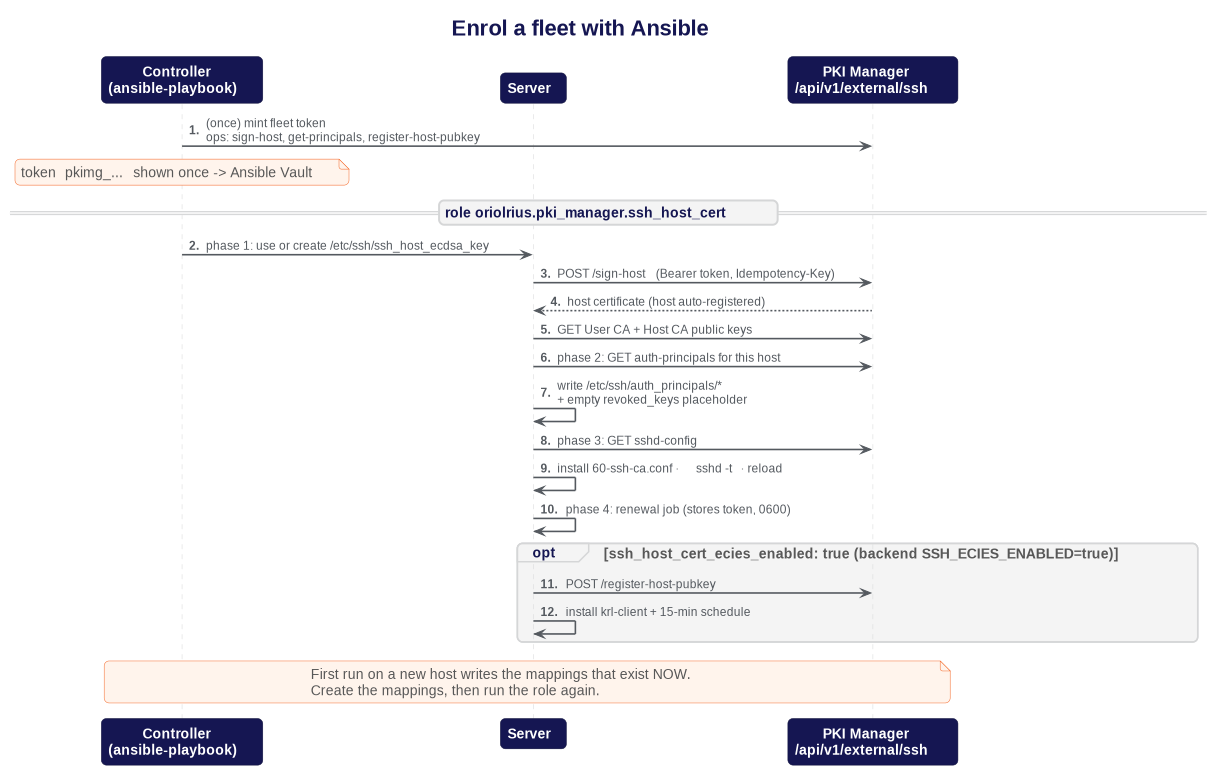
Automation: fleet tokens and Ansible
Let servers enrol themselves with a scoped token and the Ansible role.
SSH → Fleet tokens → Mint token, preset Self-provisioning host with KRL
(recommended) = sign-host, get-principals,
register-host-pubkey. Shown once (pkimg_…); PKI Manager keeps only a
hash. Store it in Ansible Vault.
ansible-galaxy collection install oriolrius.pki_manager

- hosts: sshservers
  become: true
  vars:
    ssh_ca_base_url: https://pki.acme.example
    ssh_ca_fleet_token: "{{ vault_fleet_token }}"
    # live revocation + blocks (backend: SSH_ECIES_ENABLED=true)
    ssh_host_cert_ecies_enabled: true
    ssh_host_cert_krl_client_url: https://artifacts.acme.example/krl-client-linux-amd64
    ssh_host_cert_krl_client_checksum: "sha256:…"
  roles:
- oriolrius.pki_manager.ssh_host_cert- On a new host: run the role, create the mappings, run it again.
- CI:
POST /api/v1/external/ssh/sign-user, optionally locked withforceCommandandsourceAddress. - Renewal stores the token on the host (
/etc/pki-manager/ssh-renew.env, 0600); setssh_host_cert_renew_enabled: falseto renew from the controller.
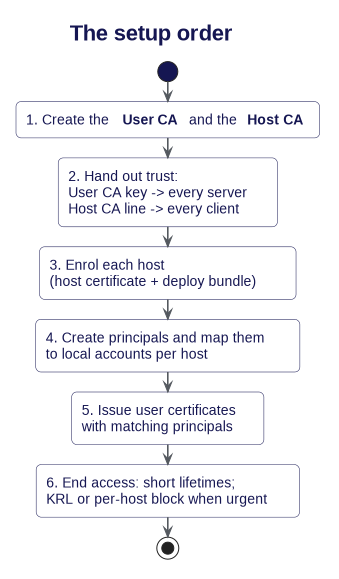
Recap and troubleshooting
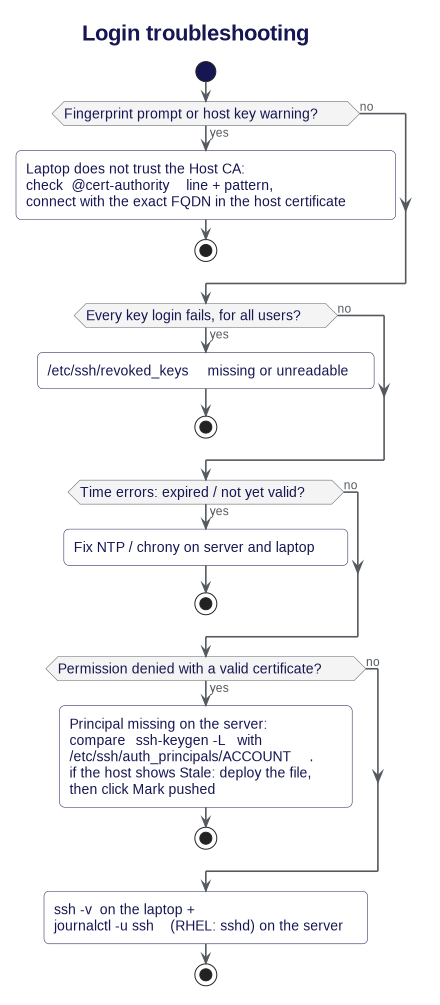
| Symptom | Cause / fix |
|---|---|
| Still asked about the fingerprint | @cert-authority line missing or pattern does not match; connect with the exact FQDN in the host certificate |
Permission denied with a valid certificate | Principal not in auth_principals/<account>; host "Stale" |
| Every key login fails, all users | /etc/ssh/revoked_keys missing or unreadable |
| Expired too early / not yet valid | Clock: NTP / chrony |
| Anything else | ssh -v on the laptop, journalctl -u ssh (RHEL: sshd) on the server |
More detail: How it works · End-to-end deploy reference · Principals guide · Per-host blocks runbook · Zones · Automation API
Principals in depth
Nine short episodes to design, operate and audit principals in a real fleet. Running example: one fleet for three customers (Acme, Globex, Initech), staff Ana (junior dev, Acme), Pau (senior dev, Acme + Globex), Marta (sysadmin), Sara (security), and two robots.
Full mapping tables: Principals guide.
Under the hood: what sshd really checks
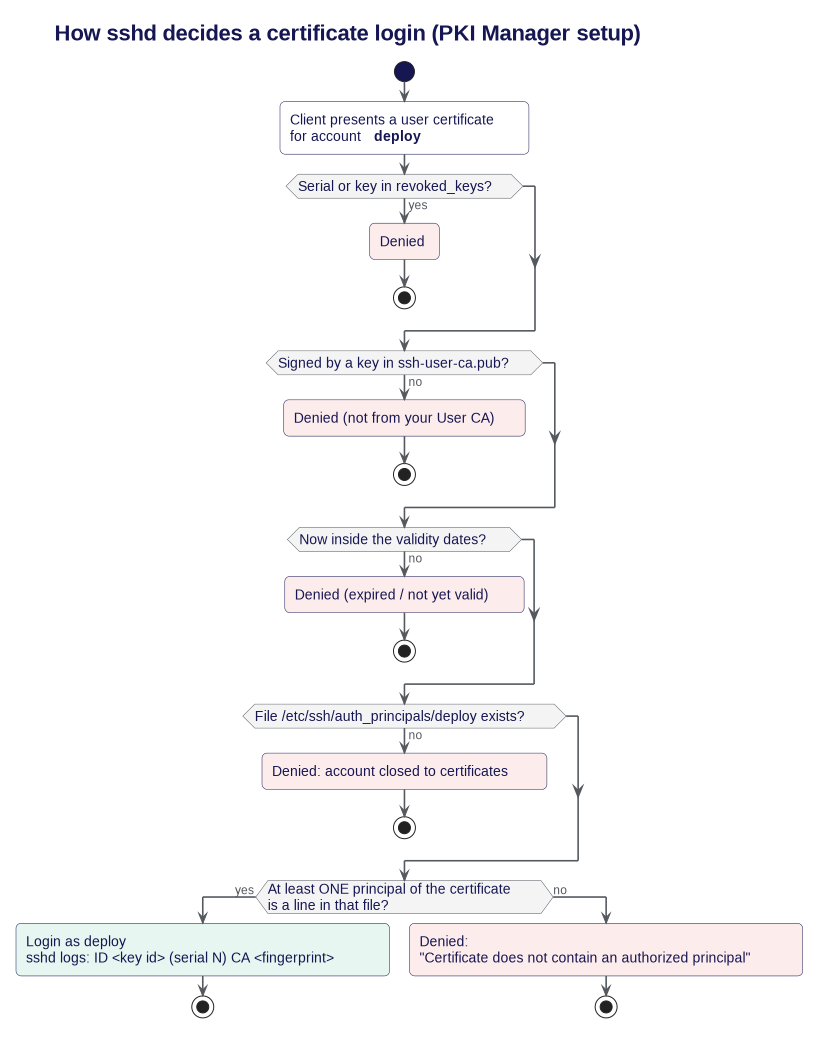
- One principals file per local account (
/etc/ssh/auth_principals/%u). - An account with no file accepts no certificate from your CA. Old
authorized_keysentries and passwords are a separate door: close them. - One match is enough (OR, never AND).
- sshd logs
ID <key id> (serial N) CA <fingerprint>. The key ID is a label (default: the identity); match CA + serial to be sure.
Designing your principal catalog
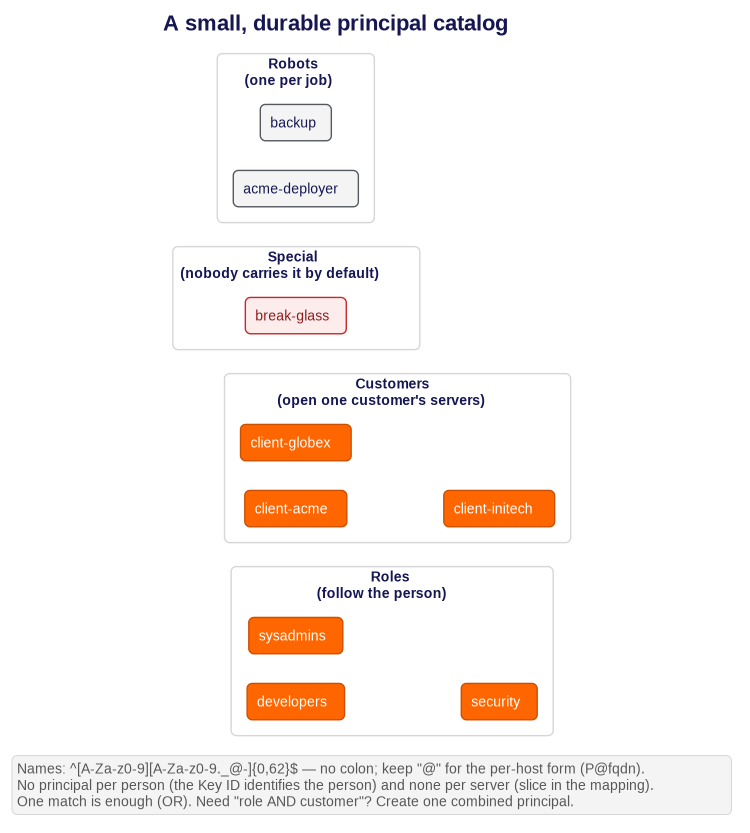
- Few, durable labels; slice per server in the mapping.
- Need "role and customer"? Create one combined principal (e.g.
acme-deployer). - Names:
^[A-Za-z0-9][A-Za-z0-9._@-]{0,62}$, no colon; keep@for the per-host form. - No principal per person: the key ID already identifies the person.
Mapping a real fleet
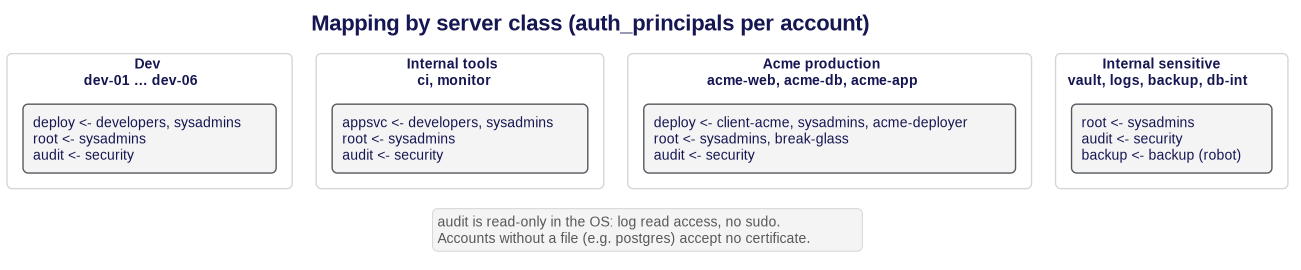
Map by server class. The host shows Stale — needs push when its principals files
changed; deploy them (Ansible role or by hand), then Mark pushed, or let automation confirm
with POST /api/v1/external/ssh/hosts/<fqdn>/principals-pushed {"sha256": …}.
Remove a mapping with the × on the mapping card, then push again. Make audit
read-only in the OS.
People and profiles
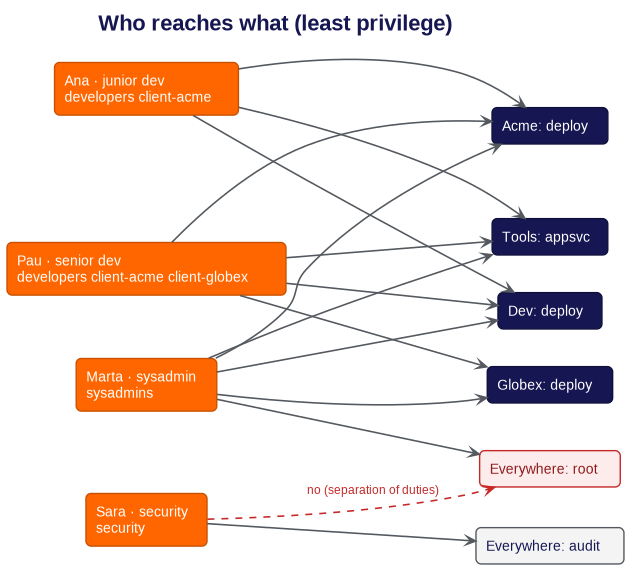
Least privilege per person; security is not admin (separation of duties). Before you issue, read Where these principals grant login on the Issue User Certificate page (it shows the identity's zone).
Customers: isolation, moves and exits
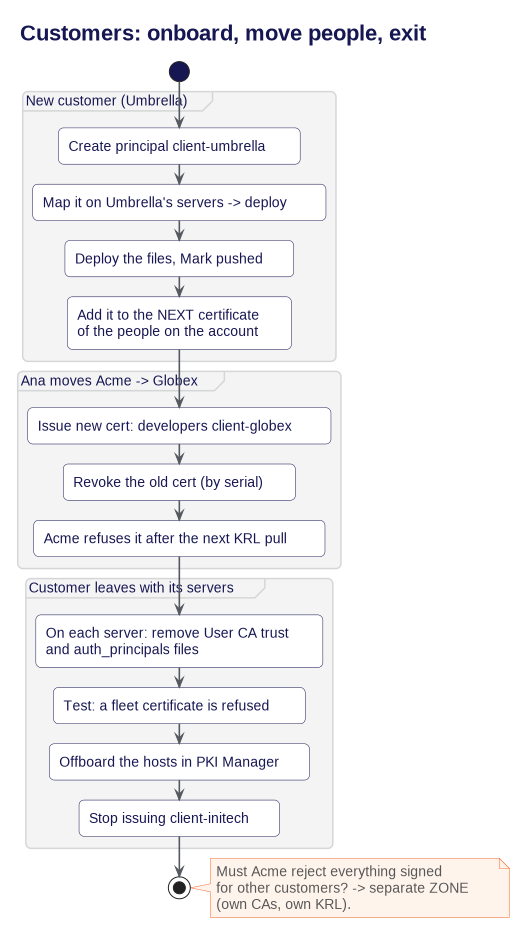
- Someone moves: issue the new certificate, revoke the old one by serial.
- Customer leaves with its servers: remove your CA trust and principals files on the machines, test, then Offboard (Offboard does not touch the machines).
- Must a customer reject everything signed for others? Use a zone.
Break-glass and temporary access
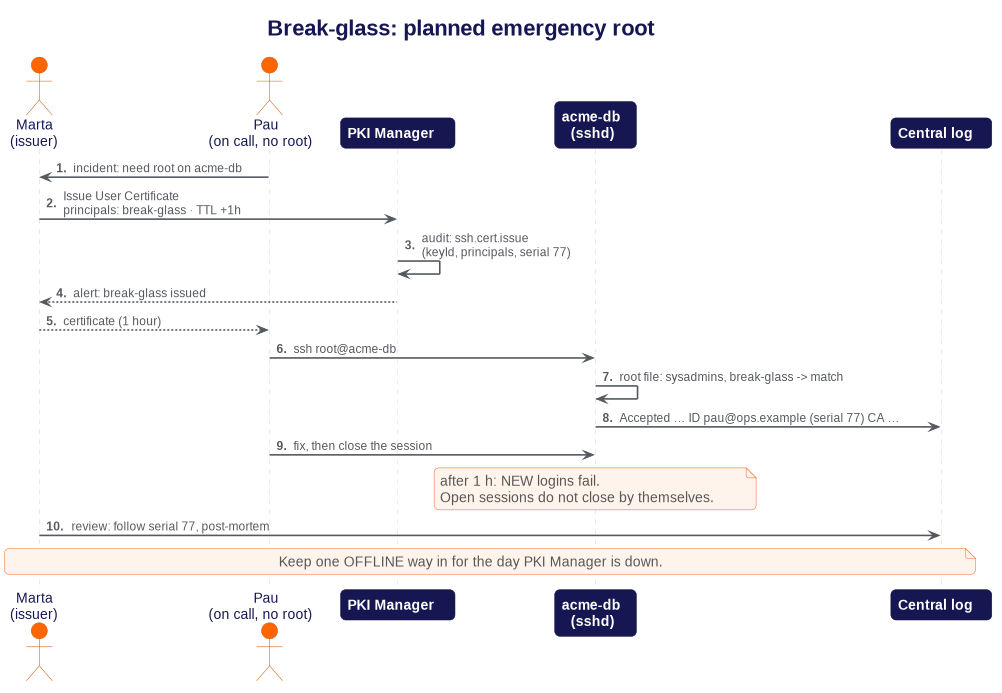
Break-glass is mapped to root and carried by nobody on normal days. Issuer ≠ holder, lifetime
+1h, alert on issuance, follow CA + serial in central logs, review. Keep one offline way
in. Contractors: only the customer principal, a short lifetime, then Offboard.
Robots and pipelines
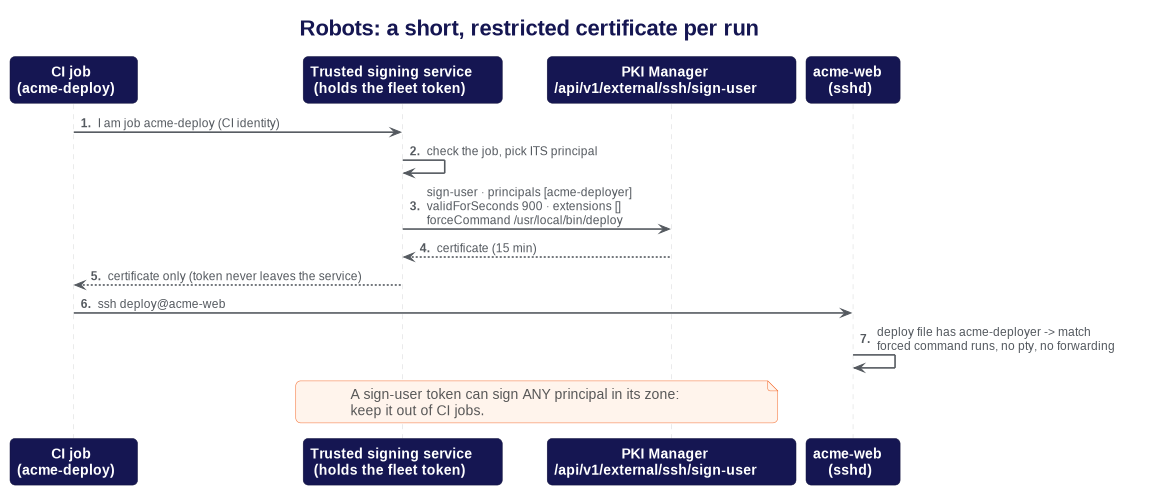
- One identity and one principal per robot; map it narrowly, never to root.
- Force command, Source address, and Harden — clear all extensions.
- Fleet tokens with sign-user limits: Allowed principals + Max certificate lifetime (15 minutes for CI). A token without limits shows Unrestricted. Keep the token in a trusted service; give the job only the certificate.
Changing access, and proving who did what
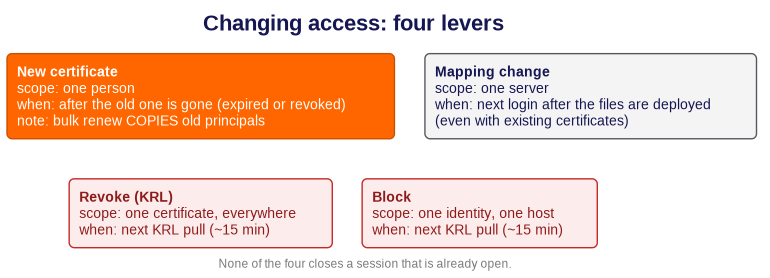
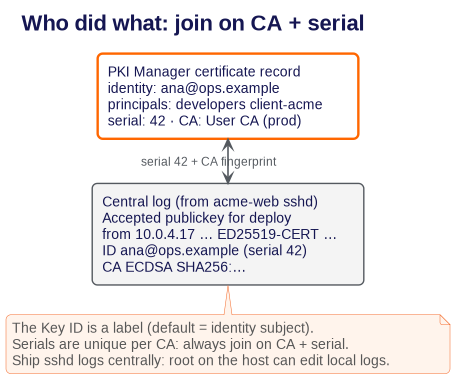
Directory changes do not change certificates; bulk renew copies old principals. Record Allowed principals on each identity (they also feed the host Access list); the entitlement check is an API/Ansible option.
Test your design
Test one person end to end (one accepted login, two refused), then match the log line to the
certificate. Look for: per-person principals, security with admin, robots with people's
certificates, signing tokens in jobs, long lifetimes, old authorized_keys or passwords.
Videos, diagrams and this page are built fromdocs/ssh/explainer/. Narration: synthetic female English voice, generated locally.