
Issue Kubernetes certificates with cert-manager
Source:
docs/guides/k8s-issuer.md
This guide issues a TLS certificate for app.acme.example inside Kubernetes.
cert-manager creates the request. The PKI Manager issuer sends it to PKI Manager.
PKI Manager signs it with your CA. The private key of the CA stays in the KMS.
The private key of the certificate never leaves the cluster.
Every step below ran on a local kind cluster against a demo PKI Manager 3.15.0. Output is trimmed. Names and IDs are from that run.
| Part | Version used |
|---|---|
| PKI Manager (backend, UI) | 3.15.0 |
| Kubernetes (kind node) | v1.35.0 |
| cert-manager (Helm chart) | v1.19.1 |
| cmctl (for renewal) | v2.1.1 |
| Issuer chart | pki-manager-issuer 3.16.0, from k8s/issuer/deploy/helm/ in the repository |
| Issuer image | ghcr.io/oriolrius/pki-manager-issuer:64d0e19 |
How it fits together
Section titled “How it fits together”
One service token is bound to one CA. One Issuer or ClusterIssuer uses one token.
1. Prerequisites
Section titled “1. Prerequisites”You need:
kubectl,helm, and a cluster (here:kind).- A running PKI Manager that the cluster can reach over HTTP(S). See Install PKI Manager.
- An admin login in PKI Manager.
- A local clone of the repository (the chart is in it).
Create the cluster:
kind create cluster --name pki-docs ✓ Starting control-plane 🕹️ ✓ Installing CNI 🔌Set kubectl context to "kind-pki-docs"Install cert-manager. The version is pinned. The issuer needs cert-manager 1.16 or newer.
helm repo add jetstack https://charts.jetstack.iohelm install cert-manager jetstack/cert-manager \ --namespace cert-manager --create-namespace \ --version v1.19.1 --set crds.enabled=true --waitkubectl get pods -n cert-managerNAME READY STATUS RESTARTS AGEcert-manager-74d45887dd-vnc76 1/1 Running 0 29scert-manager-cainjector-57974bd7f8-tzjgf 1/1 Running 0 29scert-manager-webhook-75774cfd97-k7ltj 1/1 Running 0 29sWhich URL can the pods use?
Section titled “Which URL can the pods use?”The issuer pod calls PKI Manager. It needs a URL that works from inside the cluster.
| Setup | URL used for spec.url |
|---|---|
| This guide (demo stack in Docker, kind) | http://pki-demo-backend:3000 |
| Real install | The public HTTPS URL of PKI Manager, for example https://pki.example.com |
In this guide the demo backend runs in Docker on the network pki-demo-network.
The kind node joins that network. Pods then resolve the container name:
docker network connect pki-demo-network pki-docs-control-planekubectl run nettest --rm -i --restart=Never --image=curlimages/curl -- \ curl -sS -i http://pki-demo-backend:3000/api/v1/external/healthHTTP/1.1 401 Unauthorized{"error":{"code":"UNAUTHORIZED","message":"Missing or invalid Authorization header"}}A 401 is the right answer here. The pod reached PKI Manager and it asked for a token.
If the issuer’s URL is HTTPS with a private CA, set spec.caBundle (PEM) on the issuer.
2. Create a CA and an integration in PKI Manager
Section titled “2. Create a CA and an integration in PKI Manager”2.1 Create the CA
Section titled “2.1 Create the CA”- Open PKI → Certificate Authorities and start a new root CA (
/cas/new). - Fill Common Name
K8s Demo Root CA, OrganizationAcme Demo, Organizational UnitPlatform, CountryES. - Create it.
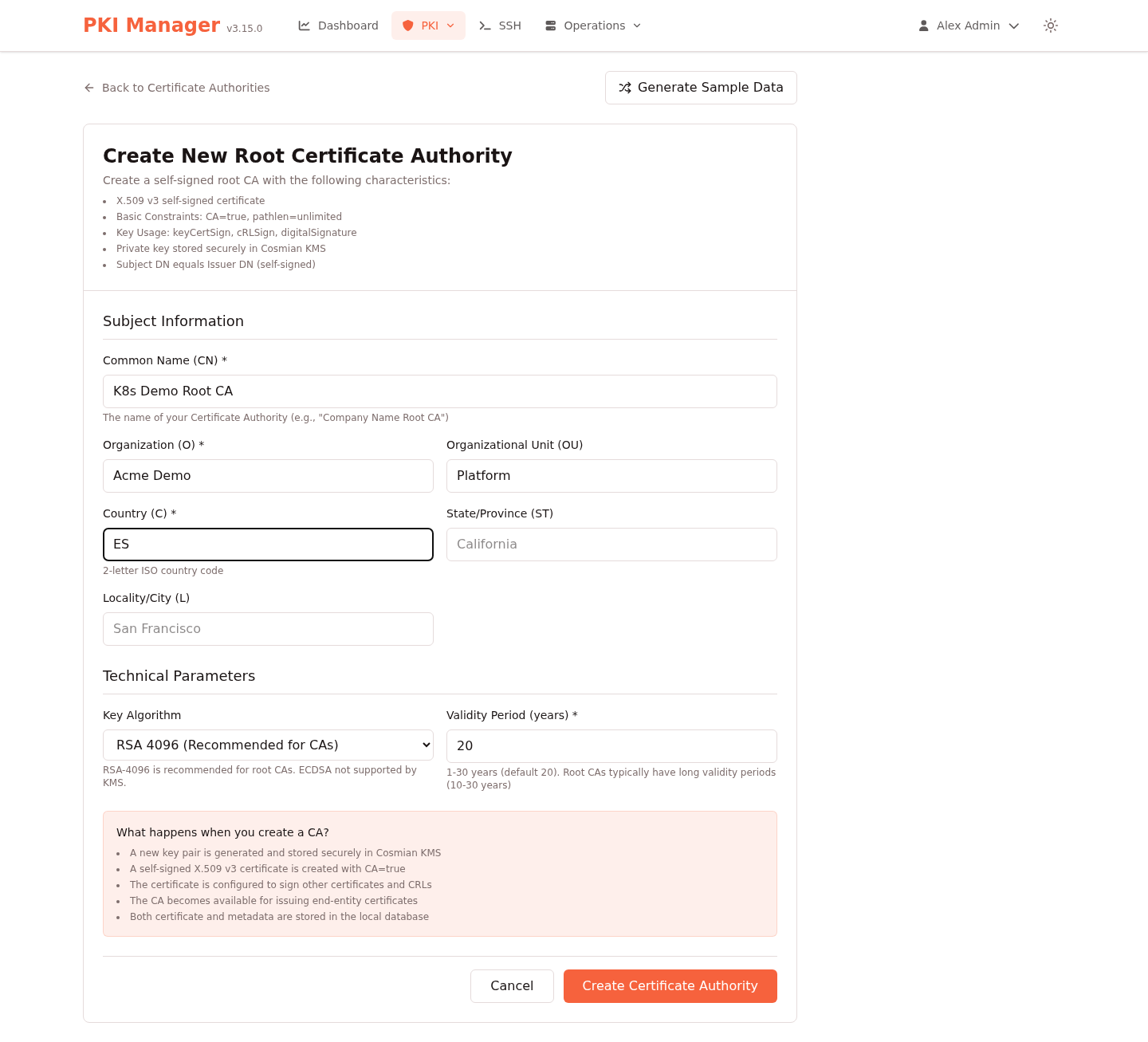
The CA page opens. Note the CA ID. The issuer needs it.
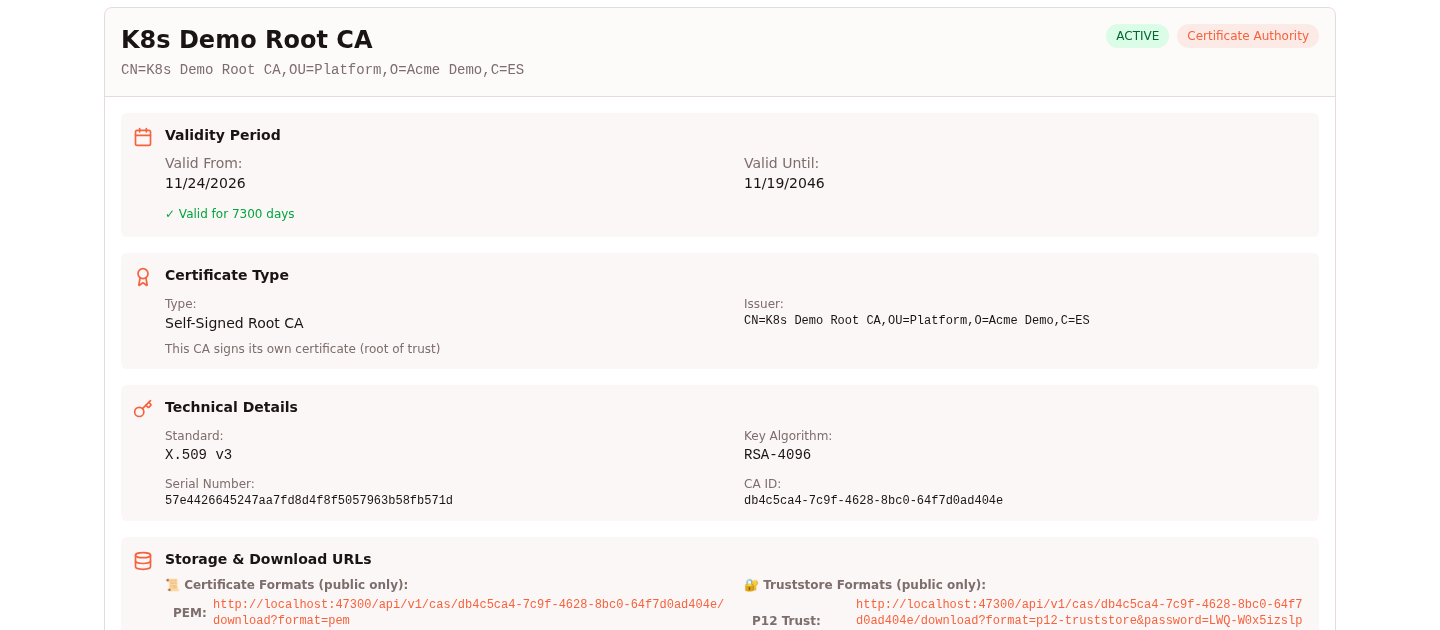
In a real install you can use an existing issuing CA. It must be active.
2.2 Create the integration (service token)
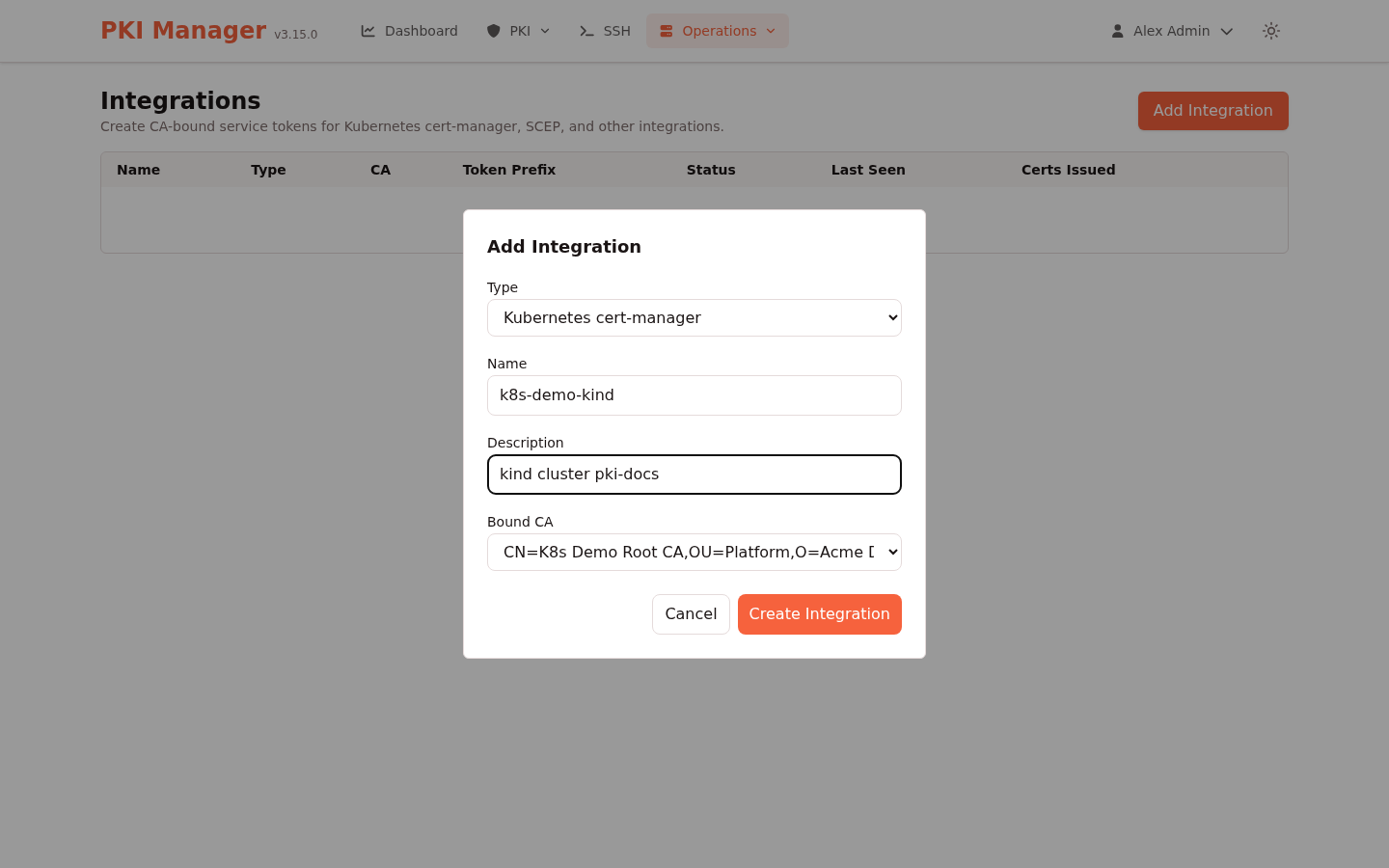
Section titled “2.2 Create the integration (service token)”- Open Operations → Integrations and click Add Integration.
- Type:
Kubernetes cert-manager. - Name:
k8s-demo-kind. Description: optional. - Bound CA: pick
K8s Demo Root CA. Only active CAs are listed. - Click Create Integration.
PKI Manager shows the Service Token one time. Copy it now.
It starts with pkimg_. PKI Manager cannot show it again.
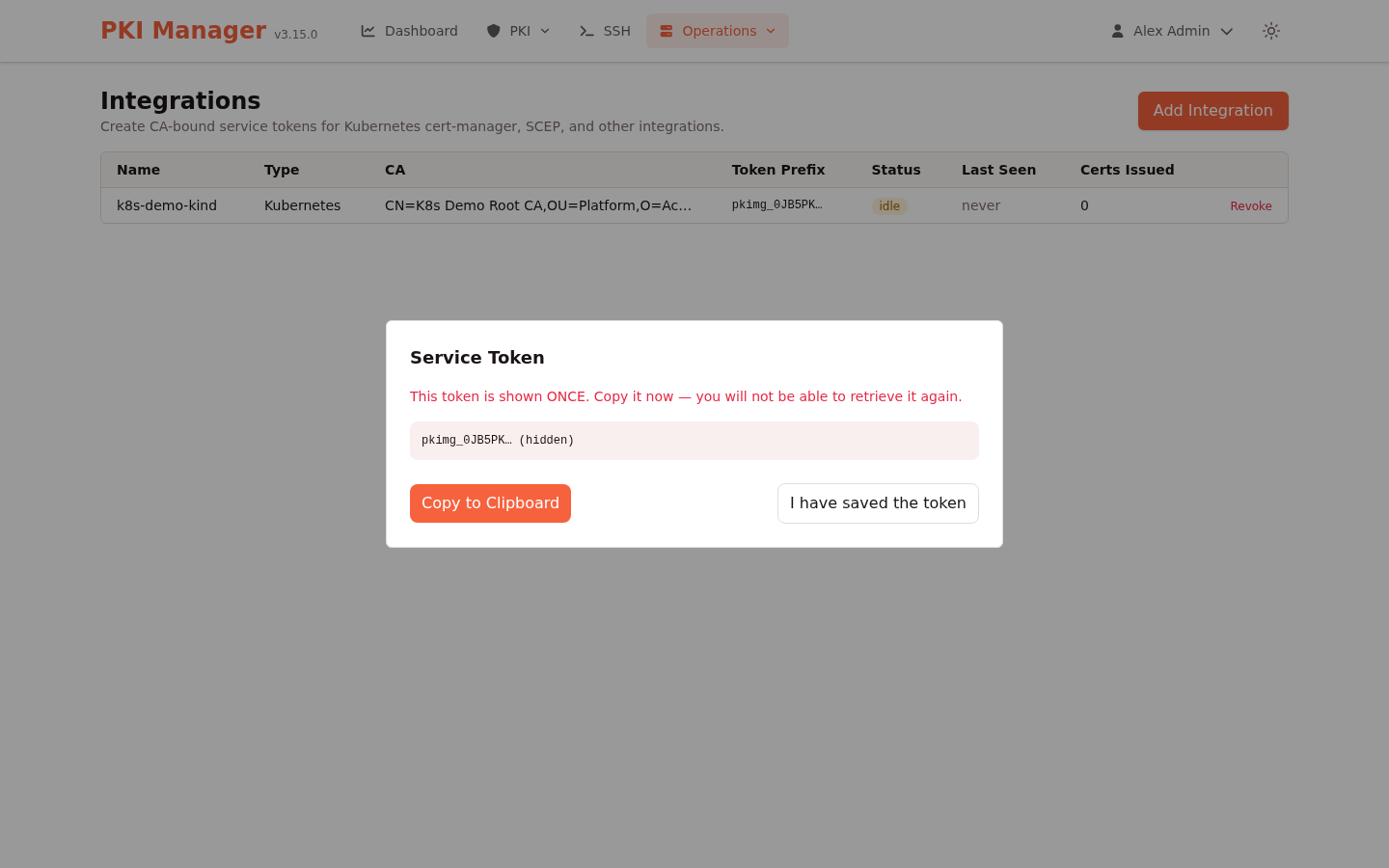
Click I have saved the token. The integration is in the list.
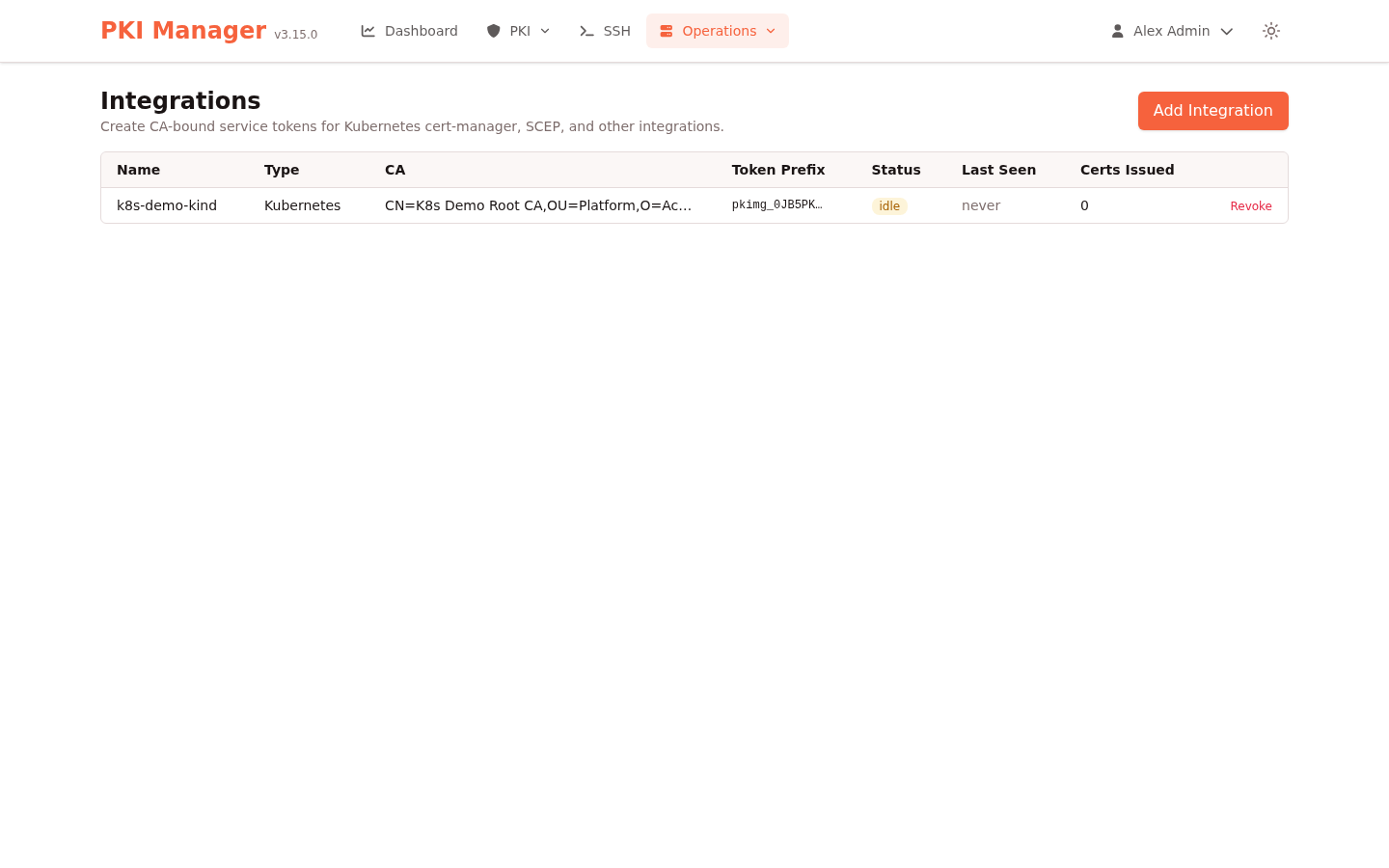
Keep the CA ID and the token in shell variables for the next steps:
export CA_ID=fcc188c4-a767-418f-883c-b9f4748cf5e7 # from the CA pageexport TOKEN=pkimg_... # from the dialog3. Install the issuer
Section titled “3. Install the issuer”The chart is in the repository, not in a Helm repository. Install it from your clone.
values.yaml:
image: tag: "64d0e19"cd pki-manager-web/k8s/issuerhelm upgrade --install pki-manager-issuer deploy/helm/pki-manager-issuer \ --namespace pki-manager-issuer --create-namespace -f values.yaml --waitkubectl get pods -n pki-manager-issuerkubectl get crd | grep pki-managerNAME READY STATUS RESTARTS AGEpki-manager-issuer-pki-manager-issuer-86868dc74c-pzpgt 1/1 Running 0 17s
clusterissuers.pki-manager.issuer.io 2026-11-24T09:58:50Zissuers.pki-manager.issuer.io 2026-11-24T09:58:50ZNotes:
image.tagdefaults to the chartappVersion. The version is the release version (cz bumpkeeps it in sync), and thek8s-issuerworkflow publishes the image tagX.Y.Zon eachvX.Y.Ztag. The workflow also publishes the short commit SHA andlatestfrommain. Pin a tag withimage.tagif you need one.- The chart also installs an approver ClusterRole (
approver.enabled=true, default). Without it, cert-manager never approves requests for this issuer. See Troubleshooting. - If cert-manager runs under another ServiceAccount than
cert-managerin namespacecert-manager, setapprover.certManagerServiceAccount.nameand.namespace.
Create the token Secret and the ClusterIssuer
Section titled “Create the token Secret and the ClusterIssuer”A ClusterIssuer reads its Secret from the controller namespace (pki-manager-issuer).
kubectl create secret generic pki-manager-token \ --namespace pki-manager-issuer --from-literal=token="$TOKEN"clusterissuer.yaml:
apiVersion: pki-manager.issuer.io/v1alpha1kind: ClusterIssuermetadata: name: pki-managerspec: url: http://pki-demo-backend:3000 # real install: https://pki.example.com caId: fcc188c4-a767-418f-883c-b9f4748cf5e7 authSecretRef: name: pki-manager-token key: token certificateType: serverkubectl apply -f clusterissuer.yamlkubectl get clusterissuer.pki-manager.issuer.io pki-managerkubectl get clusterissuer.pki-manager.issuer.io pki-manager -o jsonpath='{.status.conditions}'NAME READY AGEpki-manager True 8s[{"message":"PKI Manager reachable and CA matches","reason":"Verified","status":"True","type":"Ready"}]Ready=True and reason Verified mean:
- The controller authenticated with the token.
- The token is bound to the same CA as
spec.caId.
Fields of the issuer spec:
| Field | Required | Meaning |
|---|---|---|
url |
yes | PKI Manager base URL. Must start with http:// or https://. |
caId |
yes | CA UUID. Must match the CA of the token. |
authSecretRef |
yes | Secret name. key defaults to token. |
caBundle |
no | PEM CA bundle to verify TLS to PKI Manager. |
certificateType |
no | server, client or dual. Default dual. It is a label in PKI Manager. Key usage comes from the CSR. |
revokeOnDelete |
no | If true, PKI Manager revokes the certificate when the Kubernetes resource is deleted. Default false. |
Use a namespaced Issuer instead if you want the Secret in the application namespace.
4. Request a certificate
Section titled “4. Request a certificate”certificate.yaml:
apiVersion: cert-manager.io/v1kind: Certificatemetadata: name: app-tls namespace: defaultspec: secretName: app-tls commonName: app.acme.example dnsNames: - app.acme.example duration: 2160h # 90 days renewBefore: 360h # renew 15 days before expiry privateKey: rotationPolicy: Always usages: - server auth issuerRef: group: pki-manager.issuer.io kind: ClusterIssuer name: pki-managerPKI Manager needs an identity in the request: a Common Name, or at least one SAN (dnsNames, ipAddresses, emailAddresses). This example sets both.
kubectl apply -f certificate.yamlkubectl get certificate,certificaterequestNAME READY SECRET AGEcertificate.cert-manager.io/app-tls True app-tls 10s
NAME APPROVED DENIED READY ISSUER AGEcertificaterequest.cert-manager.io/app-tls-1 True True pki-manager 10sREADY True means cert-manager stored the signed certificate in the Secret app-tls.
The Secret has tls.crt, tls.key and ca.crt.
Check the certificate:
kubectl get secret app-tls -o jsonpath='{.data.tls\.crt}' | base64 -d > tls.crtkubectl get secret app-tls -o jsonpath='{.data.ca\.crt}' | base64 -d > ca.crtopenssl x509 -in tls.crt -noout -subject -issuer -serial -dates \ -ext subjectAltName,extendedKeyUsage,basicConstraintsopenssl verify -CAfile ca.crt tls.crtsubject=CN = app.acme.exampleissuer=CN = K8s Demo Root CA, OU = Platform, C = ES, O = Acme Demoserial=51E1A69E54CB718DAE5437F5D43AB63F0C541710notBefore=Nov 24 10:00:26 2026 GMTnotAfter=Feb 22 10:00:26 2027 GMTX509v3 Subject Alternative Name: DNS:app.acme.exampleX509v3 Extended Key Usage: TLS Web Server AuthenticationX509v3 Basic Constraints: critical CA:FALSEtls.crt: OKThe issuer is your PKI Manager CA. The SAN is the DNS name you asked for. The controller also writes the serial on the request:
kubectl get certificaterequest app-tls-1 -o jsonpath='{.metadata.annotations.pki-manager\.issuer\.io/serial}'51e1a69e54cb718dae5437f5d43ab63f0c541710The same serial is in PKI Manager. The Integrations list counts the certificates this token issued:
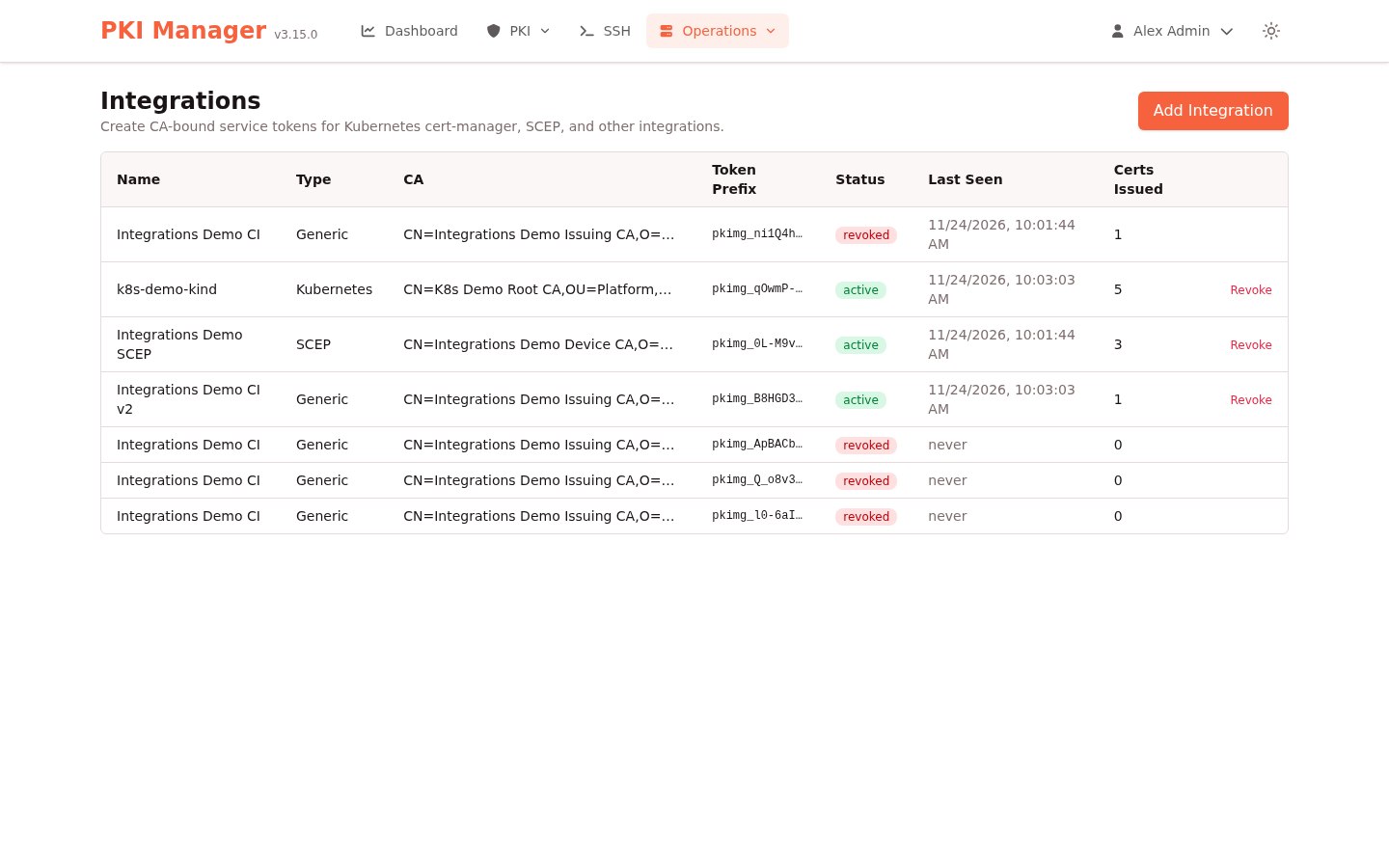
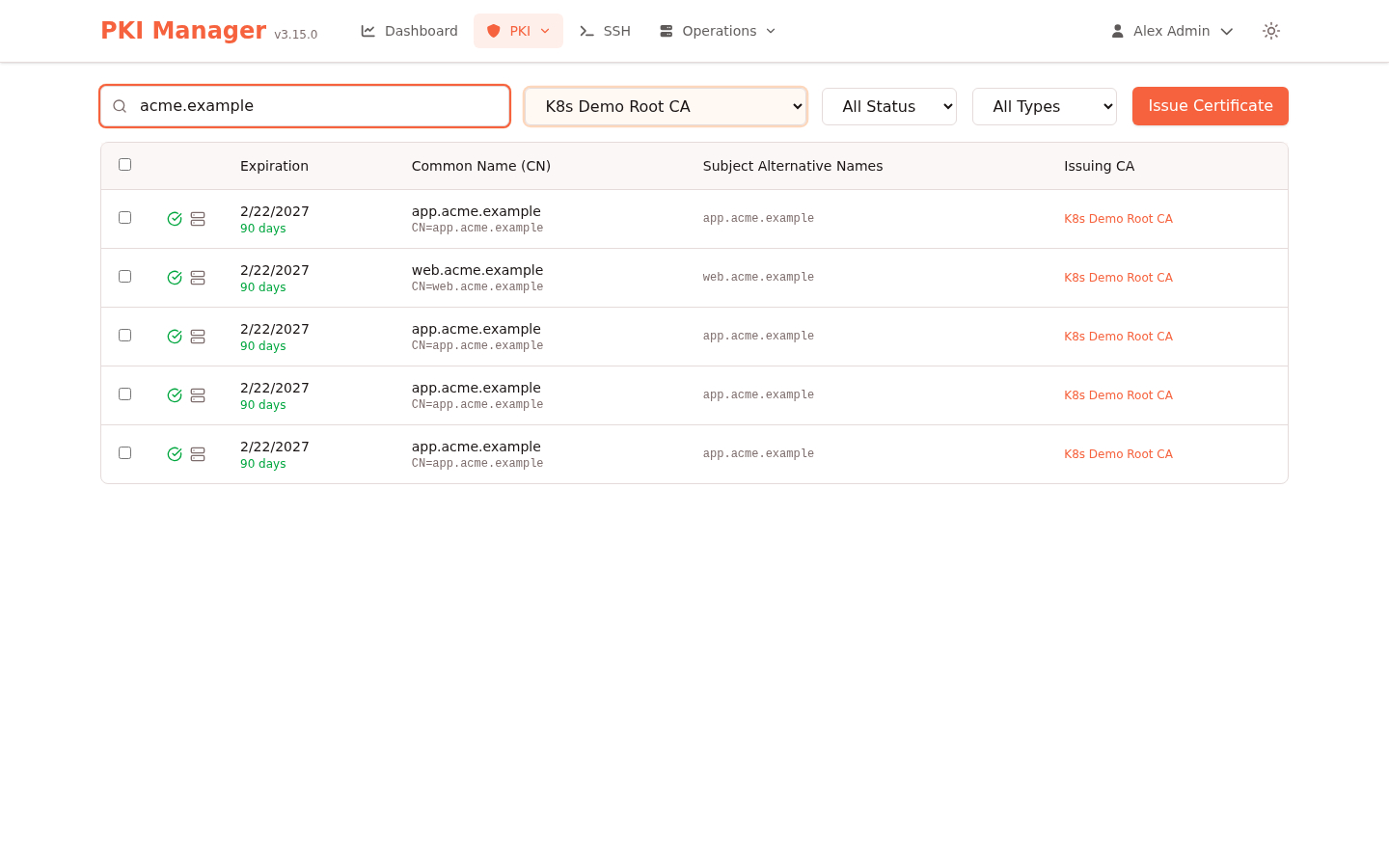
Open PKI → Certificates. Filter by CA K8s Demo Root CA.
Each issuance is one row.
5. Optional: certificate from an Ingress annotation
Section titled “5. Optional: certificate from an Ingress annotation”cert-manager can create the Certificate for you from an Ingress.
For an external issuer you set three annotations: the issuer name, its kind, and its group.
This was verified without an ingress controller. cert-manager only reads the Ingress object.
ingress.yaml:
apiVersion: networking.k8s.io/v1kind: Ingressmetadata: name: web namespace: default annotations: cert-manager.io/issuer: pki-manager cert-manager.io/issuer-kind: ClusterIssuer cert-manager.io/issuer-group: pki-manager.issuer.io cert-manager.io/common-name: web.acme.examplespec: tls: - hosts: - web.acme.example secretName: web-tls rules: - host: web.acme.example http: paths: - path: / pathType: Prefix backend: service: name: web port: number: 80kubectl apply -f ingress.yamlkubectl get certificatekubectl get secret web-tls -o jsonpath='{.data.tls\.crt}' | base64 -d \ | openssl x509 -noout -subject -issuer -ext subjectAltNameNAME READY SECRET AGEapp-tls True app-tls 94sweb-tls True web-tls 16ssubject=CN = web.acme.exampleissuer=CN = K8s Demo Root CA, OU = Platform, C = ES, O = Acme DemoX509v3 Subject Alternative Name: DNS:web.acme.exampleTwo rules to remember:
- Use
cert-manager.io/issuer, notcert-manager.io/cluster-issuer. Thecluster-issuerannotation cannot be combined with kind and group. See Troubleshooting. - No CN is needed. An Ingress certificate has no CN by default. PKI Manager accepts a CSR with an empty subject when it has at least one SAN (RFC 5280). It rejects a CSR with neither a CN nor a SAN. The certificate then has an empty subject and carries the hosts in its SAN extension. The example above sets
cert-manager.io/common-nameso the certificate has a CN; remove it to get an empty subject.
6. Renew a certificate
Section titled “6. Renew a certificate”cert-manager renews by itself when renewBefore is reached. To renew now, use cmctl:
cmctl renew app-tlskubectl get certificate,certificaterequestkubectl get secret app-tls -o jsonpath='{.data.tls\.crt}' | base64 -d | openssl x509 -noout -serial -dateskubectl get certificate app-tls -o jsonpath='{.status.revision}{"\n"}'Manually triggered issuance of Certificate default/app-tls
NAME READY SECRET AGEcertificate.cert-manager.io/app-tls True app-tls 29s
NAME APPROVED DENIED READY ISSUER AGEcertificaterequest.cert-manager.io/app-tls-2 True True pki-manager 10s
serial=7571947267DC3A96069F0E17ADC3D7E15BE9E13FnotBefore=Nov 24 10:00:46 2026 GMTnotAfter=Feb 22 10:00:46 2027 GMT2What changed:
| Item | Before | After |
|---|---|---|
| CertificateRequest | app-tls-1 |
app-tls-2 |
| Certificate revision | 1 | 2 |
| Serial | 51E1A69E... |
7571947267... |
A renewal is a new certificate. PKI Manager keeps the old one until it expires or you revoke it. The new certificate is in the list. Open it from PKI → Certificates:
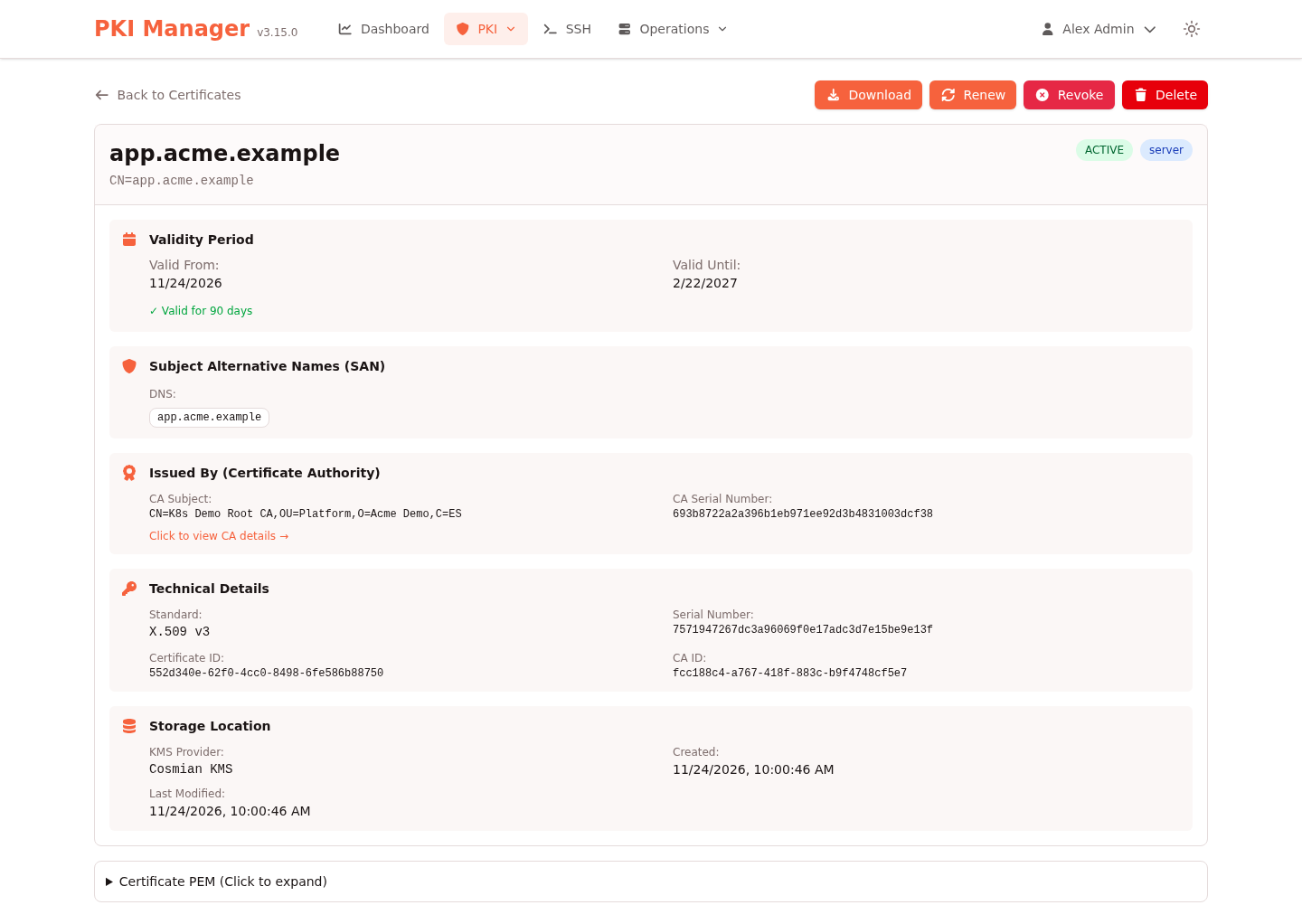
The Renew button in that page renews a certificate that PKI Manager holds the key for. It does not apply here: Kubernetes holds the key of these certificates.
7. Troubleshooting
Section titled “7. Troubleshooting”All messages below were seen in this run.
| Where | Message or symptom | Cause | Fix |
|---|---|---|---|
| Pod events | Failed to pull image "ghcr.io/oriolrius/pki-manager-issuer:<tag>": ... not found (ErrImagePull) |
The image tag is not published (for example a chart from an unreleased commit, or a release whose k8s-issuer run has not finished). |
Wait for the workflow, or set image.tag to a published tag (release X.Y.Z, short SHA or latest). |
ClusterIssuer Ready=False, reason SecretMissing |
Secret "missing-secret" not found |
Wrong Secret name, or Secret not in the controller namespace. | Create the Secret in pki-manager-issuer (ClusterIssuer) or in the Issuer namespace. |
Reason Unreachable |
Get "http://localhost:3000/api/v1/external/health": dial tcp [::1]:3000: connect: connection refused |
The URL is not reachable from the pod. localhost is the pod itself. |
Use a URL the pod can reach. Set caBundle for a private TLS CA. |
Reason Unreachable |
pki-manager GET /api/v1/external/health: 401 UNAUTHORIZED: Invalid or revoked service token |
The token is wrong or the integration is revoked. | Create a new integration and replace the Secret. |
Reason CAIDMismatch |
token bound to caId=fcc188c4-... but spec.caId=00000000-... |
spec.caId is not the CA of the token. |
Set spec.caId to the CA of the integration. |
kubectl get certificaterequest: APPROVED and READY empty, Certificate False |
Request never approved. | The approver ClusterRole is missing (approver.enabled=false) or bound to the wrong ServiceAccount. |
Install with approver.enabled=true. Set approver.certManagerServiceAccount.* to match cert-manager. Approval then happens on its own. |
CertificateRequest Ready=False, event SignFailed |
pki-manager POST /api/v1/external/sign: 400 INVALID_CSR: CSR must include a subject CN or at least one SAN |
The Certificate has neither commonName nor any SAN. |
Set dnsNames (or commonName) on the Certificate. |
Ingress event BadConfig (no Certificate is created) |
Could not determine issuer for ingress due to bad annotations: both "cert-manager.io/cluster-issuer" and "cert-manager.io/issuer-group" may not be set, both "cert-manager.io/cluster-issuer" and "cert-manager.io/issuer-kind" may not be set |
The cluster-issuer annotation was used together with kind and group. |
Use cert-manager.io/issuer with issuer-kind and issuer-group. |
Useful commands:
kubectl describe certificaterequest <name>kubectl get clusterissuer.pki-manager.issuer.io <name> -o jsonpath='{.status.conditions}'kubectl logs -n pki-manager-issuer deploy/pki-manager-issuer-pki-manager-issuerkubectl logs -n cert-manager deploy/cert-managerDemo-only choices
Section titled “Demo-only choices”| In this guide | In a real install |
|---|---|
http://pki-demo-backend:3000 over a Docker network |
HTTPS URL of PKI Manager, and caBundle if its CA is private |
| kind node joined to the Docker network | A cluster with a route to PKI Manager (check firewalls and NetworkPolicy; the chart has networkPolicy.pkiManagerEgressCIDR) |
Certificate CRL URL is http://localhost:47300/crl/... (the demo setting CRL_DISTRIBUTION_URL) |
Set CRL_DISTRIBUTION_URL on the backend to a URL that clients can reach |
Token passed with --from-literal |
Keep the token in your secret manager. Rotate it by creating a new integration and revoking the old one. |
Clean up
Section titled “Clean up”kubectl delete -f certificate.yaml -f ingress.yamlhelm uninstall pki-manager-issuer -n pki-manager-issuerkind delete cluster --name pki-docsTo stop the issuer from using the token, open Operations → Integrations and click Revoke on the integration. The token stops working at once.