
What PKI Manager is
PKI Manager is a self-hosted web application to run your own certificate authorities:
- X.509: root and intermediate CAs, certificate issue, renew and revoke, CRLs.
- SSH: a User CA and a Host CA, principals, revocation lists (KRL) and per-host access blocks.
- Kubernetes: a cert-manager external issuer that signs cluster CSRs.
Architecture
Section titled “Architecture”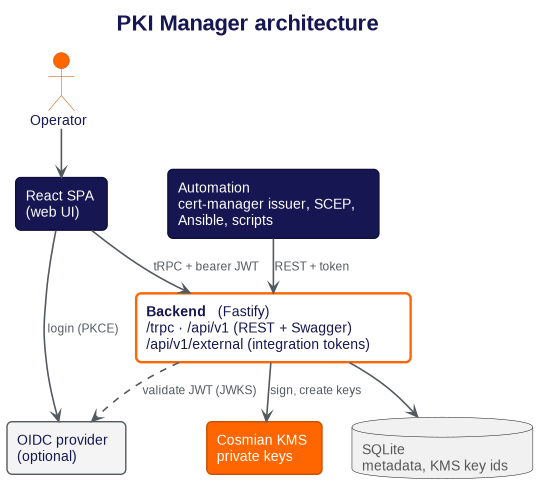
- Private keys are created and stored in a Cosmian KMS; the database stores only KMS key ids and metadata. Certificates are signed inside the KMS. The backend exports a private key from the KMS only when it must: to sign a CRL with the CA key (in memory, for that call), and when a user downloads a keystore that contains a private key (PKCS#12/JKS, also for a CA).
- Login uses OIDC (Keycloak, Auth0, Okta, Azure AD and others). OIDC is optional: with no
OIDC_ISSUER/OIDC_AUDIENCE, the backend runs without authentication — use that only for tests.
Install
Section titled “Install”- Production: run the published Docker images with Docker Compose. Start with Install and log in and Deployment, then set up login with OIDC or Keycloak.
- Development: see
DEVELOPMENT.mdin the repository.
Where to go next
Section titled “Where to go next”| You want to | Read |
|---|---|
| Install it and log in | Install and log in |
| Build an internal CA and issue, renew and revoke certificates | Private CA and certificates |
| Replace an easy-rsa PKI (Mosquitto with mutual TLS) | From easy-rsa to PKI Manager |
| Trust your root CA on browsers and devices | Trust your root CA |
| Issue certificates to Kubernetes workloads | Kubernetes with cert-manager |
| Connect automation or SCEP devices | Automation, tokens and SCEP |
Replace authorized_keys and host fingerprints with SSH certificates |
SSH video series |
| Call the API | API reference |