
PKI Manager - Docker Deployment Guide
Source:
DEPLOYMENT.md
Table of Contents
Section titled “Table of Contents”- Overview
- Prerequisites
- Local Development with Docker
- Production Deployment
- Single-Origin Edge Proxy & the
/ssh/*Namespace Collision - Environment Configuration
- GitHub Actions CI/CD
- E2E Testing
- Troubleshooting
Overview
Section titled “Overview”PKI Manager uses Docker for containerized deployment with the following components:
- Backend: Fastify + tRPC API server (Node.js 22 Alpine)
- Frontend: React SPA served by Nginx (Alpine)
- KMS: Cosmian Key Management System (official image)
All images are published exclusively to GitHub Container Registry (ghcr.io).
Deploying the SSH Certificate Manager to real servers? See the SSH guides: concept · host & client setup · Ansible role. Hosts need NTP and outbound access to the public trust/KRL endpoints (
/ssh/...,/krl/<caId>.bin).
Prerequisites
Section titled “Prerequisites”- Docker 20.10+ and Docker Compose 2.0+
- (Optional)
.envfile for custom configuration - For CI/CD: GitHub repository with GHCR access
Local Development with Docker
Section titled “Local Development with Docker”Quick Start
Section titled “Quick Start”-
Clone and navigate to the project:
Terminal window cd pki-manager/dockerThe Compose file is
docker/docker-compose.yml: run thedocker-composecommands below from thedocker/directory (or add-f docker/docker-compose.ymlfrom the repository root). -
Create
.envfile (optional, uses defaults if not present):Terminal window cp .env.example .env# Edit .env with your preferred settings -
Create the backend data folder (the backend runs as uid 1001; a folder that Docker creates is owned by root and the backend fails with
SqliteError: unable to open database file):Terminal window mkdir -p ../pki && sudo chown 1001:1001 ../pki -
Build and start all services:
Terminal window docker-compose up --build -
Access the application:
- Frontend: http://localhost:8080
- Backend API: http://localhost:3000
- KMS: not published to the host (internal
kms-internalnetwork only)
Building Individual Images
Section titled “Building Individual Images”Build backend only (from the repository root):
docker build -f docker/Dockerfile --target backend -t pki-manager-backend:dev .Build frontend only:
docker build -f docker/Dockerfile --target frontend \ --build-arg VITE_API_URL=http://localhost:3000/trpc \ -t pki-manager-frontend:dev .Development Commands
Section titled “Development Commands”# Start services in detached modedocker-compose up -d
# View logsdocker-compose logs -f
# Stop servicesdocker-compose down
# Stop and remove volumes (⚠️ deletes data)docker-compose down -v
# Rebuild specific servicedocker-compose up --build backend
# Execute commands in running containerdocker-compose exec backend shProduction Deployment
Section titled “Production Deployment”Step 1: Prepare Environment
Section titled “Step 1: Prepare Environment”Create a .env file with production values:
# Image ConfigurationIMAGE_TAG=latest  # or specific version like v1.0.0
# Network ConfigurationBACKEND_EXTERNAL_PORT=3000FRONTEND_EXTERNAL_PORT=80
# Backend ConfigurationNODE_ENV=productionFRONTEND_URL=https://your-domain.com
# KMS ConfigurationKMS_URL=http://kms:9998KMS_API_KEY=your-secure-api-key  # Optional
# Frontend Build ConfigurationVITE_API_URL=https://your-domain.com/trpc
Step 2: Pull Images from GHCR
Section titled “Step 2: Pull Images from GHCR”# Login to GitHub Container Registryecho $GITHUB_TOKEN | docker login ghcr.io -u USERNAME --password-stdin
# Pull imagesdocker-compose pullStep 3: Deploy
Section titled “Step 3: Deploy”# Start servicesdocker-compose up -d
# Verify healthdocker-compose psdocker-compose logsStep 4: Database Migrations
Section titled “Step 4: Database Migrations”The backend container entrypoint (docker/docker-entrypoint.sh) runs the database
migrations automatically on every start, so no manual step is needed. To run them
by hand (for example to inspect the output):
docker exec pki-backend node /app/backend/dist/db/migrate.jsExpected output:
Running migrations...Migrations folder: /app/backend/dist/db/migrationsMigrations completed successfully!Note: The production container only includes compiled JavaScript. The standard
pnpm db:migratecommand won’t work. Always use the directnodecommand above.
Step 5: Configure Reverse Proxy (Optional)
Section titled “Step 5: Configure Reverse Proxy (Optional)”Example Nginx configuration for production:
server {    listen 443 ssl http2;    server_name your-domain.com;
    ssl_certificate /path/to/cert.pem;    ssl_certificate_key /path/to/key.pem;
    # Frontend    location / {        proxy_pass http://localhost:8080;        proxy_set_header Host $host;        proxy_set_header X-Real-IP $remote_addr;        proxy_set_header X-Forwarded-For $proxy_add_x_forwarded_for;        proxy_set_header X-Forwarded-Proto $scheme;    }
    # Backend API    location /trpc {        proxy_pass http://localhost:3000;        proxy_set_header Host $host;        proxy_set_header X-Real-IP $remote_addr;        proxy_set_header X-Forwarded-For $proxy_add_x_forwarded_for;        proxy_set_header X-Forwarded-Proto $scheme;    }}
Client IPs behind a reverse proxy (TRUST_PROXY)
Section titled “Client IPs behind a reverse proxy (TRUST_PROXY)”Behind a proxy, the backend sees the proxy as the client, so every audit row
(audit_log.ip_address) and every per-IP limit (KRL fetches, the anonymous
external-API rejection budget) uses the proxy’s address. Set TRUST_PROXY on
the backend to the addresses of the proxies that forward to it, so it takes
the client IP from X-Forwarded-For:
| Value | Meaning |
|---|---|
unset / false |
Ignore proxy headers (default; correct when clients connect directly) |
10.222.35.0/24,172.18.0.5 |
Trust only these peers (IPs/CIDRs; also loopback, linklocal, uniquelocal). Recommended |
1..10 |
Trust that many hops whatever the peer: only safe if the backend is unreachable except through them |
true (trust anyone) is rejected and so are malformed entries, so the backend
fails at startup instead of silently ignoring a typo. List every proxy hop
that can reach the backend: e.g. the edge proxy’s network and the frontend
nginx, which also forwards /cas/*, /krl/* and /ssh/zones/*. Each proxy
must send X-Forwarded-For $proxy_add_x_forwarded_for (the example above and
docker/nginx.conf do). Never list networks whose other containers are untrusted:
any listed peer can choose the recorded client IP.
Check it: make a request that will be rejected, such as
curl https://your-domain.com/api/v1/external/health without a token, then look
at the newest external.reject row in the audit log. Its IP must be your
public address, not a Docker network address.
Single-Origin Edge Proxy & the /ssh/* Namespace Collision
Section titled “Single-Origin Edge Proxy & the /ssh/* Namespace Collision”Read this if you serve the SPA and the backend on ONE origin (one host/port behind a single reverse proxy or ingress — e.g.
https://pki.example.com), rather than the two-port model (:8080frontend,:3000backend) used by the default compose file.
The collision
Section titled “The collision”/ssh/* is claimed by both layers:
- The frontend SPA owns
/ssh/*as a UI URL namespace — TanStack Router pages such as/ssh/cas,/ssh/hosts,/ssh/krl,/ssh/users,/ssh/principals. - The backend serves public, unauthenticated trust material at the server
ROOT under
/ssh/...(plus/krl/...,/crl/...,/cas/....pem) — the files that hosts, the Ansible role, andkrl-clientfetch.
With a naive single-origin edge (SPA fallback catching everything, or the frontend
container serving / with no backend proxy), GET /ssh/host-ca-keys returns the
SPA’s index.html instead of the CA key material. Symptom observed in production:
/health and /crl/* reach the backend, but /ssh/host-ca-keys returns
<!doctype html>. The two-port compose model hides this because the backend and
frontend are different origins.
The fix (already applied to docker/nginx.conf)
Section titled “The fix (already applied to docker/nginx.conf)”The frontend container’s nginx is now a single-origin edge proxy: it proxies the
specific backend-owned paths to http://backend:3000 and lets everything else
(including the SPA’s own /ssh/cas, /ssh/hosts, … UI routes) fall through to
the SPA. The proxy location blocks are placed before the location / SPA
fallback; nginx evaluates regex locations (in order) ahead of the prefix fallback,
so the specific backend /ssh/... paths win while the SPA keeps the rest. This is
purely a proxy/routing change — the backend routes are unchanged, so external
consumers (Ansible role, krl-client) keep working against the same paths.
Backend-owned paths that MUST be routed to the backend:
| Path pattern | What it serves |
|---|---|
/api/ (prefix) |
REST + OpenAPI/Swagger API |
/trpc (prefix) |
tRPC endpoint (frontend RPC) |
^/crl/ |
Public CRL downloads (/crl/<caId>.crl|.der) |
^/cas/[^/]+\.(pem|crt|cer|der)$ |
Public CA-certificate downloads |
^/krl/ |
Public SSH KRL (/krl/<caId>.bin|.json, /krl/hosts/<id>.bin|.json) |
^/ssh/zones/[^/]+/(host-ca-keys|trusted-user-ca-keys|cert-authority)$ |
Zone-scoped SSH trust anchors |
^/ssh/(host-ca-keys|trusted-user-ca-keys|cert-authority)$ |
SSH trust anchors + known_hosts lines (default zone) |
^/ssh/cas/[^/]+/ca\.pub$ |
A single SSH CA’s public key |
^/ssh/hosts/[^/]+/(cert\.pub|sshd-config)$ |
A host’s cert + sshd drop-in |
Everything not matched above (/, /assets/*, /ssh/cas, /ssh/hosts,
/ssh/krl, /ssh/users, …) is served by the SPA. The container’s local
/health (used by the frontend healthcheck) stays local.
The exact nginx rules (standard proxy_set_header Host/X-Real-IP/X-Forwarded-For/X-Forwarded-Proto
headers included) live in docker/nginx.conf. For a
single-origin deployment, point the SPA at the same origin by setting
VITE_API_URL=/trpc (so the browser hits the edge, not :3000 directly).
Verify
Section titled “Verify”docker compose -f docker/docker-compose.yml up -d# Backend trust material through the single origin (NOT HTML):curl -s http://localhost:8080/ssh/host-ca-keys | head # -> ssh-...-ca key line(s)curl -s http://localhost:8080/krl/<caId>.bin -o /dev/null -w '%{content_type}\n' # -> application/octet-streamcurl -s http://localhost:8080/crl/<caId>.crl | head -1 # -> -----BEGIN X509 CRL-----# SPA still owns its UI routes (IS HTML):curl -s http://localhost:8080/ssh/cas | head -1 # -> <!doctype html>Using a different edge proxy (Traefik / Caddy / Kubernetes ingress)
Section titled “Using a different edge proxy (Traefik / Caddy / Kubernetes ingress)”If you terminate on something other than this nginx (Traefik, Caddy, HAProxy, an
ingress controller, a cloud LB), you must replicate the same path routing to
the backend, or the /ssh/* trust-material routes will be shadowed by the SPA
again. Route the nine path patterns in the table above to the backend service
(backend:3000) and send everything else to the frontend. Sketches:
Caddy
pki.example.com { @backend { path /api/* /trpc* path /crl/* /krl/* path_regexp cas ^/cas/[^/]+\.(pem|crt|cer|der)$ path /ssh/host-ca-keys /ssh/trusted-user-ca-keys /ssh/cert-authority path_regexp sshzone ^/ssh/zones/[^/]+/(host-ca-keys|trusted-user-ca-keys|cert-authority)$ path_regexp sshpub ^/ssh/cas/[^/]+/ca\.pub$ path_regexp sshhost ^/ssh/hosts/[^/]+/(cert\.pub|sshd-config)$ } reverse_proxy @backend backend:3000 reverse_proxy frontend:8080}Traefik / ingress — create a higher-priority router/rule matching those exact
paths/regexes to the backend service, and a default (lower priority) router to the
frontend. In Kubernetes, use Exact/ImplementationSpecific path types (or a
regex-capable ingress) for the /ssh/..., /krl/, /crl/, /cas/....pem, /api/,
and /trpc routes to the backend Service, with a catch-all / to the frontend.
Environment Configuration
Section titled “Environment Configuration”Required Variables
Section titled “Required Variables”None! The stack runs with sensible defaults. However, you should customize for production.
Available Variables
Section titled “Available Variables”See docker/.env.example for full list. Key variables:
| Variable | Default | Description |
|---|---|---|
IMAGE_TAG |
latest |
Docker image tag to use |
BACKEND_EXTERNAL_PORT |
3000 |
Host port for backend API |
FRONTEND_EXTERNAL_PORT |
8080 |
Host port for frontend |
KMS_EXTERNAL_PORT |
9998 |
Listed in docker/.env.example, but docker/docker-compose.yml does not publish the KMS port |
NODE_ENV |
production |
Node environment |
FRONTEND_URL |
http://localhost:8080 |
Frontend URL for CORS |
DATABASE_PATH |
/app/backend/data/pki.db |
Database file path (in container) |
KMS_URL |
http://kms:9998 |
KMS service URL |
KMS_API_KEY |
(empty) | Optional KMS authentication |
CRL_DISTRIBUTION_URL |
http://localhost:3000/crl |
Public URL for CRL distribution points |
TRUST_PROXY |
(empty) | Reverse proxies allowed to set the client IP (details) |
VITE_API_URL |
http://localhost:3000/trpc |
API URL for frontend |
OIDC Authentication Configuration
Section titled “OIDC Authentication Configuration”PKI Manager supports OpenID Connect (OIDC) authentication with any compliant provider (Keycloak, Auth0, Okta, Azure AD, etc.). Authentication is optional - leave OIDC variables unset to run without authentication.
Backend OIDC Variables
Section titled “Backend OIDC Variables”Add these to your .env file:
| Variable | Example | Description |
|---|---|---|
OIDC_ISSUER |
https://keycloak.example.com/realms/pki |
OIDC provider base URL (must match token iss claim) |
OIDC_AUDIENCE |
pki-web,pki-service |
Expected audience claim(s), comma-separated |
OIDC_ROLES_SOURCE |
token |
Role source: token (default) or userinfo |
OIDC_ROLES_CLAIM |
realm_access.roles |
Path to roles in the selected claim source; groups for group-based roles |
OIDC_DISCOVERY_BASE_URL |
(optional) | Override URL for fetching OIDC discovery (for Docker networking) |
Provider-specific issuer URLs:
- Keycloak:
https://keycloak.example.com/realms/your-realm - Auth0:
https://your-tenant.auth0.com - Okta:
https://your-org.okta.com - Azure AD:
https://login.microsoftonline.com/{tenant-id}/v2.0
Provider-specific roles claim paths:
- Keycloak:
realm_access.roles - Auth0:
permissionsor custom namespace - Okta:
groups - Azure AD:
roles
Frontend OIDC Variables
Section titled “Frontend OIDC Variables”| Variable | Example | Description |
|---|---|---|
VITE_OIDC_AUTHORITY |
https://keycloak.example.com/realms/pki |
Same as backend OIDC_ISSUER |
VITE_OIDC_CLIENT_ID |
pki-web |
Public OIDC client ID (PKCE-enabled) |
VITE_OIDC_SCOPE |
openid profile email |
OAuth2 scopes (optional, defaults shown) |
Important for Docker: Frontend OIDC variables are build-time only. You must either:
- Rebuild the image with
--build-arg VITE_OIDC_AUTHORITY=...(requires Dockerfile modification), or- Use runtime config by mounting a custom
config.json(see below)
Runtime OIDC Configuration (Docker)
Section titled “Runtime OIDC Configuration (Docker)”For production Docker deployments, mount a custom config.json to configure OIDC without rebuilding:
# Create config.json with OIDC settingscat > docker/config.json << 'EOF'{ "apiUrl": "https://api.pki.example.com/trpc", "oidc": { "authority": "https://keycloak.example.com/realms/pki", "clientId": "pki-web", "scope": "openid profile email" }}EOFThe default docker/docker-compose.yml already mounts it:
services: frontend: volumes: - ./config.json:/usr/share/nginx/html/config.json:roKeycloak Setup Example
Section titled “Keycloak Setup Example”For detailed step-by-step instructions with screenshots, see KEYCLOAK.md.
For a deep dive into how OIDC works (public clients, PKCE, token validation), see OIDC.md.
Quick summary:
-
Create a Realm (e.g.,
pki-manager) -
Create a Client for the SPA:
- Client ID:
pki-web - Client authentication: Off (public client)
- Standard flow: Enabled (for PKCE)
- Valid redirect URIs:
https://pki.example.com/* - Web origins:
https://pki.example.com
- Client ID:
-
Create a Client for M2M (optional):
- Client ID:
pki-service - Client authentication: On (confidential)
- Service accounts roles: Enabled
- Client ID:
-
Create a test user with username and password
-
Configure
.env:
# BackendOIDC_ISSUER=https://keycloak.example.com/realms/pki-managerOIDC_AUDIENCE=pki-web,pki-serviceOIDC_ROLES_CLAIM=realm_access.roles
# Frontend (build-time or runtime)VITE_OIDC_AUTHORITY=https://keycloak.example.com/realms/pki-managerVITE_OIDC_CLIENT_ID=pki-web
Disabling Authentication
Section titled “Disabling Authentication”To run without authentication, simply leave the OIDC variables unset or empty:
# Backend - no OIDC_ISSUER = all endpoints public# OIDC_ISSUER=
# Frontend - no VITE_OIDC_AUTHORITY = no login required# VITE_OIDC_AUTHORITY=
Secrets Management
Section titled “Secrets Management”For production, use Docker secrets or environment variable injection:
The backend reads KMS_API_KEY from its environment only (*_FILE variables are
not supported), so inject it from your secret store into the environment:
services: backend: environment: - KMS_API_KEY=${KMS_API_KEY}GitHub Actions CI/CD
Section titled “GitHub Actions CI/CD”Workflow Overview
Section titled “Workflow Overview”The .github/workflows/docker-build.yml workflow:
- Triggers: On
mainbranch pushes, tags (v*.*.*), and PRs - Builds: Both backend and frontend images
- Publishes: Only to
ghcr.io(never Docker Hub) - Tags: Semantic versioning, branch names, git SHA
- Security: Trivy vulnerability scanning, SLSA attestation
- Platform: Builds for
linux/amd64
Setup Requirements
Section titled “Setup Requirements”-
Enable GHCR:
- Go to repository Settings → Actions → General
- Under “Workflow permissions”, enable “Read and write permissions”
-
Configure Variables (Settings → Secrets and variables → Actions → Variables):
VITE_API_URL: Production API URL (e.g.,https://api.your-domain.com/trpc)
-
Create Release:
Terminal window git tag v1.0.0git push origin v1.0.0
Published Image Tags
Section titled “Published Image Tags”Images are published to:
ghcr.io/YOUR_ORG/pki-manager-web/backend:TAGghcr.io/YOUR_ORG/pki-manager-web/frontend:TAG
Available tags:
latest- Latest main branch build1.0.0,1.0,1- Semantic version tags (fromv1.0.0tags, without thev)main- Latest build of a branchsha-abc1234- Commit SHA (short)pr-123- Pull request builds
E2E Testing
Section titled “E2E Testing”PKI Manager includes comprehensive E2E tests for Role-Based Access Control (RBAC). Tests can run against a local Docker environment or production.
E2E Architecture
Section titled “E2E Architecture”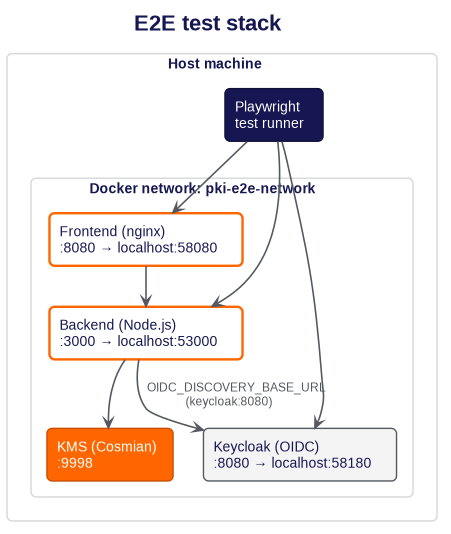
The backend uses OIDC_DISCOVERY_BASE_URL to fetch OIDC configuration from the Docker network (keycloak:8080) while validating tokens against the issuer URL that browsers use (localhost:58180).
Local E2E Testing (Recommended)
Section titled “Local E2E Testing (Recommended)”The docker-compose.e2e.yml provides a complete isolated environment for testing:
# 1. Build images with latest code (if you made changes)docker build --target backend -t ghcr.io/oriolrius/pki-manager-web/backend:latest -f docker/Dockerfile .docker build --target frontend -t ghcr.io/oriolrius/pki-manager-web/frontend:latest -f docker/Dockerfile .
# 2. Start the E2E environment (includes Keycloak with pre-configured test users)docker compose -f docker/docker-compose.e2e.yml up -d
# 3. Wait for all services to be healthy (~60-90 seconds for Keycloak)docker compose -f docker/docker-compose.e2e.yml ps
# 4. Run the RBAC testspnpm playwright test tests/e2e-rbac.spec.ts --reporter=list
# 5. Cleanup when donedocker compose -f docker/docker-compose.e2e.yml down -v
E2E Test Users
Section titled “E2E Test Users”The E2E environment includes pre-configured test users in Keycloak:
| Username | Password | Role | Description |
|---|---|---|---|
testadmin |
Test123! |
admin |
Full access - can create, revoke, delete CAs and certificates |
testuser |
Test123! |
user |
Limited access - can view and issue certificates, cannot perform admin operations |
E2E Services
Section titled “E2E Services”| Service | URL | Description |
|---|---|---|
| Frontend | http://localhost:58080 | PKI Manager UI |
| Backend API | http://localhost:53000 | tRPC API |
| Keycloak | http://localhost:58180 | Identity Provider (admin/admin for Keycloak console) |
| KMS | Internal only | Cosmian Key Management System |
Production E2E Testing
Section titled “Production E2E Testing”To test against a production environment:
E2E_TARGET=production pnpm playwright test tests/e2e-rbac.spec.ts --reporter=listOr with custom URLs:
E2E_FRONTEND_URL=https://pki.example.com \E2E_ADMIN_USER=testadmin \E2E_ADMIN_PASSWORD=Test123! \pnpm playwright test tests/e2e-rbac.spec.tsE2E Environment Variables
Section titled “E2E Environment Variables”| Variable | Default | Description |
|---|---|---|
E2E_TARGET |
local |
Target environment: local or production |
E2E_FRONTEND_URL |
(from target) | Override frontend URL |
E2E_ADMIN_USER |
testadmin |
Admin test user |
E2E_ADMIN_PASSWORD |
Test123! |
Admin password |
E2E_TEST_USER |
testuser |
Regular test user |
E2E_TEST_PASSWORD |
Test123! |
Regular user password |
Troubleshooting
Section titled “Troubleshooting”Build Failures
Section titled “Build Failures”Problem: TypeScript compilation errors during build
Solution: Ensure TypeScript type errors are fixed in the codebase:
cd backend && pnpm typecheckImage Pull Failures
Section titled “Image Pull Failures”Problem: Cannot pull from ghcr.io
Solution:
# Create personal access token with packages:read scope# Then login:echo $GITHUB_TOKEN | docker login ghcr.io -u YOUR_USERNAME --password-stdinService Health Issues
Section titled “Service Health Issues”Check service health:
docker-compose psdocker inspect pki-backend --format='{{.State.Health.Status}}'View detailed logs:
docker-compose logs backenddocker-compose logs frontenddocker-compose logs kmsDatabase Issues
Section titled “Database Issues”Problem: Database locked or corrupted
Solution:
# Stop servicesdocker-compose down
# Remove the bind-mounted data directory (⚠️ deletes data)rm -rf ../pki
# Restartdocker-compose up -d
KMS Connection Issues
Section titled “KMS Connection Issues”Problem: Backend cannot connect to KMS
Check network:
docker-compose exec backend ping kmsdocker-compose exec backend wget -qO- http://kms:9998/healthVerify KMS is healthy:
docker-compose ps kmsPort Conflicts
Section titled “Port Conflicts”Problem: Port already in use
Solution: Change ports in .env:
BACKEND_EXTERNAL_PORT=3001FRONTEND_EXTERNAL_PORT=8081E2E Test Failures
Section titled “E2E Test Failures”Problem: “no such table: audit_log” error
Solution: Database migrations didn’t run. The E2E docker-compose automatically runs migrations on startup. If using a custom setup:
docker exec pki-e2e-backend node /app/backend/dist/db/migrate.jsProblem: OIDC token validation fails in Docker
Solution: Ensure OIDC_DISCOVERY_BASE_URL is set for Docker networking:
environment: - OIDC_ISSUER=http://localhost:58180/realms/pki-e2e - OIDC_DISCOVERY_BASE_URL=http://keycloak:8080/realms/pki-e2eProblem: Keycloak healthcheck fails (timeout)
Solution: Keycloak 26+ takes ~60-90 seconds to start. The healthcheck has a 90-second start period. Check logs:
docker logs pki-e2e-keycloakProblem: Tests fail with “Login button not found”
Solution: Wait for all services to be healthy before running tests:
docker compose -f docker/docker-compose.e2e.yml ps# All services should show "healthy" statusProduction Configuration
Section titled “Production Configuration”Security Checklist:
- Check the migrations ran (the backend entrypoint runs them):
docker-compose logs backend - Set
NODE_ENV=production - Configure
FRONTEND_URLwith production domain - Set strong
KMS_API_KEY - Configure OIDC authentication (see OIDC Configuration)
- Use HTTPS with reverse proxy
- Configure firewall rules
- Set up backup strategy for volumes
- Enable Docker restart policies (already configured)
- Monitor resource limits
- Review security scan results
Resource Requirements
Section titled “Resource Requirements”Minimum
Section titled “Minimum”- CPU: 2 cores
- RAM: 4GB
- Disk: 10GB
Recommended (Production)
Section titled “Recommended (Production)”- CPU: 4+ cores
- RAM: 8GB+
- Disk: 50GB+ (SSD)
Resource Limits
Section titled “Resource Limits”Not set in docker/docker-compose.yml; add them in an override file if needed:
services: backend: deploy: resources: limits: cpus: '2' memory: 2G reservations: cpus: '0.5' memory: 512MOptional SCEP gateway (separate deployment)
Section titled “Optional SCEP gateway (separate deployment)”The SCEP gateway is a separate device-facing service. Deploy
the integration foundation (migration 0010) first; the gateway needs its integration token and external enrollment-state
endpoints. It adds no second backend. Use scep/compose.yml for an existing
installation or the docker/docker-compose.scep.yml overlay for the full stack.
KMS upgrade: backup before recreating the container
Section titled “KMS upgrade: backup before recreating the container”Do not pull/recreate the KMS before locating and backing up its database.
The historical /root/cosmian-kms mount may not contain the actual SQLite files.
The 5.12 container may have stored them only in its writable layer. Recover them
from that still-existing container; a new empty volume does not recover CA keys.
-
Stop gateways/controllers and backend writers. Record the deployed KMS image digest, container name, complete configuration, and mounts. Read the startup log’s actual
main_db_paramsSQLite path. Depending on image/configuration, paths can be/cosmian-kms/sqlite-data,/var/lib/cosmian-kms/sqlite-data, or another configured path. Do not assume the historical mount was effective. -
Stop the KMS without removing its container. Make a protected, offline copy of the entire database directory, including WAL/SHM and all database files:
Terminal window # Substitute the real container name and data path found above.set -eukms_old_container=pki-kmskms_old_data_path=/actual/path/from/kms-startup-logkms_backup_dir=/secure/backups/kms-before-524test ! -e "$kms_backup_dir"mkdir -m 700 "$kms_backup_dir"docker stop "$kms_old_container"docker cp "$kms_old_container:$kms_old_data_path/." "$kms_backup_dir/"Keep the old container and original data untouched until the upgrade passes. Verify the backup contains the existing DB, not an empty directory. Retain the matching PKI backend database backup as well.
-
Copy the backup into a new staging data directory/volume, preserving file ownership and permissions. Test 5.28 against that copy first. Do not point it at the only copy of your 5.12 DB. The full-stack Compose now maps
../kms/datato/cosmian-kms/sqlite-data, mounts../kms/kms.tomlat/etc/cosmian/kms.toml, and setsCOSMIAN_KMS_CONFto that file, matching the configuration-file approach ofkms/docker-compose.yml. For another data volume, adjust only the source side of the mount. -
kms.tomluses the 5.28[db] database_type/sqlite_pathfields with absolute paths,[http], and[workspace]. The old[database] type/pathfields are ignored by the tested image. In config-file mode the TOML takes precedence over server/database environment settings; edit the TOML for another port. -
Confirm the new startup log names the mounted directory, verify existing CA certificate retrieval and issuance, and check RA Activate/Sign/Decrypt before resuming writers. Test that data survives container recreation against the staging volume. Live Intune/device acceptance remains separate.
-
If checks fail, stop the new KMS and return to the recorded old image and untouched old data, not the staging copy. Coordinate backend rollback with its pre-upgrade DB backup. Never delete the old CA keys as a repair step.
Migration 0010 has its own backup/rollback runbook, docs/deployment/integrations-0010.md; the integration and KMS upgrades are separate operations.
Backup and Restore
Section titled “Backup and Restore”Backup
Section titled “Backup”# Backup databasedocker-compose exec backend tar czf - /app/backend/data | \ gzip > backup-$(date +%Y%m%d).tar.gz
# Or back up the bind-mounted data directory (docker/../pki) with the stack stoppedtar czf db-backup.tar.gz -C ../pki .Restore
Section titled “Restore”# Restore from backup# With the stack stoppedtar xzf db-backup.tar.gz -C ../pkiMonitoring
Section titled “Monitoring”Health Checks
Section titled “Health Checks”All services include health checks:
# Check overall healthdocker-compose ps
# Test endpointscurl http://localhost:3000/health # Backendcurl http://localhost:8080/health # Frontenddocker-compose exec backend wget -qO- http://kms:9998/health # KMS (not published to the host)# Follow all logsdocker-compose logs -f
# Follow specific servicedocker-compose logs -f backend
# Last 100 linesdocker-compose logs --tail=100
# Export logsdocker-compose logs > logs-$(date +%Y%m%d).txtSupport
Section titled “Support”For issues or questions:
- GitHub Issues: https://github.com/YOUR_ORG/pki-manager/issues
- Documentation: README.md
- Project Instructions: AGENTS.md
OIDC: admin groups through UserInfo
Section titled “OIDC: admin groups through UserInfo”Complete OIDC templates for providers exposing roles through UserInfo are included:
backend/.env.oidc.example: backend development settings.frontend/.env.oidc.example: frontend development settings, includinggroupsscope.docker/.env.oidc.example: Docker Compose backend settings.docker/config.oidc.example.json: frontend runtime configuration for Docker.
For a new local development setup, run from the repository root:
cp -n backend/.env.oidc.example backend/.envcp -n frontend/.env.oidc.example frontend/.envFor a new Docker setup, run from the repository root:
cp -n docker/.env.oidc.example docker/.envcp -n docker/config.oidc.example.json docker/config.jsonThese commands preserve existing files. If configuration already exists, merge the
OIDC settings into it instead. Replace id.example.com,
REPLACE_WITH_OIDC_CLIENT_ID and REPLACE_WITH_ACCESS_TOKEN_AUDIENCE before
starting. Set API and frontend URLs to your deployment’s browser-accessible URLs;
the templates use local development ports. Actual .env files are local
configuration and are not committed.
For Docker, .env configures the backend; the SPA separately reads
docker/config.json, which Compose already mounts. Setting only VITE_OIDC_* in
docker/.env does not configure frontend OIDC. After editing the files:
cd dockerdocker compose up -d --force-recreate backend frontendFor local development, start/restart the stack using pnpm dev as documented in
DEVELOPMENT.md (stop an existing session with pnpm dev:stop first).
Some OIDC providers, including Pocket ID v2.18.0, supply user groups through ID
tokens and UserInfo rather than access-token role claims. These templates use
groups as an example scope and role claim; adjust both to your provider. For
providers embedding roles in access tokens, keep OIDC_ROLES_SOURCE=token. Enable the
optional UserInfo role source on the backend:
OIDC_ISSUER=https://id.example.comOIDC_AUDIENCE=<expected-access-token-audience>OIDC_ROLES_SOURCE=userinfoOIDC_ROLES_CLAIM=groupsUse the actual aud in the access token for OIDC_AUDIENCE; do not assume it is
the client ID. Configure a public OIDC client with PKCE in your provider and assign
the user to the group named exactly admin. Request openid profile email groups
in VITE_OIDC_SCOPE (development) or oidc.scope in the frontend runtime
config.json (Docker). Set the authority and client ID to your OIDC provider values.
Register the frontend origin plus /callback and /silent-renew.html as callback
URLs, and the origin plus / as the logout redirect if supported.
Recreate the backend container after changing its environment, restart the frontend development server after changing Vite variables, and sign in again to grant the groups scope. Do not put a client secret in the SPA.
The backend still verifies the access token’s signature, issuer and audience locally before sending it to the discovered UserInfo endpoint. That endpoint must share the discovered issuer’s origin and use HTTPS (HTTP is allowed only for loopback development). The backend needs outbound access to discovery, JWKS and UserInfo. Redirects from UserInfo are refused and each lookup times out after five seconds. A lookup failure or subject mismatch rejects authentication; missing groups grant no admin rights. Token roles are not used as a fallback.
UserInfo is queried on every authenticated request, without caching roles. Group
changes therefore apply on the next request when the provider reflects them in
UserInfo; this adds a provider request and makes authentication depend on its
availability. The default OIDC_ROLES_SOURCE=token preserves existing JWT-based
providers and M2M clients; enable UserInfo only for deployments whose tokens can
access the provider’s UserInfo endpoint. The GUI currently has no admin-role badge.
Upgrade from cluster tokens to integration service tokens (migration 0010)
Section titled “Upgrade from cluster tokens to integration service tokens (migration 0010)”Migration 0010 replaces clusters with integrations, preserving token hashes,
CA bindings, usage and revocation state. Certificate ownership is backfilled in
integration_id; legacy k8s_cluster_id values are retained. Only exclusively
lowercase scep: request histories are reclassified as SCEP. Mixed/empty or
uppercase histories remain Kubernetes. Legacy cluster.* calls and /clusters
links remain compatible; new management uses integration.* and /integrations.
The backend entrypoint migrates automatically on start. Back up the SQLite
database before pulling/starting the upgrade. Redeploying v3.14.x against the
migrated database fails because that code expects clusters. Follow the
0010 backup and rollback runbook. Rollback
restores the entire pre-upgrade database and discards later changes; it is not
a reverse DDL migration. The gateway is deployed separately.
SCEP RA renewal with a retained key requires KMS 5.28.0: 5.24 derives the certificate serial from the public key and therefore reuses it on renewal. The backend refuses serial collisions. 5.28 generates fresh random serials. Do not treat 5.24 as a supported automatic RA-renewal deployment.