
From easy-rsa to PKI Manager: Mosquitto with mutual TLS
Source:
docs/guides/mqtt-mtls.md
Acme Example Ltd runs a Mosquitto broker for factory sensors. Only sensors with a valid
certificate may connect, and the broker must use TLS. This guide builds that setup with
PKI Manager: a CA, a server certificate for mqtt.acme.example, client certificates, and
a revocation that the broker enforces.
The author wrote the same setup by hand, with easy-rsa and openssl, in a blog series.
This guide redoes the broker posts with PKI Manager and says what changes and what does not.
| # | Post | Topic |
|---|---|---|
| 1 | Certificate management with easy-rsa | CA, server and client certificates, revoke, CRL, renew, OCSP |
| 2 | Mosquitto with a self-signed server certificate | TLS on 8883, WSS on 8884 |
| 3 | Mosquitto with server and client certificates | mutual TLS, use_identity_as_username |
| 4 | Mosquitto with a Let’s Encrypt certificate | public names only, no client certificates |
| 5 | Certificate formats: PEM, DER and PKCS#12 | formats, passphrases |
Read post 1 for the concepts. This guide does not repeat them. Post 4 is not redone: a public CA cannot issue client certificates, and PKI Manager is a private CA.
Every step was run on a demo stack with release 3.15.0 (see
Install PKI Manager and log in) and Mosquitto 2.0.22
(eclipse-mosquitto:2.0.22). You log in as an admin user. The CA, certificate and CRL
steps use the same screens as Build a private CA. That guide has the
details of each form and download format.
Easy-rsa step and PKI Manager step
Section titled “Easy-rsa step and PKI Manager step”Each PKI Manager cell is something that was run in this guide, or is written in Build a private CA or Automate issuance.
| Task | easy-rsa (posts 1 to 3) | PKI Manager |
|---|---|---|
| Create the CA | init-pki, build-ca on your machine. The CA key is a file, protected by a passphrase. |
Create CA in the UI. The key pair is made in the Cosmian KMS. You type no CA passphrase. The CA is always a root CA. |
| Where the CA key lives | pki/private/ca.key on disk. |
In the KMS. The backend reads it from the KMS to sign each CRL (audit row kms.get_private_key in crl.generate), and when a user downloads the CA as a PKCS#12/JKS keystore. Certificates are signed in the KMS (audit row kms.sign_certificate). |
| Server certificate | gen-req then sign-req server. You edit the SAN by hand. |
Issue Certificate, type Server, DNS Names list. Key and certificate come from one form. |
| Client certificate | gen-req then sign-req client. |
Same form, type Client. |
| CSR from another machine | import-req then sign-req. |
External issuer API: an admin makes an integration with a token. The machine sends its CSR to POST /api/v1/external/sign. The key stays on the machine (step 6). |
| Key passphrase | gen-req asks for one. Mosquitto asks for it at start. You remove it for MQTTX. |
Download has the checkbox “Encrypt private key with password”. Leave it off to get an unencrypted key. Not tested here: Mosquitto with an encrypted key. |
| Export PKCS#12 | export-p12 |
Download, format PKCS#12. Also PEM with Private Key (ZIP) and JKS. Password is optional for PEM and PKCS#12. |
| Revoke | revoke, then gen-crl. |
Revoke on the certificate page. The CRL is made at once. |
| Publish the CRL | You copy crl.pem to every place that needs it. |
PKI Manager serves it at the URL inside each certificate. The broker still reads a local file, so you fetch it (step 7 and 8). |
| Renew and revoke the old one | renew, then revoke-renewed, then gen-crl. |
Renew makes a new certificate and, by default, a new key (an option keeps the key). The old certificate stays active unless you select “Revoke the previous certificate (superseded)” in the dialog. |
| OCSP | openssl ocsp with your own responder. |
Not available. No responder, and the certificates have no OCSP URL. Use the CRL. |
| First CRL | You run gen-crl once. |
The CRL URL returns 404 until the first revocation (TASK-264). Mosquitto does not start without the file (step 4). |
| Inventory and expiry | index.txt |
Dashboard “Expiring Soon” and the certificate list with filters. |
| Who did what | Shell history. | Audit log with operation, entity, time and IP address. The rows have no user name in this release. The UI has no audit page: use the API. |
| Several operators | Everyone who can read the CA key. | OIDC login with two roles: user (view, issue, download) and admin (also create CAs, revoke, delete). |
1. Create the CA, the server certificate and the client certificate
Section titled “1. Create the CA, the server certificate and the client certificate”Use the screens of Build a private CA. The values used here:
| Object | Value |
|---|---|
| CA | CN Acme MQTT Root CA, O Acme Example Ltd, OU IT Security, C ES, RSA 4096, 10 years |
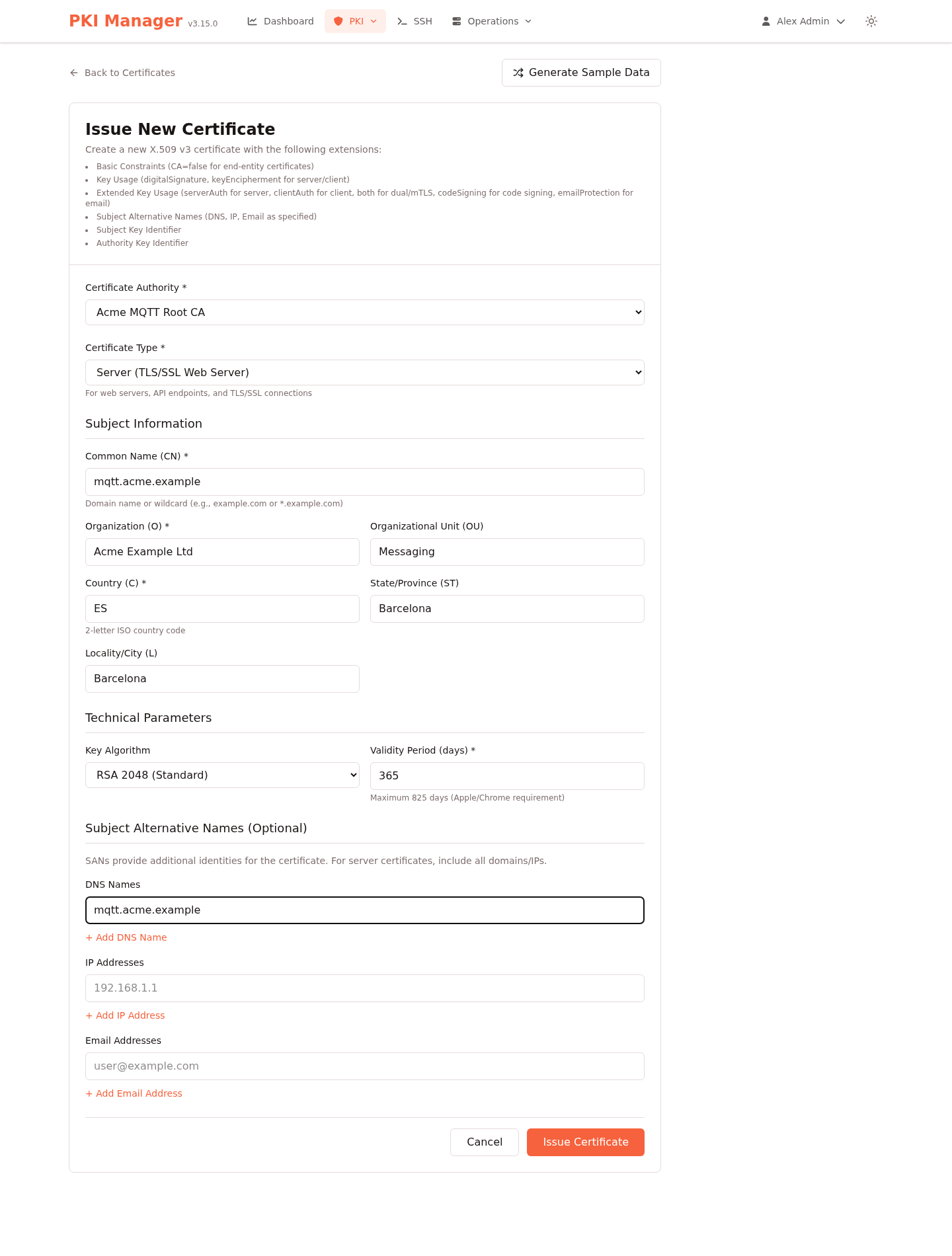
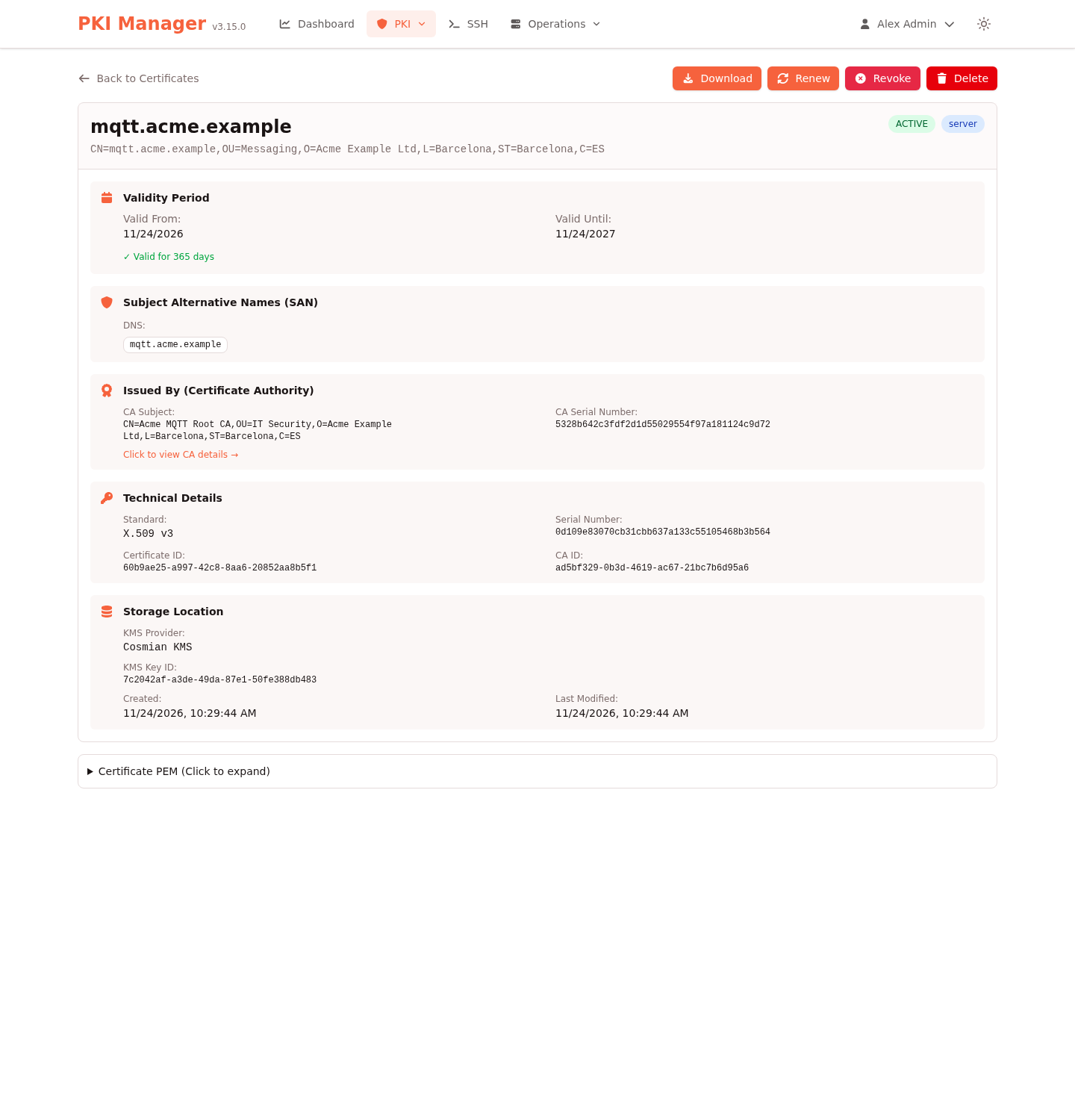
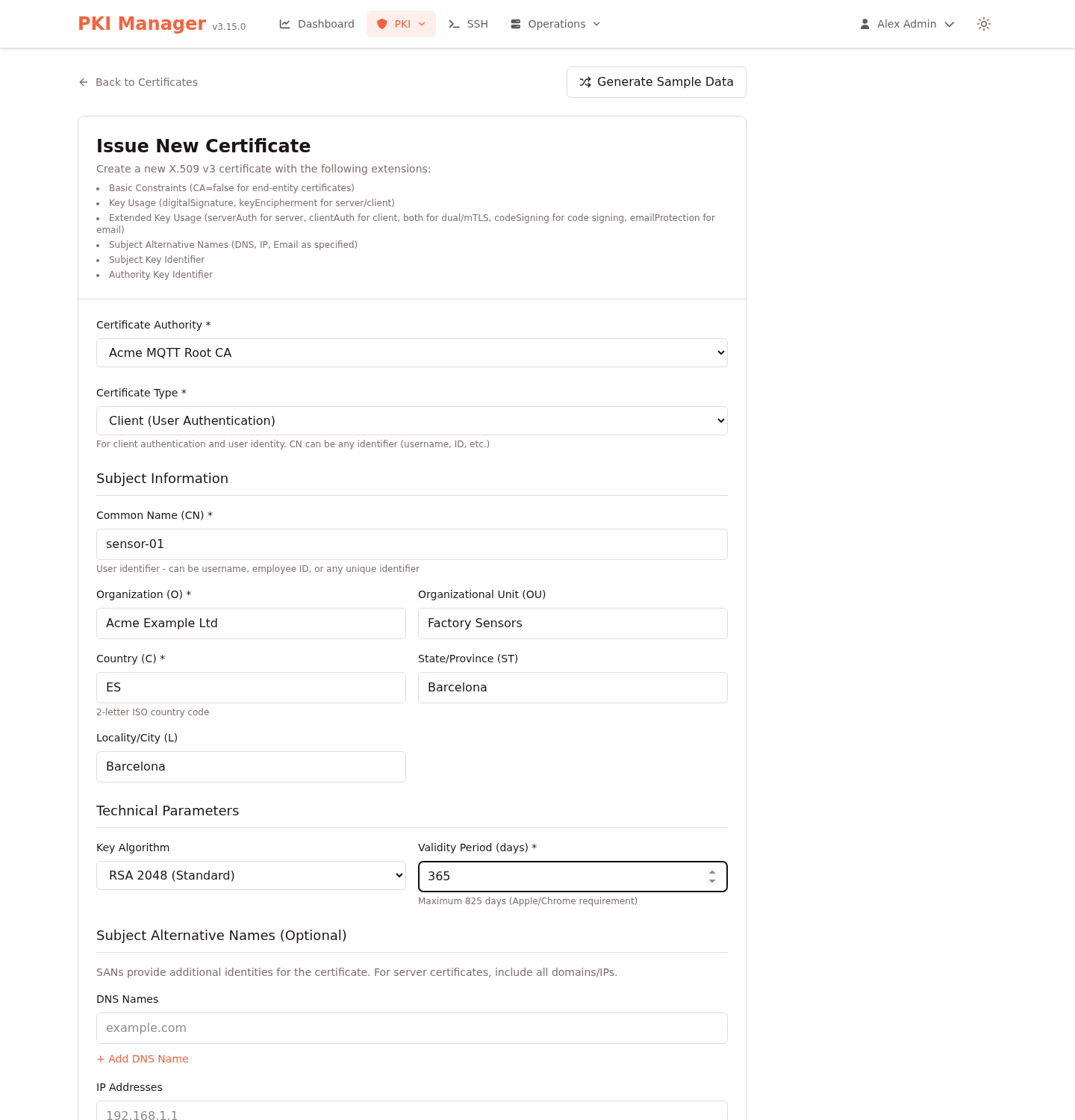
| Server certificate | type Server (TLS/SSL Web Server), CN mqtt.acme.example, OU Messaging, DNS Names mqtt.acme.example, 365 days |
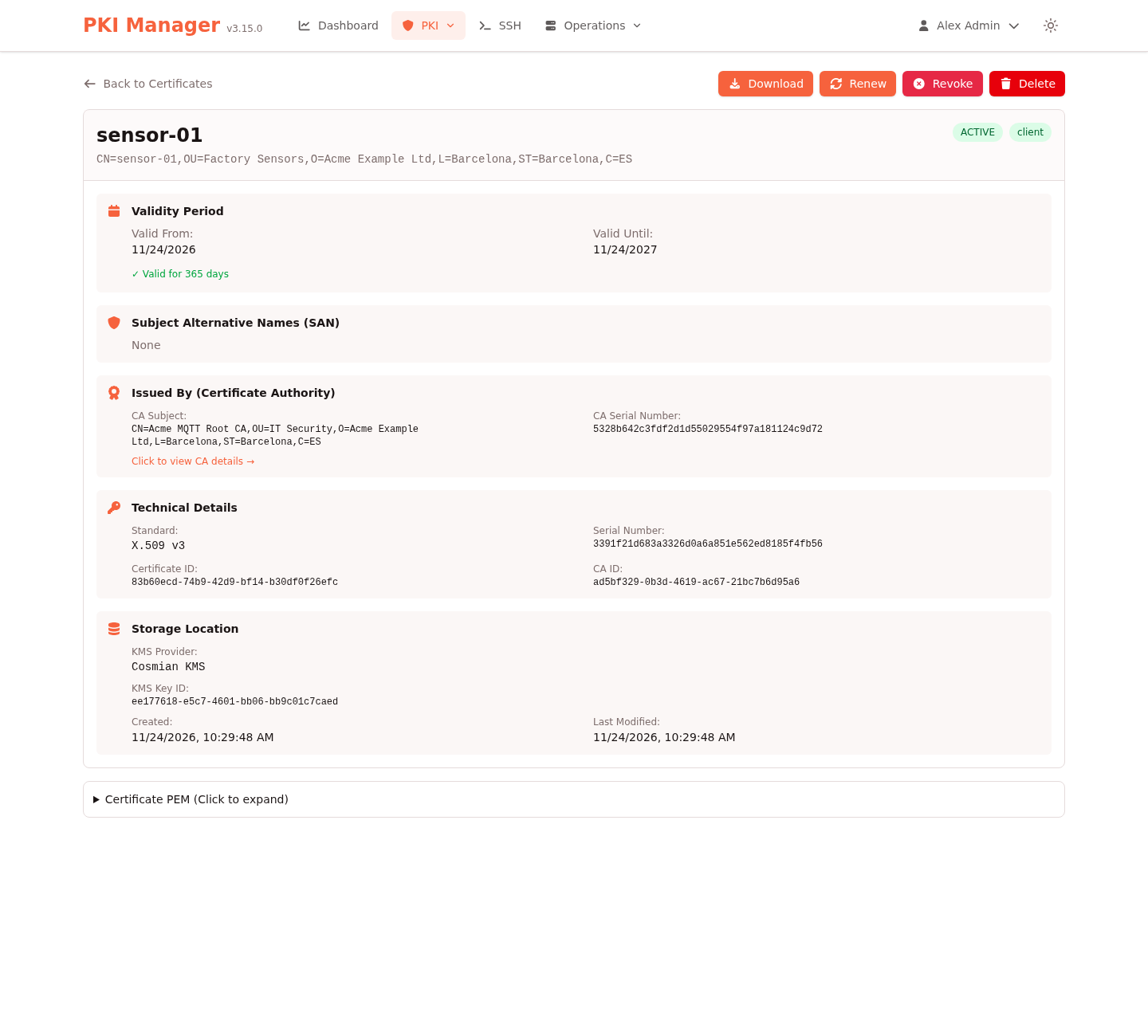
| Client certificate | type Client (User Authentication), CN sensor-01, OU Factory Sensors, 365 days |
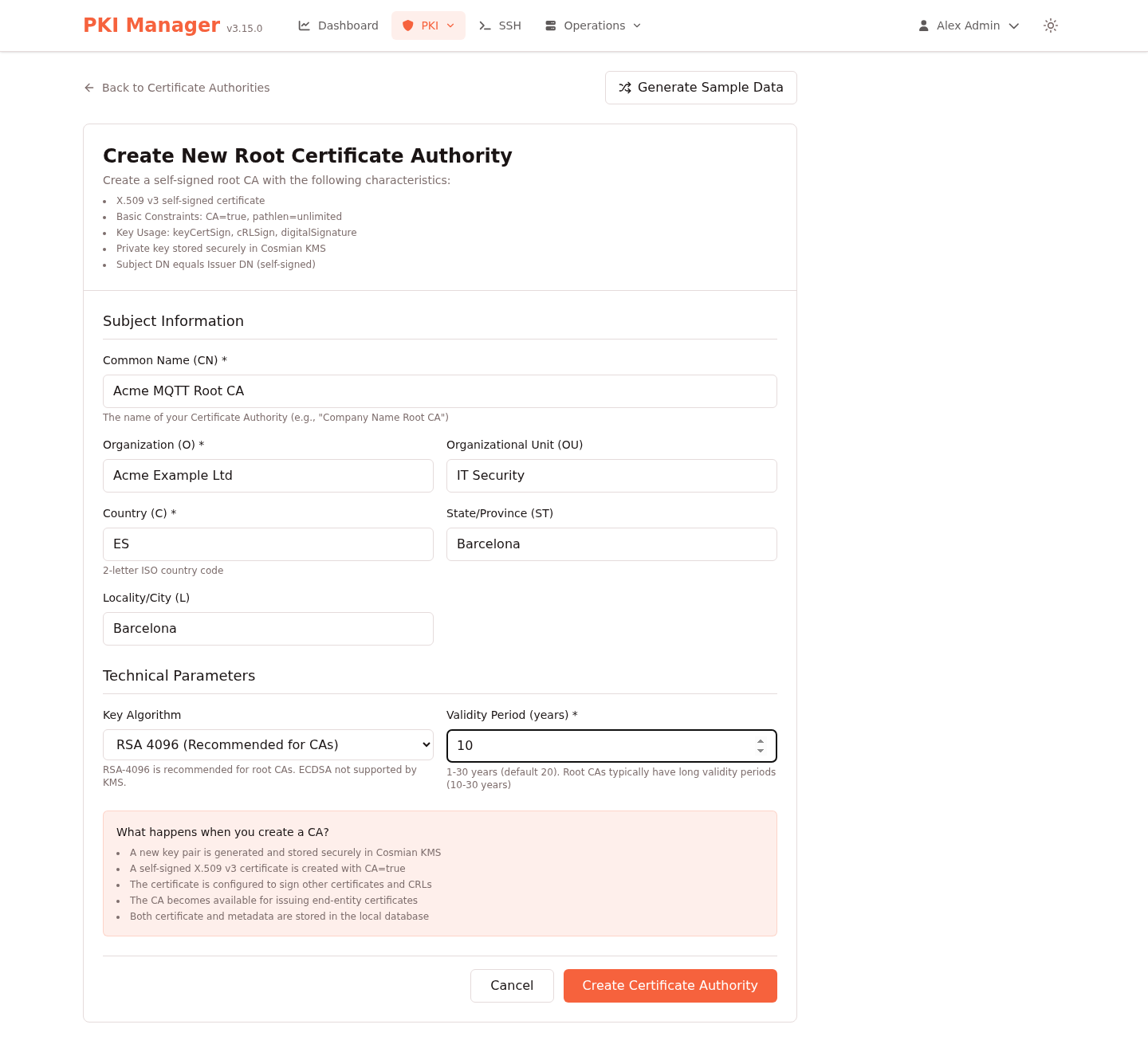
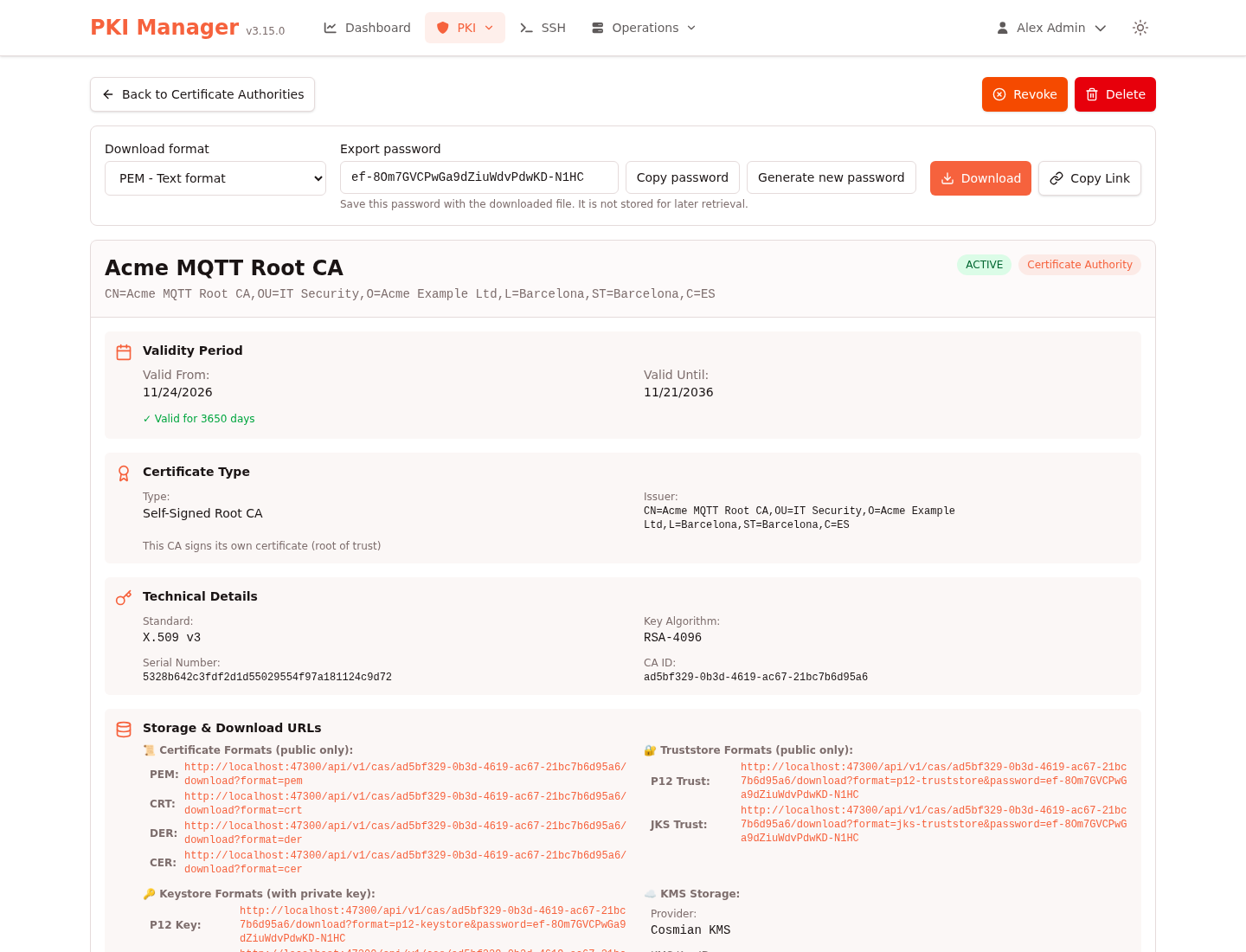
For the server certificate, put the name in DNS Names. Clients check the SAN, not the CN.
For the client certificate the CN sensor-01 is the MQTT user name later (step 3).
2. Download the files
Section titled “2. Download the files”Make a work folder with a certs folder in it. Download these files into certs:
| From | Format | Save as |
|---|---|---|
| CA page | PEM - Text format |
ca.pem |
| Server certificate | PEM with Private Key, encrypt box off |
ZIP, then server.pem and server.key |
| Client certificate | PEM with Private Key, encrypt box off |
ZIP, then client.pem and client.key |
The ZIP holds a .pem (certificate) and a .priv (key). Rename the .priv to .key.
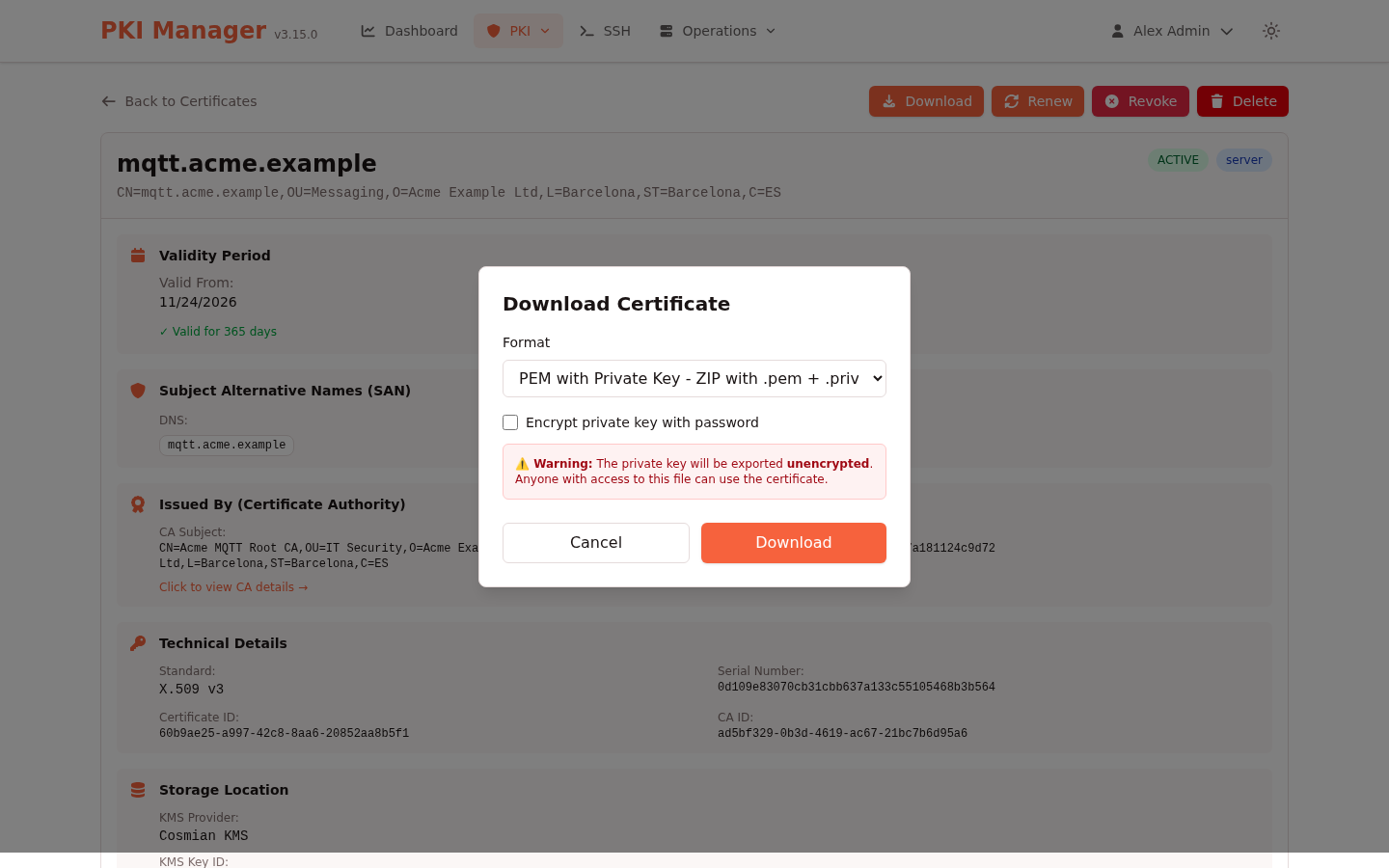
Mosquitto has no terminal in a container and cannot ask for a passphrase, so the key must be unencrypted. Protect the file with its permissions:
chmod 600 certs/*.keyopenssl verify -CAfile certs/ca.pem certs/server.pem certs/client.pemcerts/server.pem: OKcerts/client.pem: OKopenssl x509 -in certs/server.pem -noout -subject -ext subjectAltName,extendedKeyUsageopenssl x509 -in certs/client.pem -noout -subject -ext extendedKeyUsage,crlDistributionPointssubject=CN = mqtt.acme.example, OU = Messaging, C = ES, ST = Barcelona, L = Barcelona, O = Acme Example LtdX509v3 Extended Key Usage: TLS Web Server AuthenticationX509v3 Subject Alternative Name: DNS:mqtt.acme.examplesubject=CN = sensor-01, OU = Factory Sensors, C = ES, ST = Barcelona, L = Barcelona, O = Acme Example LtdX509v3 Extended Key Usage: TLS Web Client AuthenticationX509v3 CRL Distribution Points: Full Name: URI:http://localhost:47300/crl/ad5bf329-0b3d-4619-ac67-21bc7b6d95a6.crlThe server certificate is for servers only (serverAuth). The client certificate is for
clients only (clientAuth). The client certificate holds the CRL URL. You need it in step 7.
For tools that want one file (MQTTX, a browser), download the client certificate as PKCS#12
with a password. Check it:
openssl pkcs12 -in client.p12 -passin pass:Acme-Export-1 -nokeys -clcerts | openssl x509 -noout -subjectsubject=CN = sensor-01, OU = Factory Sensors, C = ES, ST = Barcelona, L = Barcelona, O = Acme Example LtdIn post 3 you removed the key passphrase by hand. Here you choose it in the download dialog.
3. The broker configuration
Section titled “3. The broker configuration”The file is mqtt/mosquitto.conf:
listener 8883cafile   /mosquitto/certs/ca.pemcertfile /mosquitto/certs/server.pemkeyfile  /mosquitto/certs/server.keycrlfile  /mosquitto/certs/crl.pem
require_certificate trueuse_identity_as_username true
connection_messages truelog_dest stdout| Option | Effect |
|---|---|
cafile |
The CA that signed the client certificates. |
certfile, keyfile |
The server certificate and its key. |
crlfile |
The CRL. Mosquitto reads it from a file. |
require_certificate true |
A client without a certificate is refused. |
use_identity_as_username true |
The certificate CN is the MQTT user name. |
Post 2 also opens WSS on 8884. This guide uses one listener. WSS needs a second listener
block with protocol websockets and the same files.
4. The CRL file must exist before the broker starts
Section titled “4. The CRL file must exist before the broker starts”crlfile needs a file. Ask PKI Manager for it with the URL from the certificate:
curl -s -w '\n[%{http_code}]\n' http://localhost:47300/crl/ad5bf329-0b3d-4619-ac67-21bc7b6d95a6.crl{"error":"No CRL available for CA ad5bf329-0b3d-4619-ac67-21bc7b6d95a6"}[404]A new CA has no CRL until the first revocation (TASK-264). Without the file, Mosquitto does not start:
Error: Unable to load certificate revocation file "/mosquitto/certs/crl.pem". Check crlfile.Error: No such file or directoryYou have two ways out:
- Remove the
crlfileline, and add it after the first revocation. - Make a spare certificate and revoke it, so the CA has a CRL. This guide does that: it issued a
client certificate
sensor-spareand revoked it (reasonSuperseded).
Then fetch the CRL and check it:
curl -sS -o certs/crl.pem http://localhost:47300/crl/ad5bf329-0b3d-4619-ac67-21bc7b6d95a6.crlchmod 600 certs/crl.pemopenssl crl -in certs/crl.pem -noout -nextupdate -issuerThe CRL is valid for 7 days (Next Update). See step 8.
5. Start the broker and test the handshake
Section titled “5. Start the broker and test the handshake”A Docker network gives the broker the name mqtt.acme.example, so the names in the
certificate match. The broker runs as your user, so it can read the 600 files.
docker network create acme-mqttdocker run -d --name acme-mosquitto --user "$(id -u):$(id -g)" \ --network acme-mqtt --network-alias mqtt.acme.example -p 127.0.0.1:47391:8883 \ -v "$PWD/mosquitto.conf:/mosquitto/config/mosquitto.conf:ro" \ -v "$PWD/certs:/mosquitto/certs:ro" eclipse-mosquitto:2.0.22docker logs acme-mosquittomosquitto version 2.0.22 startingConfig loaded from /mosquitto/config/mosquitto.conf.Opening ipv4 listen socket on port 8883.Opening ipv6 listen socket on port 8883.mosquitto version 2.0.22 runningTest the handshake with openssl s_client from the host (the port is published on 127.0.0.1:47391):
openssl s_client -connect 127.0.0.1:47391 -servername mqtt.acme.example \ -CAfile certs/ca.pem -cert certs/client.pem -key certs/client.key \ -verify_hostname mqtt.acme.example </dev/null 2>&1 \ | grep -E "^depth|Verification|Verified peername|Verify return|New,"depth=1 CN = Acme MQTT Root CA, OU = IT Security, C = ES, ST = Barcelona, L = Barcelona, O = Acme Example Ltddepth=0 CN = mqtt.acme.example, OU = Messaging, C = ES, ST = Barcelona, L = Barcelona, O = Acme Example LtdVerification: OKVerified peername: mqtt.acme.exampleNew, TLSv1.3, Cipher is TLS_AES_256_GCM_SHA384Verify return code: 0 (ok)The client verified the server name against the SAN.
Note: with TLS 1.3 the server checks the client certificate after the handshake.
s_clientwithout a client certificate also ends withVerify return code: 0. Use an MQTT client to test the refusal (below).
6. Publish and subscribe with the client certificate
Section titled “6. Publish and subscribe with the client certificate”The MQTT clients run in containers on the same network. Set a shortcut first:
MQ="docker run --rm --network acme-mqtt --user $(id -u):$(id -g) -v $PWD/certs:/certs:ro eclipse-mosquitto:2.0.22"TLS="-h mqtt.acme.example -p 8883 --cafile /certs/ca.pem --cert /certs/client.pem --key /certs/client.key"Subscribe in the background, then publish:
$MQ mosquitto_sub $TLS -t 'acme/sensors/#' -C 1 -v &$MQ mosquitto_pub $TLS -t acme/sensors/line1/temp -m '21.5'acme/sensors/line1/temp 21.5The broker log shows the user name. It is the CN of the certificate:
New client connected from 10.222.14.3:58398 as auto-7073B8C7-... (p2, c1, k60, u'sensor-01').Without a client certificate the broker refuses:
$MQ mosquitto_pub -h mqtt.acme.example -p 8883 --cafile /certs/ca.pem -t acme/sensors/line1/temp -m '21.5'Error: The connection was lost.OpenSSL Error[0]: error:0A0000C7:SSL routines::peer did not return a certificateClient <unknown> disconnected: Protocol error.The first lines are the client output, the last two are the broker log.
7. Revoke the certificate and make the broker refuse it
Section titled “7. Revoke the certificate and make the broker refuse it”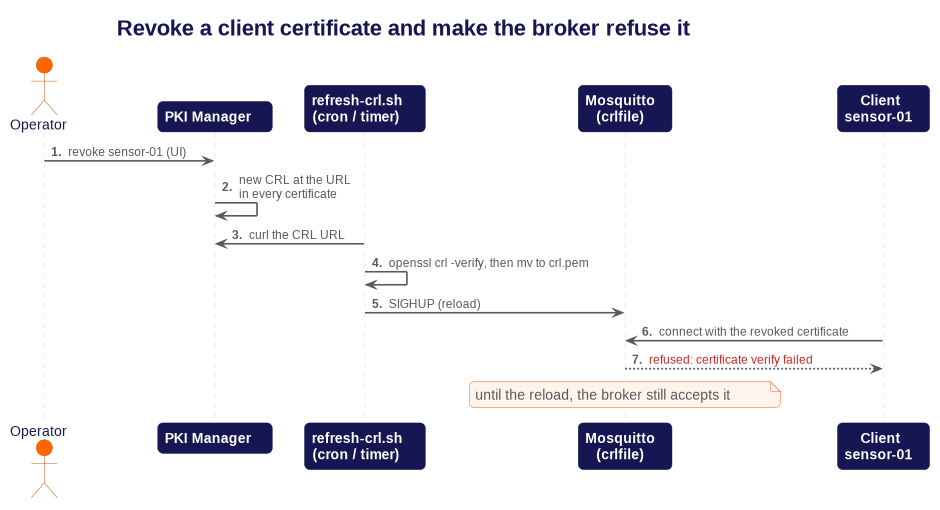
A sensor is stolen. Open its certificate page, select Revoke, choose Key Compromise,
add a detail, and select Revoke Certificate.
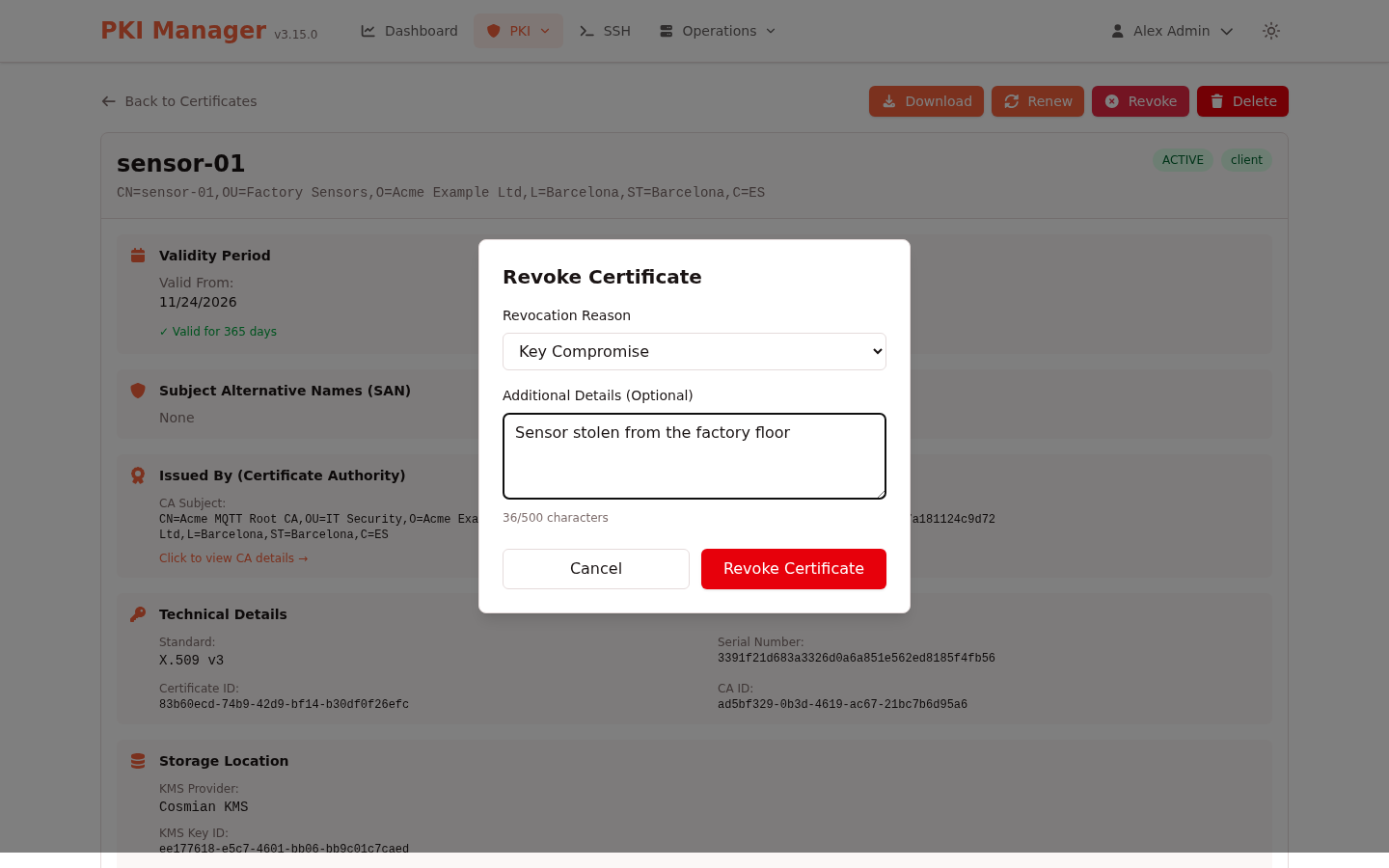
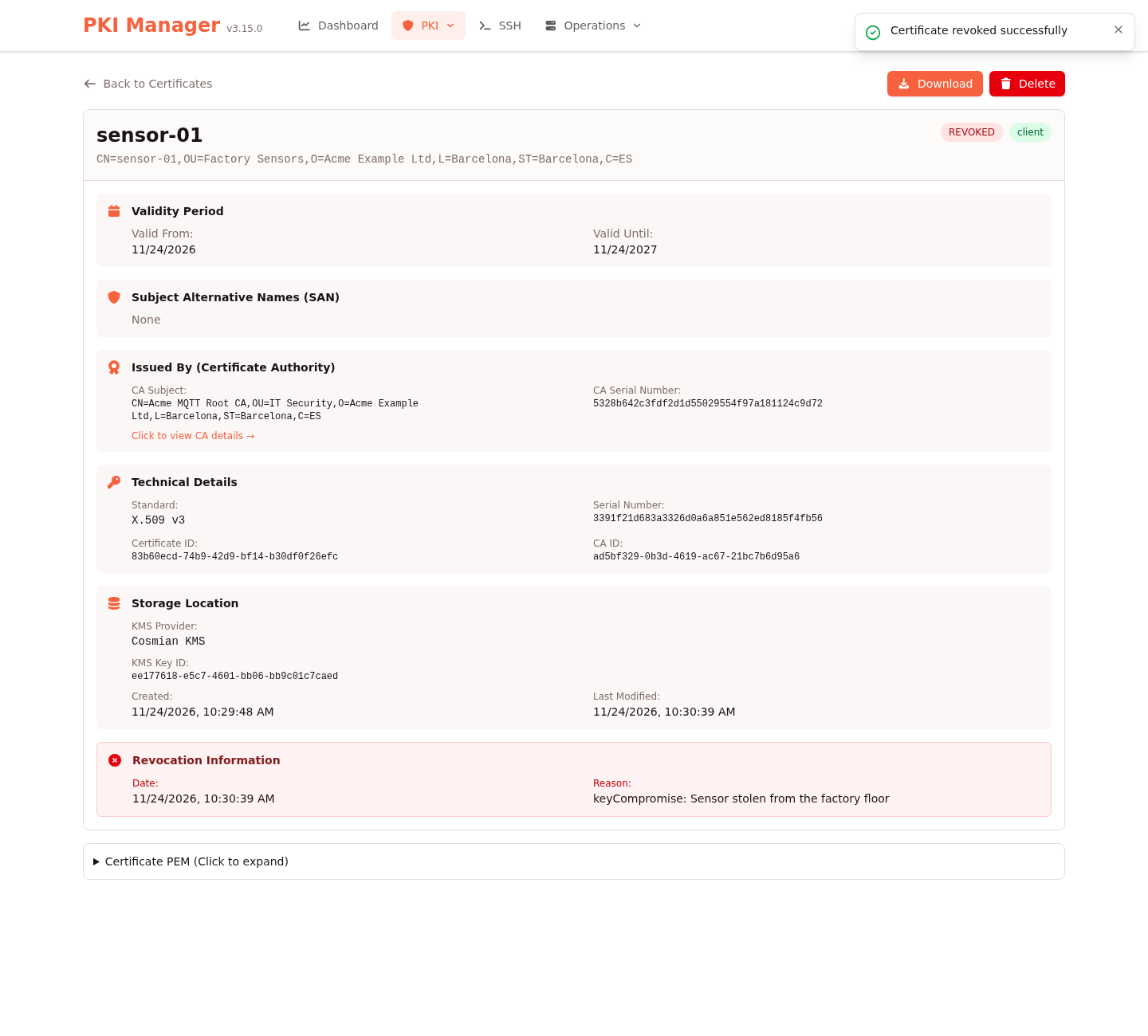
The broker still accepts the certificate. It reads its own copy of the CRL, which is old:
$MQ mosquitto_pub $TLS -t acme/sensors/line1/temp -m '21.5'; echo "rc=$?"rc=0Fetch the new CRL from the URL inside the certificate:
curl -sS -o certs/crl.pem http://localhost:47300/crl/ad5bf329-0b3d-4619-ac67-21bc7b6d95a6.crlopenssl crl -in certs/crl.pem -noout -text | grep -E "CRL Number|Serial Number|Reason" -A1 X509v3 CRL Number: 2 Serial Number: 3391F21D683A3326D0A6A851E562ED8185F4FB56 Revocation Date: Nov 24 10:30:39 2026 GMT X509v3 CRL Reason Code: Key Compromise Serial Number: 2925792E20E72BF41564363CF16EF811E4245D1E Revocation Date: Nov 24 10:30:11 2026 GMT X509v3 CRL Reason Code: SupersededThe serial 3391…FB56 is sensor-01 (openssl x509 -in certs/client.pem -noout -serial).
Tell the broker to reload. In this test SIGHUP was enough, no restart:
docker kill -s HUP acme-mosquitto$MQ mosquitto_pub $TLS -t acme/sensors/line1/temp -m '21.5'; echo "rc=$?"Error: The connection was lost.rc=7The broker log (timestamps trimmed):
Reloading config.New connection from 10.222.14.3:32938 on port 8883.OpenSSL Error[0]: error:0A000086:SSL routines::certificate verify failedClient <unknown> disconnected: Protocol error.The log does not say “revoked”. It says certificate verify failed. Check the reason
yourself with openssl verify -crl_check (see Build a private CA).
A restart (docker restart acme-mosquitto) gave the same refusal.
Other sensors are not affected. A second sensor, sensor-02, was signed with the external
API (below) and still connects:
New client connected from 10.222.14.3:32924 as B89621AF-... (p2, c1, k60, u'sensor-02').A CSR made on the device
Section titled “A CSR made on the device”Post 1 uses import-req and sign-req for a key made on another machine. PKI Manager has
the external issuer API for this. See Automate issuance for the full
flow. In short:
-
An admin opens Operations > Integrations, selects Add Integration, and sets Type
Generic, a Name, and the Bound CAAcme MQTT Root CA. The token appears once.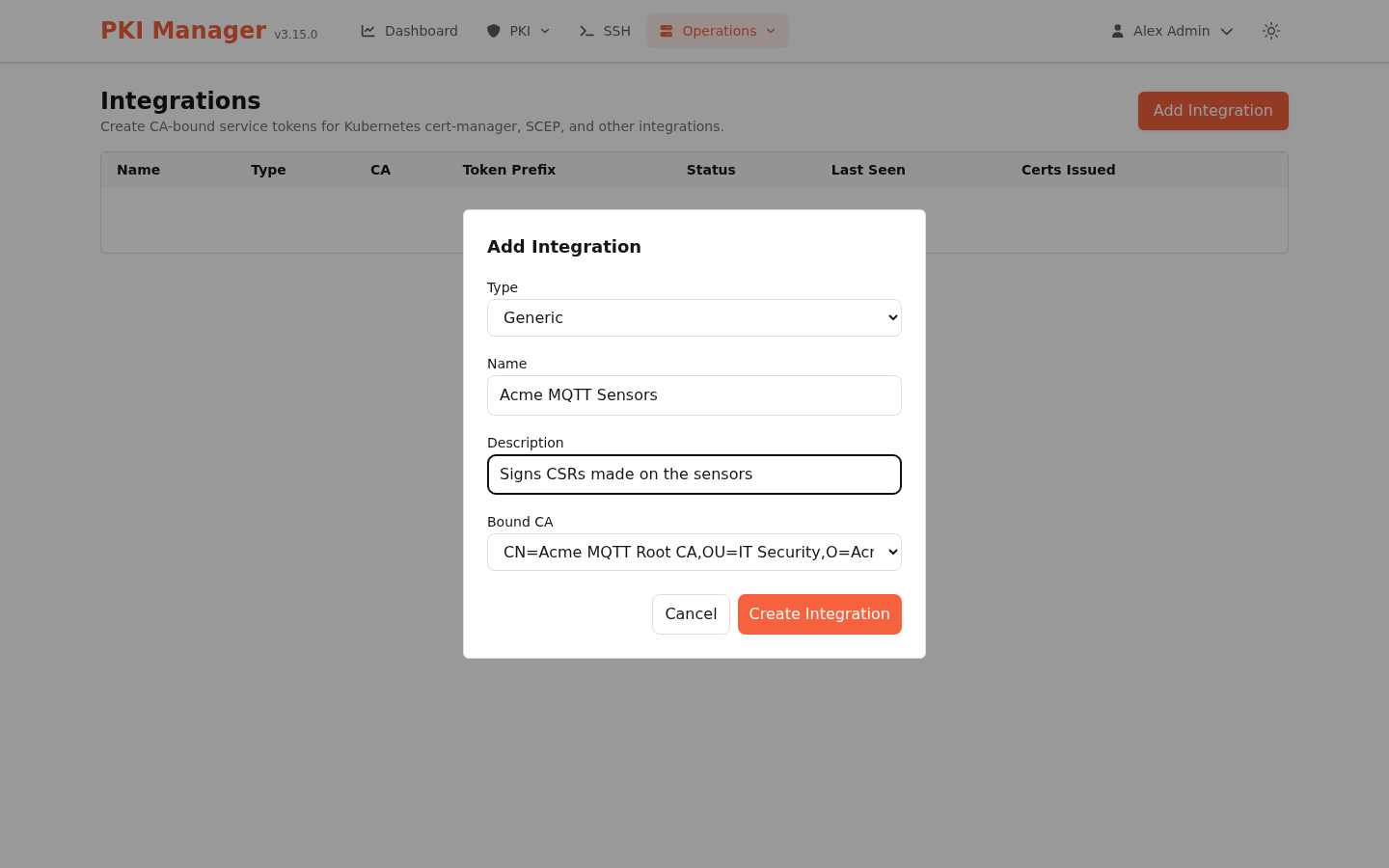
-
On the sensor, make the key and the CSR. The key never leaves the sensor:
Terminal window openssl req -new -newkey rsa:2048 -nodes -keyout sensor-02.key -out sensor-02.csr \-subj "/CN=sensor-02/O=Acme Example Ltd/C=ES" \-addext "extendedKeyUsage=clientAuth" -addext "keyUsage=digitalSignature" -
Send it.
Bishttp://localhost:47300/api/v1/external:Terminal window jq -n --rawfile csr sensor-02.csr \'{csrPem:$csr, requestUid:"sensor-02-1", durationDays:365, certificateType:"client"}' > sign.jsoncurl -s -X POST $B/sign -H "Authorization: Bearer $TOKEN" \-H 'Content-Type: application/json' -d @sign.json | tee sign.out | jq 'del(.certificatePem, .chainPem)'jq -r .certificatePem sign.out > sensor-02.crt{"idempotent": false,"id": "35a5f44d-1cce-43e4-b0b8-74cb1c2cc1dd","serialNumber": "75cdb48b111ab69107cf91c3cc44fdbb36f720d8","notBefore": "2026-11-24T10:31:19.000Z","notAfter": "2027-11-24T10:31:19.000Z"}
The certificate has the same CRL URL and works with the same broker. Its CN sensor-02 is
the MQTT user name.
8. Keep the CRL fresh
Section titled “8. Keep the CRL fresh”The broker reads a local file. PKI Manager serves the CRL over HTTP. Something must copy it. The script mqtt/refresh-crl.sh does four things:
- It fetches the URL with
curl -f(a404is an error and the old file stays). - It checks that the CA signed the CRL (
openssl crl -CAfile). - It replaces
crl.pemin one step (mv). - It sends
SIGHUPto the broker.
One manual run, against the stack of this guide:
CRL_URL=http://localhost:47300/crl/ad5bf329-0b3d-4619-ac67-21bc7b6d95a6.crl CERTS=$PWD/certs ./refresh-crl.shverify OK2026-11-24T10:31:06Z CRL updated, nextUpdate=Dec 1 10:30:39 2026 GMTA wrong CRL URL (a CA id that does not exist) stops the script and keeps the old file:
curl: (22) The requested URL returned error: 404Run it every hour with cron (the CRL is valid for 7 days):
0 * * * * CRL_URL=http://pki.acme.example/crl/<CA id>.crl /opt/mqtt/refresh-crl.sh >>/var/log/refresh-crl.log 2>&1Or with a systemd timer:
[Service]Type=oneshotEnvironment=CRL_URL=http://pki.acme.example/crl/<CA id>.crlExecStart=/opt/mqtt/refresh-crl.sh
# /etc/systemd/system/refresh-crl.timer[Timer]OnCalendar=hourlyPersistent=true[Install]WantedBy=timers.target
Not tested: only the script command was run, once, by hand. The cron line and the systemd units were not run, and no timer ran for days. Set
CERTSandBROKERto your paths. In a real install the CRL URL host must be a name the broker host can reach: setCRL_DISTRIBUTION_URLin the PKI Manager configuration. The demo useslocalhost.
What changed, and what did not
Section titled “What changed, and what did not”| Changed | Not changed |
|---|---|
| No CA key file and no CA passphrase to look after. | The broker reads a local CRL file. You still copy and reload it. |
| One form for the certificate, the SAN list and the key. | No OCSP. A revoked client is refused only after the broker has the new CRL. |
| The CRL is made and served for you. | crlfile must exist at start, and a new CA has no CRL (TASK-264). |
| A CSR flow with a scoped token, no shell access to the CA. | Renew makes a new key by default and leaves the old certificate active unless you ask to revoke it. |
| Inventory, expiry view and audit rows. | Audit rows show no user name. The UI has no audit page. |
Source of the screenshots: docs/site/demo/shots/05-mqtt.spec.ts (run with PHASE=issue,
bootstrap, revoke and csr).