
Chunking: The Single Biggest Quality Lever
Splitters, chunk size and overlap, semantic chunking and an A/B harness: the lever that decides everything downstream.
You are in Phase A, box 2 of the mental model: Load ──► Split ──► Embed ──► Store. This is the box that decides whether any of the boxes to its right can ever work. Everything in Parts 4 through 16 — better embeddings, hybrid search, reranking, compression, agentic retrieval — operates on units that this stage manufactures. If the units are wrong, all of that machinery is polishing the wrong object.
That is invariant 1 restated in its sharpest form: quality is inherited forward and never recovered downstream. The instructor calls it the "brutal truth" 00:33:37 — the best embedding model, the fastest vector database and the smartest LLM together still produce garbage if the chunking is wrong. Money does not fix a chunking bug.
"Chunking is not pre-processing. It's architecture." 00:36:40
He says that line twice in a row on purpose. The chunk is the atom of your system: it is what gets embedded, what gets indexed, what gets retrieved, what lands in the context window, and what the model is asked to reason over. Choosing its shape is an architectural decision with the same permanence as choosing a schema — and, as Part 4 makes concrete, changing it later means re-embedding and re-indexing the whole corpus.
This part is deliberately front-loaded with theory, because the theory is what lets you read the experiment at the end. That experiment is the most valuable single result in the source course, because it refutes the course's own recommendation: on a heading-structured document, semantic chunking — the "premium" strategy — loses 1 to 4 against plain recursive chunking.
Where splitting sits: the four-stage indexing pipeline
The indexing half of RAG is four stages and nothing else 00:28:27:
- Load — a document loader extracts text and normalises formats (Part 2).
- Split — cut the text into chunks of roughly 500 to 1,000 characters, preserving
sentence boundaries, adding overlap so meaning survives the seams.
- Embed — convert each chunk into a vector (Part 4).
- Store — write vectors, original text and metadata into a vector database (Part 4).
Only after stage 4 is the system ready for queries. Stage 2 is the one that deserves deep study, because it is the only stage where you make an irreversible judgement about meaning with no feedback signal. Stages 1, 3 and 4 fail loudly — a missing parser raises, a wrong dimension raises, a bad connection raises. Stage 2 never raises. It produces perfectly valid chunks of perfectly useless text and hands them downstream.
The failure you cannot see: chunk 47 and chunk 48
Take the running example the course uses for the whole chapter: 50 pages of API documentation containing an OAuth2 authentication section 00:29:29.
Chunk it at a fixed 500 characters. There is no algorithm behind that boundary — you cut wherever the counter runs out. The OAuth2 section happens to straddle the cut, mid-sentence:
- Chunk 47 ends up holding something like *"to authenticate you need to first obtain
client ID…"*
- Chunk 48 picks up with "…developer portal, then make a POST request…"
Now a user asks "how do I authenticate with OAuth2?". The verdict 00:30:32:
"When we search, neither chunk has the complete answer."
Semantic chunking, on this same document, cuts at the meaning boundary instead and the entire OAuth2 section lands intact in a single chunk 12. Same documents, same embedding model, same vector database, same query — "night and day results" 00:31:34. The only variable that changed was how the text was cut.
Why it fails mechanically
This is the subtlest and most useful idea in the chapter, and it is worth slowing down for. When you embed chunk 47, the embedding model does its job perfectly. It reads client credentials, something about developers, an incomplete thought — and produces a faithful vector of exactly that. It has no way to know the text is a fragment. Its job is to embed 00:31:34.
"It's not wrong. It's accurately representing an incomplete fragment." 00:32:35
So the resulting vector is correct and useless. Your query vector encodes a complete concept; your stored vectors encode fragments. Those two things do not live in the same neighbourhood of embedding space, so similarity search returns whatever is closest to a half-thought, which is usually another half-thought. The slide illustrates it with shattered glass; the instructor reaches for a better analogy 00:32:35:
"Imagine tearing a photograph into pieces and asking someone to find the person smiling."
If the smile is split across two pieces, neither piece shows a smile. The feature you want to search on only exists in the whole. Tearing destroys it, and no amount of better searching recovers it.
The three downstream damages
Bad chunking degrades exactly three things 00:33:37, and it is worth naming them separately because they have different symptoms:
| Damage | Symptom you observe |
|---|---|
| Retrieval accuracy | The right chunk never appears in the top-k. |
| Context efficiency | You burn context window on partial chunks — you paid for tokens that answer nothing. |
| Answer quality | Even with the right chunks retrieved, the model cannot synthesise from fragments; it needs a complete section. |
Note that the third one survives a perfect retriever. That is the part people miss: fixing retrieval does not fix fragmentation, because the model still receives torn text.
The four variables you actually control
There are exactly four knobs 00:33:37: chunk size, overlap, split boundary, and content type. Every chunking strategy in existence is a particular setting of these four.
Variable 1 — Chunk size (a two-sided failure)
| Direction | What breaks | Second-order effect |
|---|---|---|
| Too small | Fragments lose context — a chunk that says only "client ID" means nothing | More chunks → more noise in retrieval (more candidates competing for top-k) |
| Too large | Specific facts get averaged away — 10 pages of text yields a very vague embedding | Wasted token budget in the context window |
The sweet spot is around 200 to 1,000 tokens 00:34:38. The repo's own sweep uses exactly that range:
# production-course-main-code/text_splitters.py
def chunk_size_comparison():
    sizes = [200, 500, 1000]

    print("=== Chunk Size Comparison ===")
    for size in sizes:
        splitter = RecursiveCharacterTextSplitter(
            chunk_size=size, chunk_overlap=size // 5
        )  # 20% overlap
        chunks = splitter.split_text(SAMPLE_TEXT)
        print(f" Size {size}: {len(chunks)} chunks")
Variable 2 — Overlap
Overlap duplicates a region of text between consecutive chunks so that an idea straddling the seam survives in at least one chunk whole 00:34:38. With zero overlap, a sentence spanning the boundary is orphaned from both sides and there is no preservation of context.
Rule of thumb: 10–20% of chunk size. The repo is internally inconsistent about which, and you should know that before you copy a number:
RecursiveCharacterTextSplitter(chunk_size=500, chunk_overlap=50)— 10% — used in
recursive_splitter(), document_splitter(), rag_pipeline.create_kb() and effectively everywhere in the production repo.
chunk_overlap = size // 5— 20% — used only inchunk_size_comparison().
Both appear within 20 lines of each other in the same file. Treat 10% as the shipped default and 20% as the "good overlap" the 80/20 rule is talking about.
The overlap demo is worth running once, because it makes the seam visible:
# production-course-main-code/text_splitters.py
def overlap_importance():
    text = "The quick brown fox jumps over the lazy dog. " * 10  # Repeated text

    # without overlap
    no_overlap = RecursiveCharacterTextSplitter(chunk_size=50, chunk_overlap=0)

    # with overlap
    with_overlap = RecursiveCharacterTextSplitter(chunk_size=50, chunk_overlap=20)

    chunks_no_overlap = no_overlap.split_text(text)
    chunks_with_overlap = with_overlap.split_text(text)

    print("Without overlap:")
    print(f"  Chunk 1 end: ...{chunks_no_overlap[0][-20:]}")
    print(f"  Chunk 2 start: {chunks_no_overlap[1][:20]}...")

    print("\nWith overlap:")
    print(f"  Chunk 1 end: ...{chunks_with_overlap[0][-20:]}")
    print(f"  Chunk 2 start: {chunks_with_overlap[1][:20]}...")
That sentence — "The quick brown fox jumps over the lazy dog" — is the same one the fixed-chunking slide uses to show mid-word butchery. The demo prints the last 20 characters of chunk 1 next to the first 20 of chunk 2, so you can see with your own eyes whether the seam was healed.
Variable 3 — Split boundary
Three methods, ranked from worst to best 00:35:40:
| Method | What decides the cut | Verdict |
|---|---|---|
| Fixed | Every N characters — "more of a random cut essentially" | Don't. |
| Recursive | Natural structural separators, tried in order of preference | Smarter. The default. |
| Semantic | Where meaning changes — not randomly, not merely at paragraphs | Premium, conditional. |
Variable 4 — Content type
Code, legal documents and Markdown are very different content types, and each needs different treatment 00:35:40. The canonical disaster is code: cut a for loop in half and neither half functions as context, because at query time the model has no way to reassemble the pieces 00:36:40. The rule for code is simple — keep functions together, keep classes together.
The four strategies
The course lays these out as a maturity ladder 00:37:42: Fixed (basics) → Recursive (intermediate) → Semantic (intermediate) → Late chunking (advanced).
"Once you understand chunking, you control RAG quality at the source." 00:37:42
Strategy 1 — Fixed-size chunking: never
Mechanism: split every N characters or tokens, with zero awareness of content. On the sentence "The quick brown fox jumps over the lazy dog" the slide walks through the carnage 00:37:42:
- Chunk 1 =
"The quick brown fox jump"— mid-word cut, incomplete. - Chunk 2 =
"ps over the la"— no context, total fragment loss. - Chunk 3 =
"zy dog"— too small to be useful.
The damage list: destroys meaning, loses context, poor retrieval, incomplete sentences, and text that is genuinely hard for a model to understand. The instructor's warning is the most emphatic sentence in the whole chapter:
"Don't use this in production. Okay? Ever. Ever. Ever. Forever." 00:39:43
The narrow legitimate uses: simple implementations where you need fast processing and predictable sizes, quick prototypes, or a hard external constraint that mandates fixed windows. Note that CharacterTextSplitter — the fixed-size splitter — is imported in the course's text_splitters.py and never called. That silence is the recommendation.
Strategy 2 — Recursive chunking: the reliable default
Recursive chunking is the default in LangChain and, per the instructor, many other frameworks. Its mechanism is a fallback ladder: try to split on the highest-preference natural separator; if a resulting piece is still bigger than chunk_size, recurse to the next separator down.
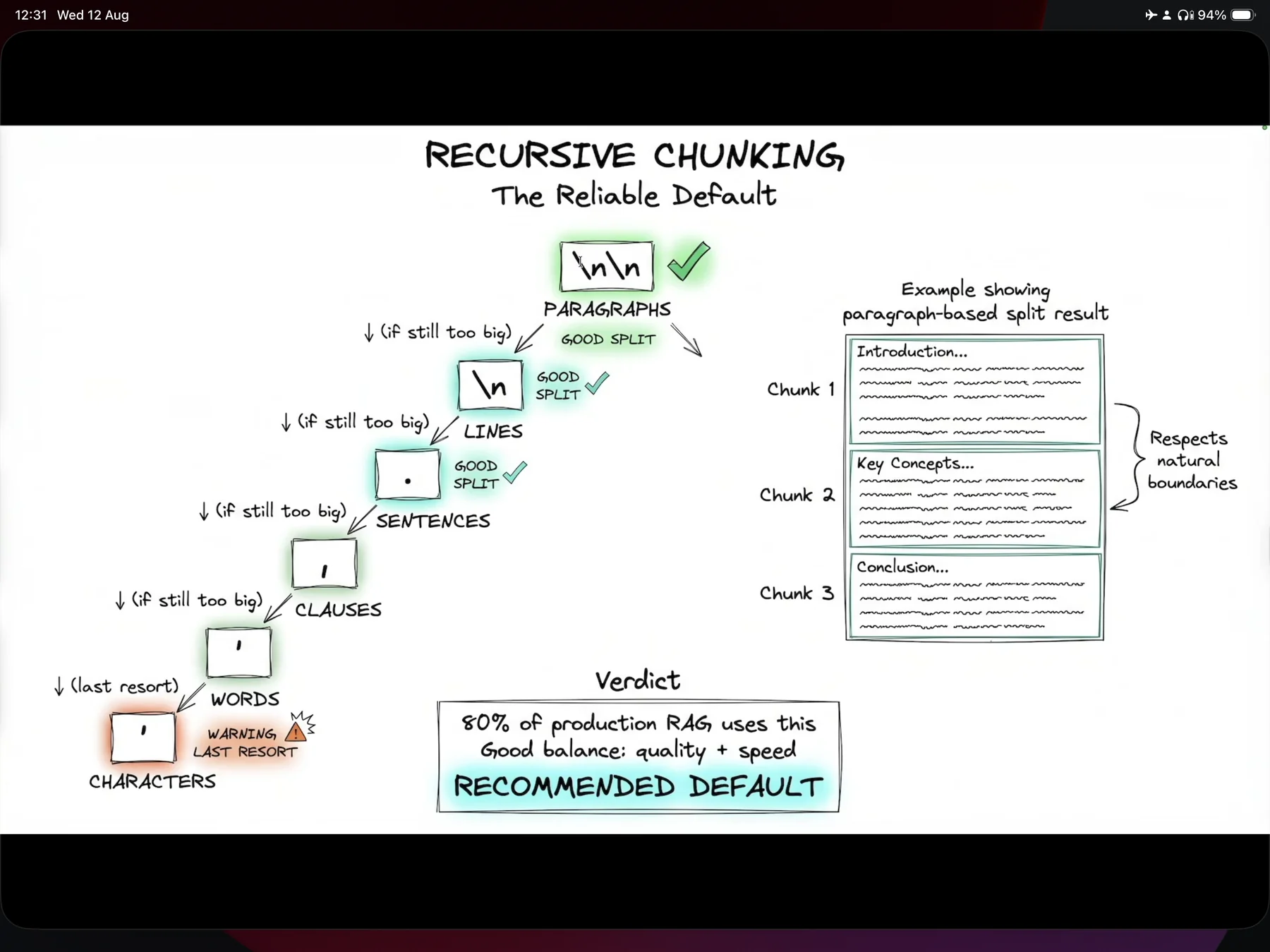
chunk_size, so a well-formed document with real paragraph breaks never descends past \n\n — which is exactly why recursive chunking wins the A/B test at the end of this part.The hierarchy, in order:
- Paragraphs —
\n\n✅ good split - Lines —
\n✅ good split - Sentences —
.✅ good split - Clauses —
, - Words —
- Characters — ⚠ LAST RESORT
The slide's worked example is a document whose three paragraphs — Introduction, Key Concepts, Conclusion — become chunks 1, 2 and 3 untouched: the ladder never gets past rung one, so the author's own boundaries survive intact.
There is a theory of meaning underneath this ordering, and it is why the ladder is not arbitrary: a paragraph is one thought; a sentence is one thought; below that you are cutting inside a thought. Each descent trades a little more meaning for a little more size compliance. Reaching the character rung is possible but undesirable 00:40:45.
The slide's own verdict box:
80% of production RAG uses this. Good balance: quality + speed. RECOMMENDED DEFAULT.
That 80% figure is uncited — it is the instructor's field impression, not a measurement. The direction is right (recursive is the industry default) but do not quote the number as fact.
Here is the real implementation, with the ladder passed explicitly:
# production-course-main-code/text_splitters.py
def recursive_splitter():
    splitter = RecursiveCharacterTextSplitter(
        chunk_size=500,
        chunk_overlap=50,
        separators=["\n\n", "\n", " ", ""],
    )
    chunks = splitter.split_text(SAMPLE_TEXT)

    print(f"Original length: {len(SAMPLE_TEXT)} chars")
    print(f"Number of chunks: {len(chunks)}")
    print(f"Chunk sizes: {[len(c) for c in chunks]}")
    print(f"\nFirst chunk preview:\n{chunks[0][:200]}...")
Three things to notice:
separators=["\n\n", "\n", " ", ""]is exactly the library default (character.py
falls back to that list when separators is None). It is passed here for clarity. Note also that it is shorter than the slide's hierarchy — the repo version omits the sentence (.) and clause (,) rungs, jumping straight from lines to words. If you want the slide's behaviour you must pass the full ladder yourself: separators=["\n\n", "\n", ". ", ", ", " ", ""].
- The trailing
""matters. It is the rung that splits between arbitrary characters, and it
is the only rung that can guarantee a piece fits. Drop it and an unbreakable run of text is emitted oversized, with only a logging.warning ("Created a chunk of size N, which is longer than the specified M") to tell you. If you are not capturing LangChain's logs, that warning is invisible.
split_text()returns a list of plain strings, notDocumentobjects. That matters a
great deal — see the split_documents trap below.
Strategy 3 — Semantic chunking: the premium option
Semantic chunking splits on meaning, not structure 00:41:45. The algorithm is three steps:
- Embed each sentence individually.
- Compare adjacent embeddings — similarity between sentence i and i+1.
- Split where similarity drops. The drop is the topic boundary.
Walk the similarity graph: while consecutive sentences stay on-topic, adjacent similarity stays high; when it falls, the meaning has ended and that point becomes the chunk boundary. Sentences group into runs: chunk 1 = S1, S2, S3; chunk 2 = S4, S5, S6 — clean, topic-based splits 00:42:46.
In code:
# Reconstructed from the narration at [02:41:01]; the on-screen file
# chunking/semantic_chunking.py is not present in either published repo.
# Requires a separate install: uv add langchain-experimental
from langchain_experimental.text_splitter import SemanticChunker
from langchain_openai import OpenAIEmbeddings

embeddings = OpenAIEmbeddings(model="text-embedding-3-small")

semantic_splitter = SemanticChunker(
    embeddings,
    breakpoint_threshold_type="percentile",
    breakpoint_threshold_amount=90,
)
semantic_chunks = semantic_splitter.split_text(API_DOCS)
The two parameters are the whole configuration surface:
| Parameter | Meaning |
|---|---|
breakpoint_threshold_type="percentile" | Decide breakpoints by percentile of the observed dissimilarity distribution (the alternatives are standard deviation, interquartile and gradient). |
breakpoint_threshold_amount=90 | Split at the 90th percentile — only the top ~10% biggest meaning-jumps become boundaries. Higher = fewer, larger chunks. |
Where it belongs: high-value RAG where quality matters — legal documents, technical manuals, knowledge bases 00:41:45. The trade-off is stated plainly: use it when accuracy matters more than speed, because there is more computation happening in the background.
Strategy 4 — Late chunking: the newest approach (forward reference)
Traditional (a.k.a. early) chunking is: document → split into chunks 1, 2, 3 → embed each chunk separately. Each chunk is embedded in isolation, so it loses cross-chunk context — chunk 5 has no idea what chunks 1 through 4 contain 00:43:47. The classic symptom, in the words of the course's own repo file: "He founded the company" — who is "he"? The referent was in the previous chunk.
Late chunking flips the order: embed the full document first (producing token-level embeddings), then split those embeddings into per-chunk vectors by pooling the token embeddings for each span. Because the whole document was embedded first, the chunks know about each other.
| Late chunking | |
|---|---|
| Result | +10–12% accuracy improvement on retrieval tasks |
| Pros | Full document context preserved; better boundary handling |
| Cons | More complex implementation; limited model support |
| Requires | A model that exposes token-level embeddings — the Jina family |
The verdict for today 00:45:48:
"This is the future of chunking… but for now semantic chunking is your practical best."
Full treatment of late vs early chunking is Part 14. Do not bet production on it yet.
The four strategies, side by side
| Strategy | Boundary rule | Index cost | Quality | Use it when |
|---|---|---|---|---|
| Fixed | Every N chars/tokens | Trivial | Destroys meaning | Never in production; prototypes and hard constraints only |
| Recursive | Ordered separator ladder | Trivial | Good | Default for ~everything |
| Semantic | Adjacent-sentence similarity drop | Embeds every sentence, then re-embeds every chunk | Best on flowing prose | Unstructured text, legal, technical manuals |
| Late | Split after embedding the document | Special model + more complexity | +10–12% | Watch this space (Part 14) |
Choosing a strategy
The decision tree
Walk it in order 00:45:48:
- Does it have to be quick (prototype), or is slow acceptable? → quick ⇒ recursive.
- Are these simple, structured documents? → yes ⇒ recursive.
- Is quality critical? → yes ⇒ semantic.
- Are there topic shifts inside the content? → yes ⇒ semantic; no ⇒ recursive.
Notice what the tree can output: only recursive or semantic. Fixed and late chunking are not valid outputs of the production decision tree. Fixed is excluded for being bad; late for not being ready.
The 80/20 rule and the measurement gate
"Recursive chunking with good overlap gets you 80% of the way." 00:46:48
"Semantic chunking gets you the last 20%. But the problem is that it costs more." 00:46:48
And the discipline that goes with it:
"Start with recursive, measure your retrieval quality." 00:46:48
That sentence is the important one. The upgrade from recursive to semantic is gated on a metric, not on ambition. You are not allowed to spend on semantic chunking until you have a retrieval-quality number that says recursive is insufficient. (How to get that number is Part 7, observability, and Part 15, evals. This is one of the main reasons this guide moves observability earlier than the source course does.)
The content-type cheat sheet
The instructor explicitly says to screenshot this one 00:46:48:
| Content type | Strategy | Chunk size |
|---|---|---|
| General documents | Recursive — "just use recursive" | 500–1,000 |
| Technical / legal content | Semantic — "it's worth it" | auto |
| Code | Code splitter | per function |
| Markdown | MD splitter | by headers |
"Auto" for the semantic row means you do not set a size at all — the breakpoint threshold decides, and chunk sizes come out variable by construction. That is a real operational difference: with semantic chunking you cannot promise an upper bound on chunk length, which is why smart_chunker validates sizes afterwards.
The specialised splitters
LangChain ships the content-type-specific splitters, so you never hand-roll a Python-aware or Markdown-aware splitter 00:47:49.
Code: never use a generic splitter
# production-course-main-code/text_splitters.py
def code_splitter():
    python_splitter = RecursiveCharacterTextSplitter.from_language(
        language=Language.PYTHON, chunk_size=500, chunk_overlap=50
    )
    chunks = python_splitter.split_text(SAMPLE_CODE)
    print(f"Code Splitter produced {len(chunks)} chunks.")
    for i, chunk in enumerate(chunks):
        print(f"\nChunk {i} ({len(chunk)} chars):")
        print(chunk[:150] + "..." if len(chunk) > 150 else chunk)
from_language(language=Language.PYTHON, ...) swaps the generic separator ladder for a syntax-aware one. For Python the library returns, in order: ["\nclass ", "\ndef ", "\n\tdef ", "\n\n", "\n", " ", ""] — class definitions first, then top-level functions, then indented methods, and only then the ordinary prose rungs. That ordering is what keeps functions and classes whole. The course's SAMPLE_CODE fixture is two functions — quicksort() and binary_search() — chosen precisely so you can watch the boundary land between them rather than inside one.
Markdown: headers become metadata
# production-course-main-code/text_splitters.py
def markdown_splitter():
    headers_to_consider = [
        ("#", "h1"),
        ("##", "h2"),
        ("###", "h3"),
    ]
    splitter = MarkdownHeaderTextSplitter(headers_to_split_on=headers_to_consider)
    chunks = splitter.split_text(SAMPLE_TEXT)

    print(f"Markdown Splitter produced {len(chunks)} chunks.")
    for i, chunk in enumerate(chunks):
        print(f"--- Chunk {i} ---")
        print(f" Metadata: {chunk.metadata}\n")
        print(f" Content: {chunk.page_content[:200]}...\n")
The (marker, metadata_key) tuples are the point. Each chunk comes back carrying its header path in metadata — for the repo's SAMPLE_TEXT fixture that is {"h1": "Introduction to Machine Learning", "h2": "Types of Machine Learning", "h3": "Supervised Learning"}. That is what makes header-level citations possible downstream ("this came from §Types of Machine Learning → Supervised Learning"), and it is a filterable field at query time. As Part 4 will make concrete, filterability is decided at index time. If you do not capture the header path now, you cannot filter or cite on it later without re-indexing.
split_documents vs split_text — the metadata-destroying trap
This is the most commonly made mistake in this whole area, and it is invisible until your citations are empty.
| Method | Input | Output | Metadata |
|---|---|---|---|
split_text(str) | one string | list[str] | destroyed — there was never any |
split_documents(docs) | a list of Document | list[Document] | propagated onto every chunk |
split_documents takes a list, even for one document. Here is the real end-to-end wiring of stages 1 + 2, straight from the repo:
# production-course-main-code/text_splitters.py
def document_splitter():
    from langchain_community.document_loaders import PyPDFLoader
    from langchain_core.documents import Document

    loader = PyPDFLoader("./docs/langchain_demo.pdf")
    docs = loader.load()

    print(f"Loaded {len(docs)} documents from PDF.")

    splitter = RecursiveCharacterTextSplitter(chunk_size=500, chunk_overlap=50)

    # split the docs
    split_docs = splitter.split_documents(docs)

    print(f"Split into {len(split_docs)} chunks")
    print(f"\nFirst chunk metadata: {split_docs[0].metadata}")
    print(f"First chunk content: {split_docs[0].page_content[:200]}...")
    print(f"\nLast chunk metadata: {split_docs[-1].metadata}")
Printing the first and last chunk's metadata is the habit worth stealing: it proves the source and page fields survived the split for the whole range, not just the head. (The function re-imports PyPDFLoader and Document inside its own body while Document is already imported at module level — harmless, but do not reproduce it as style.)
And when the text does not arrive from a loader, wrap it in a Document yourself so you can attach the metadata you will want to cite — that is exactly what the pipeline file does:
# production-course-main-code/rag_pipeline.py
def create_kb():
    """Create a vector store from knowledge base."""

    # split the knowledge base into chunks
    splitter = RecursiveCharacterTextSplitter(chunk_size=500, chunk_overlap=50)
    doc = Document(
        page_content=KNOWLEDGE_BASE, metadata={"source": "langchain_knowledge_base.md"}
    )

    chunks = splitter.split_documents([doc])

    # create a vector store from the chunks
    vector_store = Chroma.from_documents(
        documents=chunks,
        embedding=embeddings_model,
        persist_directory=tempfile.mkdtemp(),
    )
    return vector_store
That is the full four-stage pipeline in fourteen lines: a Document (stage 1), a recursive split at 500/50 (stage 2), embeddings_model = OpenAIEmbeddings(model="text-embedding-3-small") declared once at module scope (stage 3), and Chroma.from_documents (stage 4). Note split_documents([doc]) — the list brackets around a single document.
The measured A/B: semantic chunking loses 1–4
Everything above is theory, and the theory says semantic chunking is the premium option. The course then does the honest thing and measures it 02:37:58. The result contradicts the theory, and the instructor keeps it in the video rather than re-rolling the demo — "I'm glad this happened to show you the nuances of these different strategies" 02:48:09. That decision is why this is the most useful twenty minutes in the source material.
"Does semantic chunking actually work better?" 02:37:58
The experiment design
The harness is the reusable part, more than the result:
| Element | Value |
|---|---|
| Corpus | One document, four deliberately distinct topics: webhooks, error handling, rate limiting, OAuth 2.0 authentication |
| Document format | Essentially a Markdown file with ## section headings |
| Embedding model | text-embedding-3-small — identical for both arms |
| Arm A | RecursiveCharacterTextSplitter(chunk_size=400, chunk_overlap=50, separators=["\n\n", "\n", ",", ". "]) |
| Arm B | SemanticChunker(embeddings, breakpoint_threshold_type="percentile", breakpoint_threshold_amount=90) |
| Stores | Two separate Chroma collections, one per arm, distinct collection_names |
| Queries | The same 4 queries through both |
| Retrieval | similarity_search(query, k=1) |
Topics were chosen to be maximally distinct precisely so that chunk contamination is visible instantly 02:38:58. And k=1 was chosen on purpose 02:45:05: with a single result there is nowhere to hide — the top hit is either right or wrong. k=4 would have let both arms look fine.
One detail in Arm A is worth copying deliberately or fixing deliberately: the separator list ends at ". ", with no " " and no "" rung. If a section had exceeded 400 characters with no comma and no sentence break, the splitter would have emitted it oversized and only logged a warning. On this corpus it never happens; on yours it might.
What came out
First signal, from chunk inspection alone [02:42:02–02:43:02]:
| Recursive | Semantic | |
|---|---|---|
| Total chunks | 4 | 3 |
| Chunk 1 | OAuth authentication guide, 300 chars | authentication |
| Chunk 2 | rate limiting, 283 chars | rate limiting + error handling (mixed) |
| Chunk 3 | error handling | webhooks |
| Chunk 4 | webhooks | — |
| Topic mixing | none | 1 of 3 chunks |
The missing fourth chunk is the whole story: semantic chunking merged two sections into one chunk where recursive kept one topic per chunk. Note that "topic mixing" here is a human label the instructor read off the chunk dump, not a computed metric — which is the first thing to automate when you adapt this harness (tag each chunk with the section headings its text came from, then count chunks spanning more than one).
Then the retrieval test, in the order he runs it [02:45:05–02:47:07]:
| # | Query as run | Recursive (k=1) | Semantic (k=1) |
|---|---|---|---|
| 1 | "How do I authenticate with OAuth 2?" | ✅ authentication guide | ✅ authentication guide |
| 2 | "What happens when I hit the rate limit?" | ✅ rate-limiting chunk | ❌ returned the OAuth chunk |
| 3 | "How are webhooks secured?" | ✅ webhooks chunk | ❌ returned the mixed chunk |
| 4 | "What format are errors returned in?" | ✅ error-handling chunk | ❌ returned the same mixed chunk |
| Score | 4/4 | 1/4 |
Why semantic lost
Not because the algorithm malfunctioned. Because it worked 02:43:02:
"It did exactly what it's supposed to do."
Rate limiting and error handling are both about API responses. Their sentences embed close together. Adjacent-sentence dissimilarity therefore never reached the 90th-percentile threshold at the section boundary, so SemanticChunker — correctly, by its own definition — declined to cut there and glued the two sections into one chunk. The embedding model has no access to your document's taxonomy; it only sees which sentences sound alike.
Recursive chunking, meanwhile, had no opinion about meaning at all. It found a \n where the author had written a heading and cut there. The instructor is candid about this 02:41:01:
"Chunks are splitting at arbitrary points. That's fine. It's better than nothing."
Chunk 2 exists, he notes, purely because there is a newline. The structural separator, not any semantic understanding, is what produced a clean rate-limiting chunk. The author had already done the topic segmentation — in the headings — and recursive chunking simply honoured it.
Note also the blast radius. One bad merge did not cost one query, it cost two: once two topics share a chunk, queries about either return the same noisy blob. Merged chunks poison retrieval for every topic they contain.
The rule that falls out. On well-structured documents with clear headings, recursive structural chunking preserves logical boundaries that semantic chunking destroys. Semantic chunking shines on unstructured flowing text where topic shifts aren't marked by headers 02:47:07 — it reconstructs boundaries the author never wrote down. When the author did write them down, honouring them is strictly better than re-deriving them. Reframed: semantic chunking is a boundary-reconstruction algorithm, and reconstruction is only valuable when the original is missing.
The methodological lesson: never judge a chunker by looking at chunks
This is the part to internalise even if you never run this experiment 02:44:04:
- The chunk-inspection summary said semantic was mildly worse — 3 chunks instead of 4, one
with topic mixing. Mildly.
- The retrieval test said semantic was catastrophically worse — 1/4 versus 4/4.
Eyeballing chunks tells you almost nothing. A chunk that looks like reasonable prose can still be the wrong retrieval unit. Measure end-to-end retrieval, and report a topic-mixing column next to it — making that a first-class measured quantity is the actual teaching device of the chapter.
The A/B harness, reconstructed and runnable
The two files the instructor works in on screen — chunking/semantic_chunking.py and chunking/production_ready.py — are not present in either published repo. They belong to a "Part 3 — Optimize for Quality" repository that was never cloned. What follows is reconstructed from the transcript and the parameters he reads out; it is not a verbatim copy of his file. Install first: uv add langchain langchain-openai langchain-chroma chromadb langchain-experimental.
"""A/B one chunking decision: recursive vs semantic, judged on retrieval."""

from dotenv import load_dotenv
from langchain_chroma import Chroma
from langchain_openai import OpenAIEmbeddings
from langchain_text_splitters import RecursiveCharacterTextSplitter
from langchain_experimental.text_splitter import SemanticChunker

load_dotenv()
embeddings = OpenAIEmbeddings(model="text-embedding-3-small")

# One Markdown-shaped string, four `##` sections separated by blank lines.
# Replace the bodies with your own corpus; keep the headings.
API_DOCS = """## OAuth 2.0 Authentication
To authenticate, first obtain a client ID from the developer portal, then make
a POST request to /oauth/token with your client credentials...

## Rate Limiting
The API allows 1000 requests per hour per API key. When you exceed the limit
the API returns 429 with a Retry-After header...

## Error Handling
Always check the HTTP status code before parsing the body. Errors are returned
as JSON with `code`, `message` and `details` fields...

## Webhooks
Register a webhook endpoint to receive event notifications. Verify the
signature header on every delivery before trusting the payload...
"""

# --- Arm A: recursive -------------------------------------------------
recursive = RecursiveCharacterTextSplitter(
    chunk_size=400,
    chunk_overlap=50,
    separators=["\n\n", "\n", ",", ". "],
)
recursive_chunks = recursive.split_text(API_DOCS)

# --- Arm B: semantic --------------------------------------------------
semantic = SemanticChunker(
    embeddings,
    breakpoint_threshold_type="percentile",
    breakpoint_threshold_amount=90,
)
semantic_chunks = semantic.split_text(API_DOCS)


def print_chunks(name, chunks):
    """Diagnostic ergonomics: you cannot compare chunkers by squinting at lists."""
    print(f"\n=== {name}: {len(chunks)} chunks, "
          f"avg {sum(len(c) for c in chunks) // len(chunks)} chars ===")
    for i, c in enumerate(chunks):
        print(f"--- chunk {i} ({len(c)} chars) ---")
        print(c[:200].replace("\n", " "), "...")


print_chunks("RECURSIVE", recursive_chunks)
print_chunks("SEMANTIC", semantic_chunks)

# --- Two stores, one per arm -----------------------------------------
recursive_store = Chroma.from_texts(
    recursive_chunks, embeddings, collection_name="recursive_chunks"
)
semantic_store = Chroma.from_texts(
    semantic_chunks, embeddings, collection_name="semantic_chunks"
)


def test_retrieval(query, vectorstore, name):
    """k=1: the top hit is either right or wrong. Nowhere to hide."""
    results = vectorstore.similarity_search(query, k=1)
    print(f"\n[{name}] {query}")
    print(f"  -> {results[0].page_content[:160]!r}")


QUERIES = [
    "How do I authenticate with OAuth 2?",
    "What happens when I hit the rate limit?",
    "How are webhooks secured?",
    "What format are errors returned in?",
]

for q in QUERIES:
    test_retrieval(q, recursive_store, "recursive")
    test_retrieval(q, semantic_store, "semantic")
Four things to keep when you adapt it: two separate collections (never mix arms in one store), k=1, a print_chunks helper, and a topic-mixing label per chunk. And the last step of the recipe, which is the one everybody skips: read the source document's structure before concluding anything — the headings are the explanation 02:48:09.
smart_chunker: the production compromise
Having demonstrated that semantic chunking can fail, the course then ships a wrapper that assumes it usually will not — but survives when it does [02:48:09–02:49:11]. Four requirements:
- Semantic as primary.
- Recursive as fallback if semantic fails.
- Validate chunk sizes.
- Handle errors gracefully — a splitter exception must never kill an ingest.
The signature is smart_chunker(text, use_semantic=True), and the boolean flag exists for a specific reason: it makes the fallback path testable. You can force the recursive branch in a test without breaking or mocking the semantic branch.
# Reconstructed from the narration at [02:48:09-02:49:11]; the on-screen file
# chunking/production_ready.py is not present in either published repo.
# MIN_CHUNK / MAX_CHUNK are our values -- the course names requirement 3
# ("validate chunk sizes") without giving thresholds. Pick yours deliberately.
import logging

from langchain_openai import OpenAIEmbeddings
from langchain_text_splitters import RecursiveCharacterTextSplitter
from langchain_experimental.text_splitter import SemanticChunker

logger = logging.getLogger(__name__)

MIN_CHUNK = 100
MAX_CHUNK = 2000


def smart_chunker(text: str, use_semantic: bool = True) -> list[str]:
    """Semantic chunking with a recursive fallback and size validation.

    Requirement 1: semantic primary.
    Requirement 2: recursive fallback on any failure.
    Requirement 3: validate chunk sizes.
    Requirement 4: never let a splitter exception kill the ingest.
    """

    def _recursive_fallback(t: str) -> list[str]:
        splitter = RecursiveCharacterTextSplitter(
            chunk_size=500,
            chunk_overlap=50,
            separators=["\n\n", "\n", ". ", ", ", " ", ""],
        )
        return splitter.split_text(t)

    if not use_semantic:
        return _recursive_fallback(text)

    try:
        splitter = SemanticChunker(
            OpenAIEmbeddings(model="text-embedding-3-small"),
            breakpoint_threshold_type="percentile",
            breakpoint_threshold_amount=90,
        )
        chunks = splitter.split_text(text)
    except Exception as exc:  # network, rate limit, experimental-API breakage
        logger.warning("semantic chunking failed (%s); falling back to recursive", exc)
        return _recursive_fallback(text)

    # Requirement 3: semantic chunking gives you no size guarantee at all.
    oversized = [c for c in chunks if len(c) > MAX_CHUNK]
    if oversized:
        logger.warning(
            "%d/%d semantic chunks exceed %d chars; re-splitting those",
            len(oversized), len(chunks), MAX_CHUNK,
        )
        repaired = []
        for c in chunks:
            repaired.extend(_recursive_fallback(c) if len(c) > MAX_CHUNK else [c])
        chunks = repaired

    return [c for c in chunks if len(c.strip()) >= MIN_CHUNK]
The cost argument survives the failed demo, and it is worth stating fairly: the instructor's claim at 02:50:15 is that with semantic chunking the cost is minimal and the implementation straightforward. That is true of the code. It is not true of the index-time bill on a large corpus, and it is why the measurement gate exists.
What chunking cannot fix, and who fixes it
Chunking is a partition problem: every piece of text lands in exactly one primary unit, and whichever boundary you pick destroys something. That is unavoidable, which is why several later techniques exist purely to buy back what the partition cost:
| Technique | What it buys back | Where |
|---|---|---|
| Parent-document retrieval | Search on small focused chunks, hand the LLM the large parent | Part 6 |
| Contextual compression | Strip the irrelevant spans out of oversized retrieved chunks | Part 6 |
| Hybrid search | Recover exact-term matches that a diluted chunk embedding lost | Part 6 |
| Contextual retrieval | Prepend LLM-generated document context to each chunk before embedding | Part 14 |
| Late chunking | Embed the whole document first, so chunk vectors carry cross-chunk context (+10–12%) | Part 14 |
Every one of them is more expensive than getting the boundary right the first time. Reach for them after you have measured that a well-configured recursive splitter is genuinely insufficient — not instead of configuring it.
Decisions to make
Run down this list once per corpus, not once per project.
- What is my content type — really? Prose, Markdown, code, PDF-of-tables, or a mix. If it
is a mix, where does the routing dispatcher live?
- Which strategy does the decision tree give me? Quick prototype or structured documents →
recursive. Quality-critical or unmarked topic shifts → semantic. Fixed is never an answer.
- What chunk size, and in what unit? Start at 500 characters; sanity-check it against
the 200–1,000 token sweet spot; decide whether you are budgeting in characters or tokens and be consistent, because the bill is in tokens.
- What overlap? 10% (
chunk_overlap=50at 500) as the shipped default, 20%
(size // 5) if you can afford the duplication. Never zero.
- Does my separator ladder end in
""? Without that final rung an unbreakable run is
emitted oversized and only logged. Are you capturing LangChain's warnings at all?
- Am I using
split_documents()? If any code path callssplit_text()on real corpus
documents, your citations are already gone. Verify by printing split_docs[0].metadata and split_docs[-1].metadata.
- What metadata must each chunk carry?
sourceat minimum; header path for Markdown;
page/page_label for PDFs. Decide now — filterability is fixed at index time.
- If Markdown: is there a second size-enforcing pass?
MarkdownHeaderTextSplitteralone
does not bound chunk size.
- If code: am I using
from_language()? A generic splitter on source code is a defect. - How will I measure retrieval quality? Name the harness before you name the strategy. Two
collections, the same queries, k=1, and a topic-mixing label.
- Have I actually run the A/B on my own corpus? The published result is 4/4 versus 1/4 on
a heading-structured document. Yours will differ. The harness transfers; the number does not.
- If semantic: what is the failure path?
smart_chunker-style fallback, size validation,
and a log line loud enough that a partially degraded ingest is visible.
- Do I have a re-index plan? Changing chunk size, overlap or strategy invalidates every
vector you have stored. Budget the re-embed before you tune, not after.
Checklist before you move on to Part 4
- Fixed-size chunking appears nowhere in my ingest path.
RecursiveCharacterTextSplitteris my default, with an explicit separator ladder if I want the sentence and clause rungs — and that ladder ends in"".chunk_overlapis 10–20% ofchunk_size, never 0.- Every splitter call in the pipeline is
split_documents([...]), notsplit_text(). - Chunk metadata carries
sourceand whatever I intend to cite or filter on. - Code goes through
from_language(); Markdown goes throughMarkdownHeaderTextSplitterplus a size-enforcing second pass. - I have a two-collection,
k=1retrieval harness I can re-run on demand. - I have a retrieval-quality number for recursive before I spend anything on semantic.
- If semantic is enabled, there is a recursive fallback, size validation and a warning log.
- The splitter configuration lives in exactly one place in the codebase, because I will change it and re-index.
Carry one sentence into Part 4: the embedding model will faithfully encode whatever you hand it, and it will never tell you that what you handed it was half a thought.